Tools directory · Updated November 2026
Best UX Tools in 2026
Looking for the best UX tools? This is our hand-picked directory of 56 tools for every stage of user experience work: research, wireframing, prototyping, user testing, feedback, accessibility and behaviour analytics. Every tool here is one we would happily use on a real project.
- 56hand-picked tools
- 12categories
- 16completely free
- 0affiliate links
Fully independent: there are no affiliate or referral links on this page, and no tool paid to be listed. Pricing labels were checked in November 2026, but plans change often, so confirm on each tool’s own site before you buy.
- Wireframing
- Prototyping
- User flows, sitemaps and diagrams
- UX research and insights
- Collaboration and workshop
- User testing
- Feedback and surveys
- Bug reporting and QA
- Behaviour analytics
- Accessibility
- UX copy and placeholder content
- UX tools for WordPress sites
No tools match your search. Try another word or choose All.
Wireframing tools
Sketch layouts and page structure quickly, before anyone argues about colours or fonts.
Balsamiq
Free trialHand-drawn style wireframes that keep feedback focused on structure, not polish.
Visit Balsamiq ↗Excalidraw
FreeOpen-source whiteboard for quick, sketchy wireframes and diagrams in the browser.
Visit Excalidraw ↗Penpot
FreemiumOpen-source design and prototyping tool that works in the browser and can be self-hosted.
Visit Penpot ↗Whimsical
FreemiumFast wireframes, flowcharts and mind maps in one tidy, easy-to-learn workspace.
Visit Whimsical ↗Moqups
FreemiumWireframes, mockups and diagrams with real-time collaboration for small teams.
Visit Moqups ↗Wireframe.cc
FreemiumA deliberately minimal wireframing tool with almost no learning curve.
Visit Wireframe.cc ↗Prototyping tools
Turn static screens into clickable prototypes that feel close to the real product.
Figma
FreemiumThe industry-standard design tool for interfaces, prototypes and design systems.
Visit Figma ↗Framer
FreemiumDesign interactive prototypes and publish them as live websites without code.
Visit Framer ↗ProtoPie
FreemiumHigh-fidelity prototypes with real logic, variables and device sensors.
Visit ProtoPie ↗Axure RP
Free trialPowerful prototypes with conditional logic for complex apps and enterprise flows.
Visit Axure RP ↗Origami Studio
FreeFree prototyping tool from Meta’s design team for detailed interactions.
Visit Origami Studio ↗Justinmind
FreemiumWireframes and interactive prototypes for web and mobile apps.
Visit Justinmind ↗User flows, sitemaps and diagrams
Map how people move through your site or app, from first visit to finished task.
draw.io
FreeFree, open-source diagramming for flowcharts, sitemaps and user journeys.
Visit draw.io ↗Lucidchart
FreemiumFlowcharts, process maps and diagrams with team collaboration.
Visit Lucidchart ↗Mermaid
FreeCreate flowcharts and diagrams from simple text, ideal for developers.
Visit Mermaid ↗Octopus.do
FreemiumVisual sitemap builder for planning website structure and content.
Visit Octopus.do ↗FlowMapp
FreemiumPlan sitemaps, user flows and personas for website projects.
Visit FlowMapp ↗UX research and insights
Store interview notes, find patterns and share what users actually told you.
Dovetail
FreemiumResearch repository that turns interviews and notes into searchable insights.
Visit Dovetail ↗Notion
FreemiumFlexible workspace for research plans, interview notes and personas.
Visit Notion ↗Airtable
FreemiumSpreadsheet-database hybrid for tracking participants, findings and feedback.
Visit Airtable ↗Collaboration and workshop tools
Run remote workshops, journey mapping sessions and brainstorms with your team.
Miro
FreemiumOnline whiteboard for workshops, journey maps and affinity diagrams.
Visit Miro ↗FigJam
FreemiumFigma’s whiteboard for brainstorming, flows and team rituals.
Visit FigJam ↗Mural
FreemiumStructured whiteboard for facilitated workshops and design sprints.
Visit Mural ↗Milanote
FreemiumVisual boards for collecting ideas, references and research.
Visit Milanote ↗User testing tools
Watch real people use your designs and find problems before you build or launch.
Maze
FreemiumUnmoderated tests on prototypes and live sites, with clear reports.
Visit Maze ↗Lyssna
FreemiumRemote usability tests, first-click tests, preference tests and surveys.
Visit Lyssna ↗UXtweak
FreemiumUsability testing, card sorting and tree testing in one platform.
Visit UXtweak ↗Useberry
FreemiumUser testing for prototypes with heatmaps and task analytics.
Visit Useberry ↗Lookback
Free trialModerated and unmoderated user interviews with recordings.
Visit Lookback ↗UserTesting
PaidEnterprise platform with a large panel of test participants.
Visit UserTesting ↗Feedback and surveys
Ask users what they think, from quick polls to detailed questionnaires.
Google Forms
FreeSimple, free surveys and forms with results in Google Sheets.
Visit Google Forms ↗Tally
FreemiumGenerous free form builder that works like writing a document.
Visit Tally ↗Typeform
FreemiumConversational, one-question-at-a-time forms and surveys.
Visit Typeform ↗Formbricks
FreemiumOpen-source in-app and website surveys you can self-host.
Visit Formbricks ↗Bug reporting and QA
Collect clear, visual bug reports and feedback from clients and testers.
Jam
FreemiumOne-click bug reports with screen recording and console logs.
Visit Jam ↗BugHerd
Free trialPin feedback and bugs directly onto live web pages.
Visit BugHerd ↗Marker.io
Free trialVisual bug reporting for websites that syncs with issue trackers.
Visit Marker.io ↗Behaviour analytics
See what people actually do on your live site with heatmaps, recordings and data.
Microsoft Clarity
FreeCompletely free heatmaps and session recordings with no traffic limits.
Visit Microsoft Clarity ↗Hotjar
FreemiumHeatmaps, recordings and on-site surveys, now part of Contentsquare.
Visit Hotjar ↗Google Analytics
FreeFree web analytics for traffic sources, pages and conversions.
Visit Google Analytics ↗PostHog
FreemiumOpen-source product analytics, session replay and feature flags.
Visit PostHog ↗Matomo
FreemiumPrivacy-friendly analytics, free to self-host with a paid cloud option.
Visit Matomo ↗Mixpanel
FreemiumEvent-based product analytics for funnels and retention.
Visit Mixpanel ↗Accessibility tools
Make sure everyone can use what you design, including people using assistive technology.
WAVE
FreeFree accessibility checker that highlights issues directly on the page.
Visit WAVE ↗axe DevTools
FreemiumBrowser extension that finds accessibility issues during development.
Visit axe DevTools ↗Lighthouse
FreeBuilt into Chrome. Audits accessibility, performance and SEO.
Visit Lighthouse ↗WebAIM Contrast Checker
FreeChecks whether text and background colours meet WCAG contrast rules.
Visit WebAIM Contrast Checker ↗Stark
FreemiumAccessibility checks inside design tools like Figma.
Visit Stark ↗UX copy and placeholder content
Fill designs with realistic text, people and images so tests feel real.
Lorem Ipsum
FreeThe classic placeholder text generator.
Visit Lorem Ipsum ↗Random User Generator
FreeRealistic placeholder names, photos and profiles for mockups.
Visit Random User Generator ↗Logoipsum
FreePlaceholder logos for client lists and mockups.
Visit Logoipsum ↗Unsplash
FreeFree high-quality photos to make prototypes look realistic.
Visit Unsplash ↗Hemingway Editor
FreemiumHighlights long, complex sentences so your UX copy stays clear.
Visit Hemingway Editor ↗UX tools for WordPress sites
Free plugins that bring UX insights straight into your WordPress dashboard.
Microsoft Clarity for WordPress
FreeOfficial plugin that adds Clarity heatmaps and recordings to WordPress.
Visit Microsoft Clarity for WordPress ↗Site Kit by Google
FreeShows Google Analytics and Search Console data in your dashboard.
Visit Site Kit by Google ↗Accessibility Checker
FreemiumScans WordPress posts and pages for accessibility problems as you edit.
Visit Accessibility Checker ↗How to choose the best UX tools for your project
You don’t need 56 tools. The best UX tools are the ones your team will actually use. Choose one tool for each stage of your process, start with free plans, and only pay when a tool clearly saves you time.
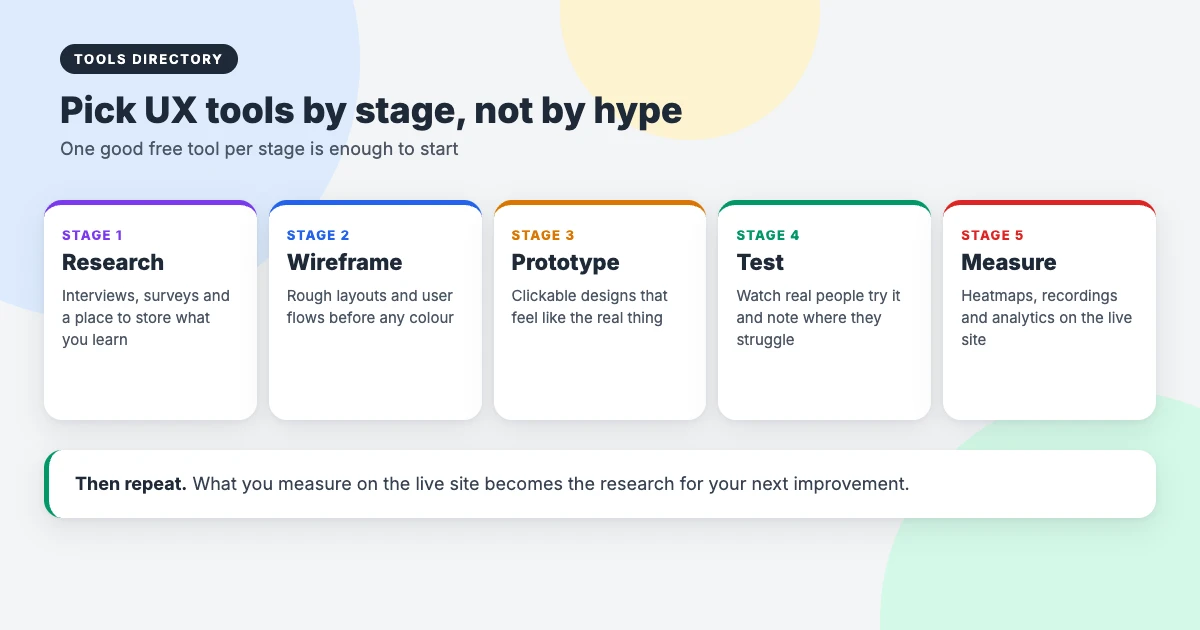
- Match the stage. Research, wireframing, prototyping, testing and measuring each need different tools.
- Start free. Most tools on this page have a free plan or trial. Test them on a real project before committing.
- Check collaboration. If clients or developers need to comment, make sure they can join without a paid seat.
- Think about data and privacy. Analytics and recording tools collect visitor data, so check consent and privacy settings for your region.
- Avoid overlap. Many tools now do several jobs. One all-rounder can replace three single-purpose tools.
A free UX tool stack to start with
If you’re starting from scratch, this all-free combination of the best UX tools covers the whole process at no cost:
- Research: Google Forms for surveys and Notion for notes.
- Wireframing: Excalidraw for quick sketches.
- Prototyping: Penpot or Figma’s free plan.
- Flows: draw.io for sitemaps and user journeys.
- Testing: the free plan of Maze, Lyssna or UXtweak, or a simple screen-shared session.
- Measuring: Microsoft Clarity for heatmaps and recordings, plus Google Analytics.
- Accessibility: WAVE and the WebAIM Contrast Checker.
How we chose these tools
We built this list of the best UX tools independently. Every tool had to be actively maintained in 2026, have a clear purpose, and offer a free plan, free trial or open-source version wherever possible. We left out tools that were abandoned, unclear about pricing or simply copies of better options.
We don’t use affiliate links, accept payment for listings, or rank tools by commission. If a tool here gets worse or a better one appears, we’ll update the page.
Using UX tools with WordPress
If your site runs on WordPress, the free Microsoft Clarity and Site Kit plugins put behaviour and traffic data in your dashboard, and Accessibility Checker flags problems while you edit. For more on measuring and improving your site, see our comparison of Google Analytics vs Jetpack Stats, our guide to improving INP in WordPress, and our list of accessible WordPress themes.
Frequently asked questions
What are the best UX tools for beginners?
Start with free, easy tools: Excalidraw or Whimsical for wireframes, Figma or Penpot for prototypes, and Microsoft Clarity to see how people use your live site. They cover the basics without a big learning curve.
Are there free UX tools that are actually good?
Yes. Excalidraw, draw.io, Penpot, Origami Studio, Microsoft Clarity, WAVE and Lighthouse are free, and many others, including Figma, Maze and Miro, have useful free plans.
What is the difference between wireframing and prototyping tools?
Wireframing tools create simple layouts to plan structure. Prototyping tools add clicks, transitions and logic so people can try a design as if it were real.
Which UX tool should I use for user testing?
For quick unmoderated tests, try the free plans of Maze, Lyssna, UXtweak or Useberry. For live interviews, Lookback or a simple video call with screen sharing works well.
Do you earn money from these tools?
No. There are no affiliate or referral links on this list of the best UX tools, and no tool paid to be included.
How often is this list updated?
We review it regularly. Pricing labels were checked in November 2026, but free plans and prices change, so always confirm on the tool’s own website.
Final thoughts
The best UX tools are the ones that help you understand people and fix real problems, not the ones with the longest feature list. Pick one free tool for each stage, use it on your next project, and add more only when you hit a limit. Bookmark this page and use the search and filters above whenever you need something new.