Payfast Payment Gateway for Easy Digital Downloads
Take Payfast payments in EDD. Refund and recover them from WordPress.
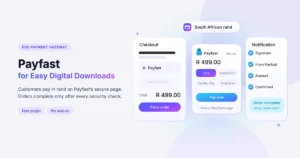
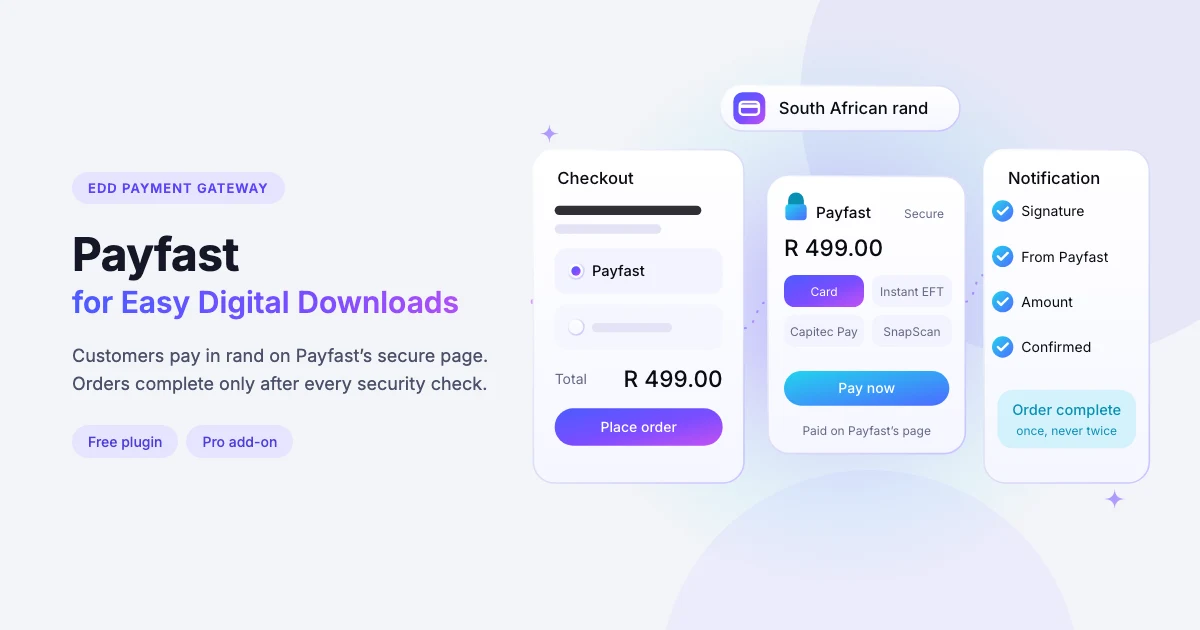
With Payfast for Easy Digital Downloads, customers pay in rand on Payfast’s own secure page with cards, Instant EFT, Capitec Pay, SnapScan, Apple Pay and more. Orders complete only after every Payfast security check. Pro adds refunds, missed-payment recovery and split payments.
Free version coming to WordPress.org · South African rand (ZAR) only · 14-day money-back guarantee on Pro
4
Payfast security checks on every notification
2
EDD checkouts supported: classic and block
1 click
“Re-check with Payfast” for a missed payment (Pro)
14 days
money-back guarantee on Pro
01 — Features
A Payfast gateway you can trust with every order
The free Payfast for Easy Digital Downloads gateway takes payments safely. Pro handles what happens after: refunds, missed notifications and fees.
Classic and block checkout
Works with both Easy Digital Downloads checkouts, with settings under Downloads → Settings → Payments → Payfast.
Four security checks
Signature, sender address, amount and a confirmation request back to Payfast on every notification.
No double fulfilment
A notification that arrives twice completes the order once.
Sandbox built in
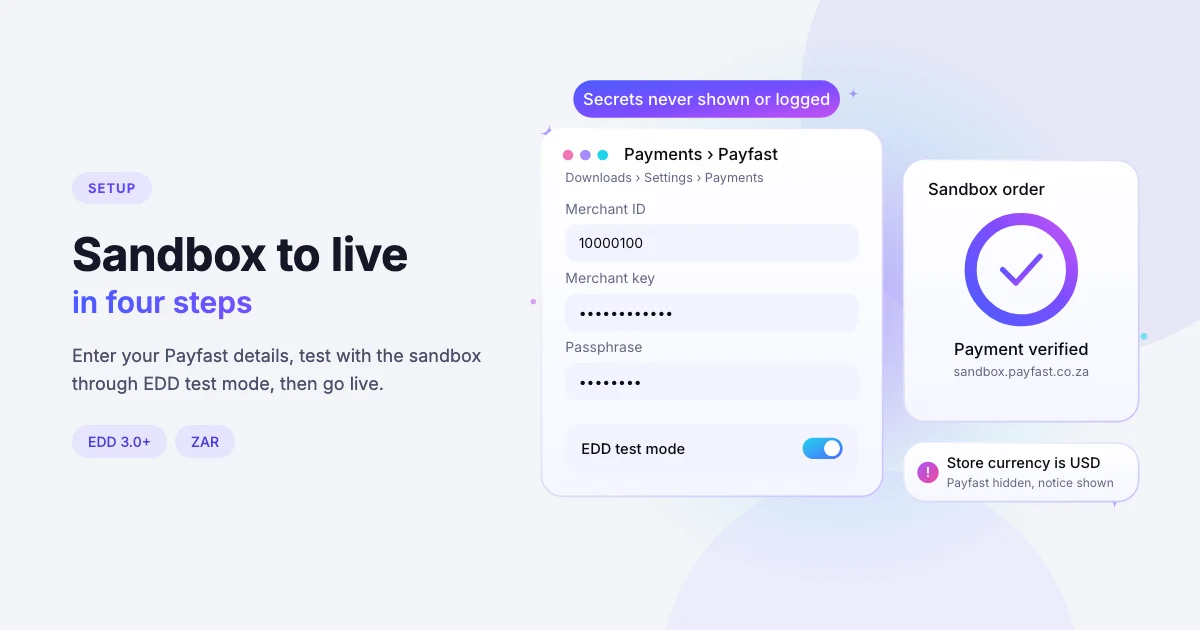
Switch EDD to test mode and payments go to the Payfast sandbox with your sandbox credentials.
Clear order history
The Payfast payment ID is stored as the transaction ID, with notes for the amount, Payfast’s fee and the net amount.
Secrets stay secret
The merchant key and passphrase are never printed back into the settings page and never written to a log.
02 — How it works
Up and running in four steps
- Install and activate Install Payfast for Easy Digital Downloads, then upload Pro under Plugins → Add New.
- Enter your Payfast details Add your merchant ID, merchant key and passphrase under Downloads → Settings → Payments → Payfast.
- Test in the sandbox Switch EDD to test mode and place a sandbox order.
- Go live Switch off test mode. Pro’s refunds and recovery use the Payfast API with your passphrase.
All Payfast for Easy Digital Downloads settings live under Downloads → Settings → Payments → Payfast.
03 — Free or Pro
Free or Pro?
Payfast for Easy Digital Downloads is a complete, secure way to take Payfast payments on its own. Pro is for stores that refund, recover and split payments from WordPress.
| FreeFree version | ProGet Pro | |
|---|---|---|
| Payments | ||
| Payfast payment page: cards, Instant EFT, Capitec Pay, SnapScan, Apple Pay, Google Pay and more | Included | Included |
| Classic and block checkout | Included | Included |
| Sandbox through EDD test mode | Included | Included |
| All four Payfast security checks | Included | Included |
| No double fulfilment | Included | Included |
| Passphrase support | Included | Included |
| Payment ID, fee and net amount in order notes | Included | Included |
| Debug log | Included | Included |
| Pro | ||
| Refunds from the EDD order screen, full or partial | Not included | Included |
| “Re-check with Payfast” for missed notifications | Not included | Included |
| Hourly recovery of pending orders | Not included | Included |
| Send customers to one method, or let them choose | Not included | Included |
| Payfast box on the order screen: fee, net, method | Not included | Included |
| Split payments with a second merchant | Not included | Included |
| Payfast payment confirmation emails | Not included | Included |
Payfast processes South African rand only. Refunds, re-checks and recovery need a passphrase on your Payfast account. Split Payments must be enabled on your Payfast account. Subscriptions are not included.
Which one do I need?
The free plugin is enough if…
- you sell in rand and want safe, verified Payfast payments,
- you’re happy to make refunds in the Payfast dashboard.
Choose Pro if…
- you want to refund from the EDD order screen,
- you want missed payments recovered, method choice or split payments.
Not sure? Start with the free plugin. When you need more, add Pro: your settings and data stay where they are.
04 — Pro
What Pro adds to Payfast
Pro
Run your Payfast payments from WordPress.
No more switching to the Payfast dashboard for refunds or chasing orders that never completed.
- Refunds from the order screen. Tick “Refund through Payfast” in the EDD refund dialog, in full or in part. Payfast is asked first, so a refused refund is never recorded as made.
- Recover missed payments. “Re-check with Payfast” finds the payment in your account and completes the order; an hourly job can do it for every pending order.
- Payment methods. Send customers straight to one Payfast method, or let them choose from the methods you tick.
- Fees on the order. Payfast’s fee and the net amount in a Payfast box on the order screen, with the payment ID, mode and method.
- Split payments. Share each payment with a second Payfast merchant by percentage, fixed amount or both, with a minimum and maximum.
- Payment emails. Let Payfast email you a confirmation of every payment, to an address of your choice.
Simple pricing. Every Pro feature in every plan.
Pick the number of sites you need. Every plan includes every Pro feature, updates and support.
-
Personal
For 1 website
$39
One license key for a single site, with plugin updates and priority support while your license is active.
- All Pro features
- Priority support
- Plugin updates
-
Most popular
Business
For 5 websites
$69
Five license keys for five sites, with plugin updates and priority support while your license is active.
- All Pro features
- Priority support
- Plugin updates
-
Agency
For unlimited websites
$99
Use it on every site you run or build, with plugin updates and priority support while your license is active.
- All Pro features
- Priority support
- Plugin updates
-
Lifetime
$199
Buy now — Payfast Payment Gateway for Easy Digital Downloads, Lifetime
Orders are processed by our online reseller, Paddle.com, the Merchant of Record for all transactions.
14-day money-back guarantee
Try Pro on your site. If it isn’t right for you, ask for a refund within 14 days of purchase and we’ll refund you in full. Refund policy
Save with the EDD Add-ons Bundle
Get all five Pro add-ons — Wishlist, Compare Products, Quick View, Product Badges and Payfast — from $79 a year, or $349 once for a lifetime licence. See the bundle
About this plugin
Payfast for Easy Digital Downloads: rand payments, done properly
Payfast for Easy Digital Downloads adds Payfast, the South African payment provider, to your Easy Digital Downloads checkout. Your customer chooses Payfast, pays on Payfast’s own page with any method your account offers, and the order completes only after Payfast’s notification passed every security check.
It is built only for Easy Digital Downloads 3.0 or newer and needs a Payfast merchant account. It is not made by, or affiliated with, Payfast. The free gateway is complete on its own; Payfast Pro adds refunds, missed payment recovery, payment method choice, fees on the order and split payments.
Why choose Payfast for Easy Digital Downloads
A payment gateway has one job: take the money and complete the right order exactly once. Payfast for Easy Digital Downloads runs all four security checks Payfast asks for on every notification: the signature, the sender’s address, the amount, and a confirmation request back to Payfast. A notification that arrives twice completes the order once.
Your merchant key and passphrase are never printed back into the settings page and never written to a log, and the passphrase salts every signature without leaving your server. Card and bank details are entered on Payfast’s site and never pass through yours.
How the free gateway works
Settings live under Downloads › Settings › Payments › Payfast, and Payfast for Easy Digital Downloads works with both the classic and the block checkout of Easy Digital Downloads. Switch Easy Digital Downloads to test mode and payments go to the Payfast sandbox with your sandbox credentials.
Customers pay with any method your Payfast account offers: cards, Instant EFT, Capitec Pay, SnapScan, Apple Pay, Google Pay and more. The Payfast payment ID is stored as the order’s transaction ID, with notes for the amount, Payfast’s fee and the net amount. Clear warnings appear when credentials are missing or the store currency is not rand, and a debug log can be switched on when something needs a closer look.
What Payfast Pro adds
With Payfast for Easy Digital Downloads Pro, refund from the order screen: tick “Refund through Payfast” in the Easy Digital Downloads refund dialog and the money goes back to the card that paid, in full or in part. Payfast is asked first, so a refund it refuses is never recorded as made. Payfast refunds some payment types, such as Instant EFT, only by bank payout; those refunds are made in the Payfast dashboard, and the refund dialog tells you when that is the case.
When Payfast’s notification never reached your site, “Re-check with Payfast” on the order finds the payment in your Payfast account and completes the order, and an hourly job can do the same for every pending order by itself. Refunds, re-checks and the hourly recovery use the Payfast API, which needs a passphrase on your account.
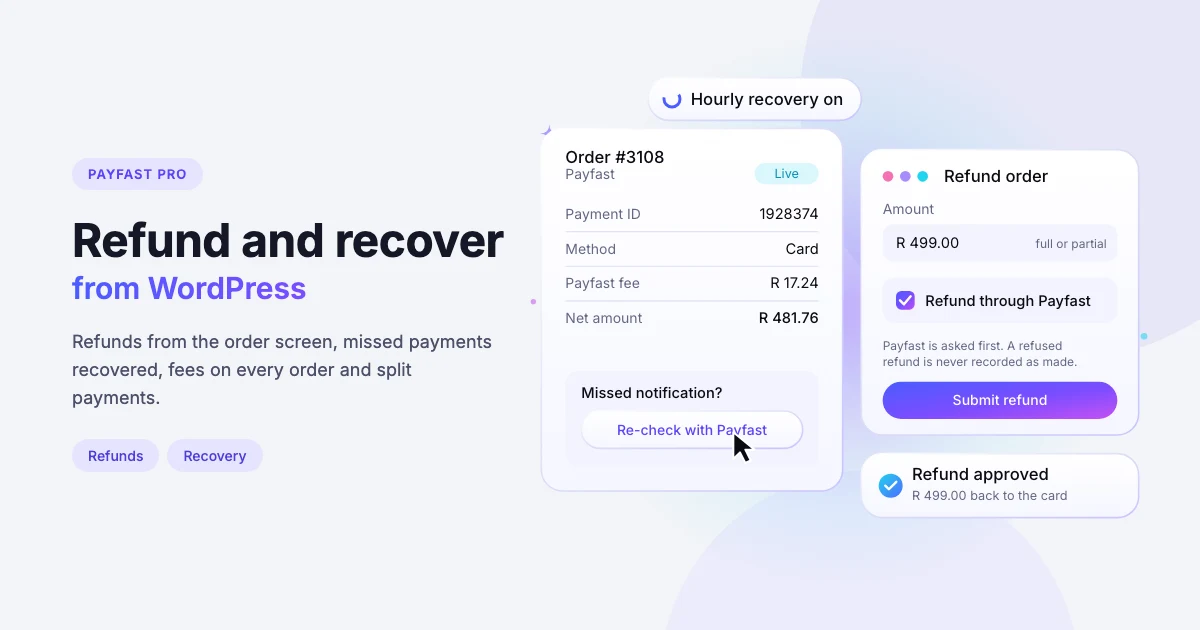
Send customers straight to one Payfast method, or let them choose from the methods you tick on your checkout. Payfast’s fee and the net amount appear in a Payfast box on the order screen, next to the payment ID, the mode and the method. Share every payment with a second Payfast merchant by percentage, fixed amount or both, with a minimum and a maximum, once Split Payments is enabled on your account, and let Payfast email you a confirmation of every payment.
South African rand only
Payfast processes South African rand (ZAR) only and has no currency setting, so Payfast for Easy Digital Downloads is offered at checkout only while your store currency is ZAR. With any other currency it is hidden and you see a notice in the admin. Subscriptions are not included.
Who Payfast for Easy Digital Downloads is for
Payfast for Easy Digital Downloads suits South African stores and creators who sell digital products in rand with Easy Digital Downloads: ebooks, courses, music, templates and software. With Pro, you handle refunds and missed notifications without leaving WordPress.
Developers can change the payment request with wpipf_payment_args, react to wpipf_order_created, wpipf_payment_completed and wpipf_itn_rejected, and extend the checkout and settings with wpipf_checkout_fields and wpipf_settings_fields.
Before you buy
Requirements
Payfast processes South African rand (ZAR) only, so Payfast for Easy Digital Downloads shows at checkout only while your store currency is ZAR. Not made by, or affiliated with, Payfast.
| Requirement | Details |
|---|---|
| WordPress | 6.5 or newer |
| PHP | 7.4 or newer |
| Easy Digital Downloads | 3.0 or newer, free or Pro |
| Payfast Payment Gateway for Easy Digital Downloads | The free plugin, installed and active |
| Payfast account | A Payfast merchant account, with a passphrase for Pro’s refunds and recovery |
| Store currency | South African rand (ZAR) |
| Your website | Reachable from the internet, so Payfast can send payment notifications |
Which currencies does it support?
South African rand only. Payfast processes ZAR and has no currency setting, so the gateway is hidden at checkout with any other store currency and you see a notice in the admin.
Can every payment be refunded from WordPress?
Card payments, yes. Payfast refunds some payment types, such as Instant EFT, only by bank payout, which needs the customer’s bank details; those refunds are made in the Payfast dashboard and the refund dialog tells you so.
Does it support subscriptions?
No. Subscriptions are not included in Payfast for Easy Digital Downloads.
Can I test before going live?
Yes. Switch Easy Digital Downloads to test mode and Payfast for Easy Digital Downloads sends payments to the Payfast sandbox with your sandbox credentials.
Does Payfast for Easy Digital Downloads work with the block checkout?
Yes. It works with both the classic and the block checkout of Easy Digital Downloads.
What does Payfast for Easy Digital Downloads send to Payfast?
The customer’s name and email address, the order ID and total, the product names, your merchant ID and key, the name of your site with the order number, the order’s payment key, a signature and three addresses on your site. Card and bank details are entered on Payfast’s site and never pass through yours, and nothing is sent to WPInterface.
Is this an official Payfast plugin?
No. Payfast for Easy Digital Downloads is made by WPInterface and is not made by, or affiliated with, Payfast.
Do I need the free plugin?
Yes. Pro is an add-on: it needs the free “Payfast Payment Gateway for Easy Digital Downloads” plugin installed and active, and adds its features on top. Your settings and data stay in the free plugin, so you can add or remove Pro at any time.
Where is the free version?
The free plugin is being prepared for WordPress.org. Until it is listed there, see all our plugins or ask the team.
How do I get Pro after buying?
Your Pro download and licence key are in your WPInterface account straight after purchase.
What do the plans include?
Every plan includes every Pro feature. Personal covers 1 site, Business 5 sites and Agency unlimited sites, each with a year of updates and support. Lifetime is a single payment for unlimited sites.
Is there a refund policy?
Yes. If Pro isn’t right for your store, ask for a refund within 14 days of purchase. See our refund policy.
Accept Payfast in your EDD store
Start with the free Payfast for Easy Digital Downloads gateway, then add Pro for refunds, recovery and split payments.
ZAR only · Pro requires the free plugin · 14-day money-back guarantee on Pro