Tools directory · Updated November 2026
Best AI Design Tools in 2026
Looking for the best AI design tools? This is our hand-picked directory of 55 AI tools for designers: image generation, UI design, prototyping, websites, presentations, branding, photo editing, 3D, video and audio. Each one is genuinely useful in real design work, not just a demo.
- 55hand-picked tools
- 12categories
- 7completely free
- 0affiliate links
Fully independent: there are no affiliate or referral links on this page, and no tool paid to be listed. AI tools change fast, so pricing labels were checked in November 2026. Always confirm plans and usage rights on each tool’s own site.
- Image generation
- UI design
- Prototyping and vibe coding
- Website builders
- Presentation makers
- Logo and branding
- Photo editing and product images
- 3D design
- Video and motion
- Voice and audio
- Assistants for designers
- Designing for AI: free resources
No tools match your search. Try another word or choose All.
AI image generation tools
Create concept art, moodboards, illustrations and visuals from a text prompt or reference image.
Midjourney
PaidKnown for striking, artistic images and a strong sense of style and lighting.
Visit Midjourney ↗ChatGPT Images
FreemiumGenerate and edit images in conversation, with good handling of text in images.
Visit ChatGPT Images ↗Adobe Firefly
FreemiumAdobe’s image generator, designed to be commercially safe and built into Creative Cloud.
Visit Adobe Firefly ↗Google Gemini
FreemiumGoogle’s assistant with fast image generation and conversational image editing.
Visit Google Gemini ↗Ideogram
FreemiumStrong at readable typography inside images, useful for posters and social graphics.
Visit Ideogram ↗Recraft
FreemiumGenerates vector graphics, icons and illustrations in a consistent brand style.
Visit Recraft ↗Leonardo
FreemiumImage generation with fine control over styles, models and consistent characters.
Visit Leonardo ↗Krea
FreemiumReal-time image generation, enhancement and upscaling on one canvas.
Visit Krea ↗ComfyUI
FreeOpen-source, node-based workflow builder for running image models locally.
Visit ComfyUI ↗AI UI design tools
Turn prompts, sketches or screenshots into editable interface designs.
Figma Make
FreemiumFigma’s prompt-to-prototype tool for turning ideas into working app designs.
Visit Figma Make ↗Google Stitch
FreeGoogle Labs experiment that generates UI designs and front-end code from prompts.
Visit Google Stitch ↗Uizard
FreemiumTurn hand-drawn sketches and screenshots into editable mockups.
Visit Uizard ↗Visily
FreemiumAI wireframes and mockups for non-designers and product teams.
Visit Visily ↗UX Pilot
FreemiumGenerate wireframes and high-fidelity screens, with a Figma plugin.
Visit UX Pilot ↗Banani
FreemiumCreate multi-screen UI designs from a text description and export to Figma.
Visit Banani ↗AI prototyping and vibe coding
Describe what you want and get a working prototype or app you can click through and share.
Lovable
FreemiumBuild full web apps by chatting, with a visual editor for design tweaks.
Visit Lovable ↗v0
FreemiumVercel’s tool for generating React interfaces and apps from prompts.
Visit v0 ↗Bolt
FreemiumPrompt, run, edit and deploy full-stack web apps in the browser.
Visit Bolt ↗Replit
FreemiumBrowser-based coding platform with an AI agent that builds and hosts apps.
Visit Replit ↗Cursor
FreemiumAI code editor that helps designers and developers turn designs into code.
Visit Cursor ↗Google AI Studio
FreeExperiment with Gemini models and build small apps right in the browser.
Visit Google AI Studio ↗AI website builders
Generate a starting website from a prompt, then refine the layout and content.
Framer
FreemiumDesign and publish responsive websites, with AI to generate layouts and copy.
Visit Framer ↗Webflow
FreemiumProfessional visual web builder with AI features for building and content.
Visit Webflow ↗Relume
FreemiumGenerates sitemaps and wireframes from a prompt, then exports to Figma or Webflow.
Visit Relume ↗Durable
FreemiumCreates a simple small-business website in minutes from a few answers.
Visit Durable ↗AI presentation makers
Turn notes or outlines into polished slides and documents in a few minutes.
Gamma
FreemiumCreate presentations, documents and simple web pages from a prompt.
Visit Gamma ↗Beautiful.ai
Free trialSmart slide templates that keep layouts tidy as you add content.
Visit Beautiful.ai ↗Canva
FreemiumAll-round design platform with AI tools for slides, social posts and edits.
Visit Canva ↗AI logo and branding tools
Explore logo ideas and brand directions quickly, then refine them by hand.
Looka
FreemiumGenerates logo concepts and matching brand kits from your preferences.
Visit Looka ↗Brandmark
Free trialAI logo maker you can try free, with paid downloads and brand assets.
Visit Brandmark ↗Kittl
FreemiumDesign platform with AI for logos, typography, posters and merchandise.
Visit Kittl ↗AI photo editing and product images
Remove backgrounds, extend images, upscale and create product shots.
Photoroom
FreemiumBackground removal and AI product photography for online stores.
Visit Photoroom ↗Clipdrop
FreemiumQuick tools to remove backgrounds, clean up objects, relight and upscale.
Visit Clipdrop ↗Adobe Photoshop
Free trialGenerative Fill and Expand bring AI editing into the industry-standard editor.
Visit Adobe Photoshop ↗Magnific
FreemiumHigh-end upscaler that adds detail when enlarging images.
Visit Magnific ↗Upscayl
FreeFree, open-source desktop app for upscaling images with AI.
Visit Upscayl ↗AI 3D design tools
Generate 3D models, scenes and textures from text or images.
Spline
FreemiumBrowser-based 3D design tool with AI for generating objects and textures.
Visit Spline ↗Meshy
FreemiumTurn text or images into 3D models ready for games, printing or web.
Visit Meshy ↗Tripo
FreemiumFast image-to-3D and text-to-3D model generation.
Visit Tripo ↗AI video and motion tools
Create video clips, animate stills, edit by text and add presenters.
Runway
FreemiumLeading AI video generation and editing tools for creatives.
Visit Runway ↗Google Flow
FreemiumGoogle’s AI filmmaking tool for generating and arranging video scenes.
Visit Google Flow ↗Kling AI
FreemiumText-to-video and image-to-video with realistic motion.
Visit Kling AI ↗Pika
FreemiumPlayful video generation and effects for short social clips.
Visit Pika ↗Descript
FreemiumEdit video and podcasts by editing the transcript, with AI clean-up.
Visit Descript ↗HeyGen
FreemiumAI avatars and video translation for explainers and marketing.
Visit HeyGen ↗AI voice and audio tools
Add voice-overs, music and clean audio to presentations and videos.
ElevenLabs
FreemiumNatural-sounding text-to-speech, voice-overs and dubbing.
Visit ElevenLabs ↗Suno
FreemiumGenerate original songs and background music from a prompt.
Visit Suno ↗Adobe Podcast
FreemiumEnhance Speech makes rough recordings sound studio-quality.
Visit Adobe Podcast ↗AI assistants for designers
General assistants for research, copy, critique, briefs and brainstorming.
ChatGPT
FreemiumVersatile assistant for ideas, copy, research and image generation.
Visit ChatGPT ↗Claude
FreemiumAssistant for writing, analysis, coding and design critique.
Visit Claude ↗Perplexity
FreemiumAnswer engine that cites its sources, useful for design research.
Visit Perplexity ↗Microsoft Copilot
FreemiumMicrosoft’s assistant with image creation and Office integration.
Visit Microsoft Copilot ↗Designing for AI: free resources
Guides and pattern libraries for designing AI features responsibly.
The Shape of AI
FreePattern library of real interface patterns for AI products.
Visit The Shape of AI ↗People + AI Guidebook
FreeGoogle’s guide to designing human-centred AI products.
Visit People + AI Guidebook ↗HAX Toolkit
FreeMicrosoft’s guidelines and tools for human-AI interaction design.
Visit HAX Toolkit ↗How to choose the best AI design tools
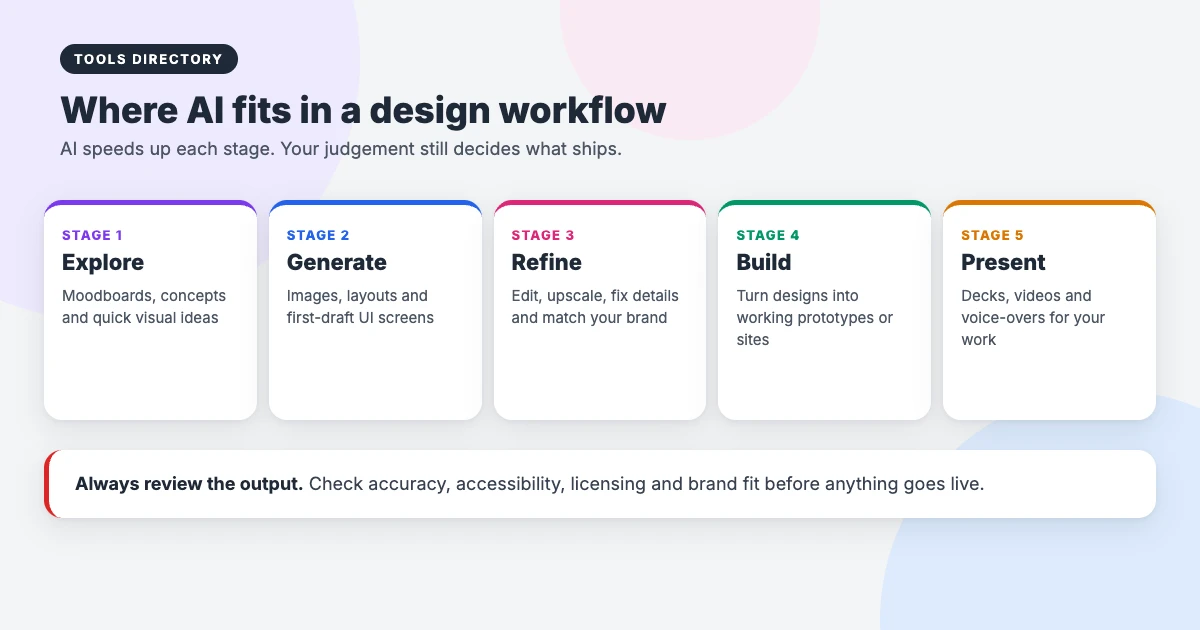
With new AI design tools launching every week, it’s easy to collect subscriptions you never use. Start with the stage of your work that takes the most time, try one or two free plans on a real project, and keep only the tools that save you hours.
- Check commercial use. Read each tool’s terms to see whether you can use the output in client and commercial work, and who owns it.
- Watch the credits. Most AI tools run on monthly credits. A free plan may be plenty for testing but not for daily work.
- Look for editable output. Vectors, layers, Figma files or code are far more useful than a flat image you can’t change.
- Protect client data. Don’t upload confidential designs or personal information unless the tool’s privacy settings allow it.
- Keep a human in the loop. AI output can be inaccurate, inaccessible or off-brand. Review everything before it goes live.
A free AI design toolkit to start with
If you want to explore AI design tools without paying anything, this combination covers most jobs for free:
- Images: the free tiers of Adobe Firefly, Ideogram or Google Gemini.
- UI ideas: Google Stitch for quick screens.
- Prototypes: Google AI Studio or the free plans of v0 and Lovable.
- Photo editing: Clipdrop for quick fixes and Upscayl for upscaling.
- Presentations: the free plans of Gamma or Canva.
- Research and copy: the free versions of ChatGPT, Claude or Perplexity.
How we chose these tools
We built this list independently. Every tool had to be actively developed in November 2026, useful for real design work rather than novelty, and clear about its pricing. Where we could, we favoured tools with a free plan or open-source version, and tools that produce editable output.
We don’t use affiliate links, accept payment for listings, or rank tools by commission. AI tools change quickly, so we’ll keep updating this list of the best AI design tools as tools improve, merge or disappear.
Using AI design tools with WordPress
Many of these tools fit neatly into a WordPress workflow: generate images and graphics for posts, design page layouts in a UI tool, then build them with the block editor. Keep images light by exporting to WebP, add proper alt text, and check every page with an accessibility tool. Our best UX tools directory covers research, testing and analytics, and our guide to finding and inserting Creative Commons images in WordPress explains image licences.
Frequently asked questions
What are the best AI design tools for beginners?
Start with tools that have generous free plans and simple interfaces: Canva for everyday graphics, Adobe Firefly or Google Gemini for images, Google Stitch for UI ideas and Gamma for presentations.
Are there free AI design tools?
Yes. ComfyUI, Upscayl, Google Stitch and Google AI Studio are free, and most others on this page, including Firefly, Figma Make, Canva and ElevenLabs, have free plans with monthly limits.
Can I use AI-generated images commercially?
It depends on the tool and your plan. Some tools allow commercial use on all plans, others only on paid plans. Always read the terms, and be careful with recognisable people, brands and copyrighted characters.
Will AI design tools replace designers?
They change the work rather than replace it. AI is fast at producing options, but designers still decide what solves the problem, fits the brand and works for real people.
Which AI tool is best for UI design?
For generating screens, try Figma Make, Google Stitch, Uizard or UX Pilot. For turning designs into working prototypes, Lovable, v0 and Bolt are popular choices.
Do you earn money from these tools?
No. There are no affiliate or referral links on this list of AI design tools, and no tool paid to be included.
Final thoughts
The best AI design tools don’t replace good design judgement. They remove the slow, repetitive parts so you can spend more time on ideas and details. Pick one tool for the stage that slows you down most, test it on a real project, and keep this page bookmarked for when you need something new.