When you choose WordPress hosting, you’re also choosing a web server, whether you realise it or not. Most hosts run one of three: Apache, Nginx or LiteSpeed. Each one serves your pages in a different way, and the choice affects your site’s speed, how you configure it and even which tutorials will work for you.
So which is best? Our honest opinion is that there’s no single winner. Each server is excellent at different things, and for most WordPress site owners, the quality of the host matters more than the server’s name.
In this opinion piece, we’ll compare Apache vs Nginx vs LiteSpeed in plain English, help you pick the right web server for WordPress, explain where each one shines, and share which we’d choose for different kinds of WordPress sites.
What is a web server?
A web server for WordPress is the software that receives requests from visitors’ browsers and sends back your pages, images and files. When someone visits your WordPress site, the web server works with PHP and your database to build the page and deliver it.
The term can also mean the physical computer your site runs on. In this article, we’re talking about the software.
Apache vs Nginx vs LiteSpeed at a glance
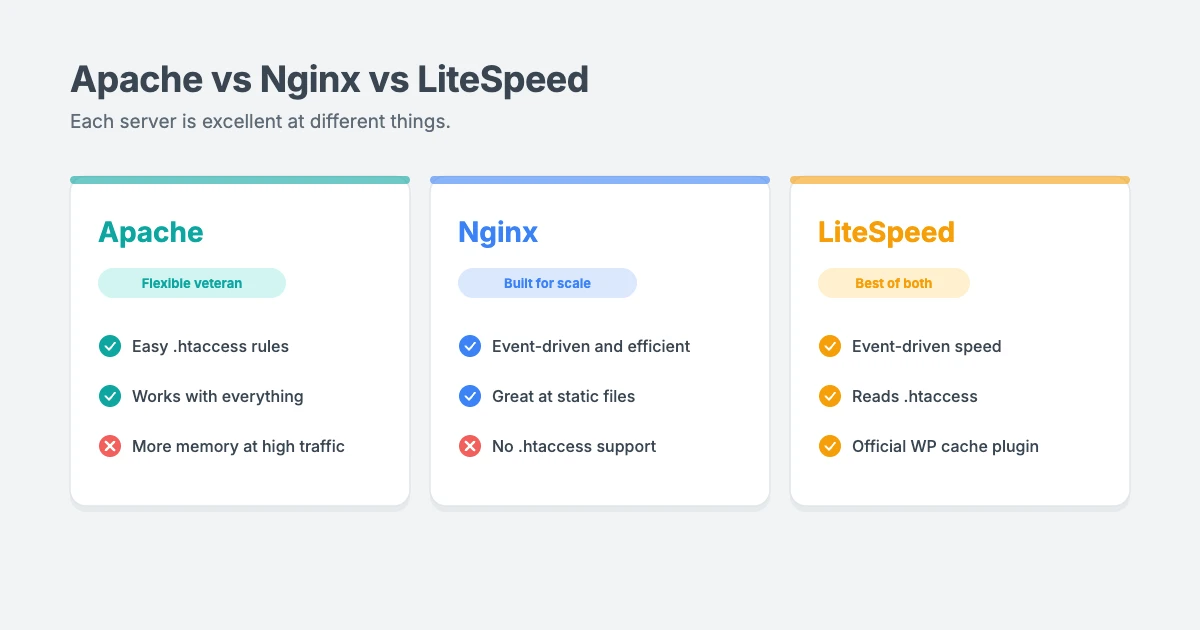
Here’s a quick Apache vs Nginx vs LiteSpeed comparison before we look at each one in detail.
| Apache | Nginx | LiteSpeed | |
|---|---|---|---|
| How it handles visitors | Process or thread based | Event-driven | Event-driven |
| .htaccess support | Yes | No | Yes |
| Built-in page caching | Through modules | Yes | Yes |
| WordPress cache plugin | Third-party plugins | Third-party or host tools | Official LiteSpeed Cache plugin |
| Ease for beginners | Easiest | Hardest | Easy |
| Cost | Free and open source | Free and open source | Free OpenLiteSpeed, or a paid licence usually included in hosting |
| Best for | Shared hosting, flexibility | High traffic, custom setups | WordPress speed with Apache compatibility |
Apache: the flexible veteran
Apache has been around since the mid-1990s and powered most of the early web. It’s still the default on many shared hosting plans.
What we like:
- .htaccess files. You can change settings for a single site or folder by editing a small text file, without access to the main server configuration. This is why so many WordPress tutorials, including our own guide to manually hardening WordPress security, use
.htaccess. - Huge compatibility. Almost every plugin, guide and hosting control panel works with Apache.
- Lots of modules. You can add features for security, redirects, compression and more.
What we don’t:
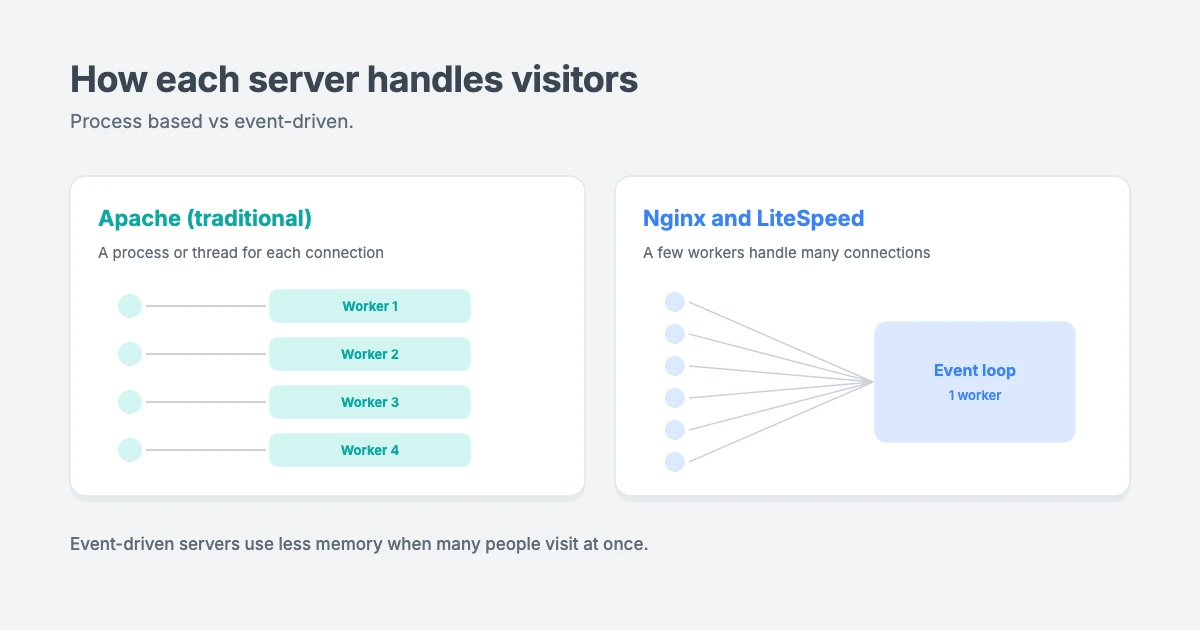
- It uses more resources under heavy traffic. Traditionally, Apache handles each connection with its own process or thread. That’s simple and reliable, but it uses more memory as visitor numbers climb. Modern Apache setups are much more efficient than they used to be, but they still tend to need more resources than event-driven servers at high traffic.
Our view: as a web server for WordPress, Apache is a safe, beginner-friendly choice for small and medium WordPress sites, especially on shared hosting. With good caching, it performs perfectly well for most sites.
Nginx: built for speed at scale
Nginx (pronounced “engine-x”) was created to handle huge numbers of visitors at once. It’s popular with large websites, managed WordPress hosts and developers.
What we like:
- Event-driven design. Instead of a new process for every visitor, a few worker processes handle thousands of connections. This keeps memory use low and speed high, even during traffic spikes.
- Great at static files. Images, CSS and JavaScript are served very quickly.
- Built-in caching, load balancing and reverse proxy features, which is why many hosts put Nginx in front of other servers.
What we don’t:
- No .htaccess support. Rules have to be added to the server configuration, usually by your host. For beginners on managed hosting, that means asking support to make changes many tutorials tell you to make yourself.
- Steeper learning curve if you manage your own server.
Our view: Nginx is a fantastic web server for WordPress for high-traffic sites, online stores and anyone who wants fine control over their server. On managed hosting, you’ll rarely touch the configuration yourself, so its complexity matters less.
LiteSpeed: the best of both worlds?
LiteSpeed is the newest of the three in WordPress hosting, and it’s become very popular. It was designed as a faster, drop-in replacement for Apache.
What we like:
- Event-driven speed, similar in approach to Nginx.
- Apache compatibility. It reads
.htaccessfiles and Apache rewrite rules, so most WordPress tutorials and plugins just work. - The LiteSpeed Cache plugin. This free plugin works with the server’s built-in cache and adds image optimisation, CSS and JavaScript optimisation and more, all from your WordPress dashboard.
- Built-in protection against common attacks, such as brute force login attempts.
What we don’t:
- The full version needs a licence. OpenLiteSpeed is free, but the Enterprise edition used by most hosts is paid. In practice, the cost is normally included in your hosting plan.
- Linux only. That’s fine for hosting, but you can’t easily run it on your own Windows or Mac computer for testing.
Our view: for typical WordPress sites on shared or cloud hosting, LiteSpeed is our favourite of the three. It’s fast, easy to manage and works with the tutorials you already know. In fact, our own website, wpinterface.com, runs on LiteSpeed.
Apache vs Nginx vs LiteSpeed: head to head
Ease of use
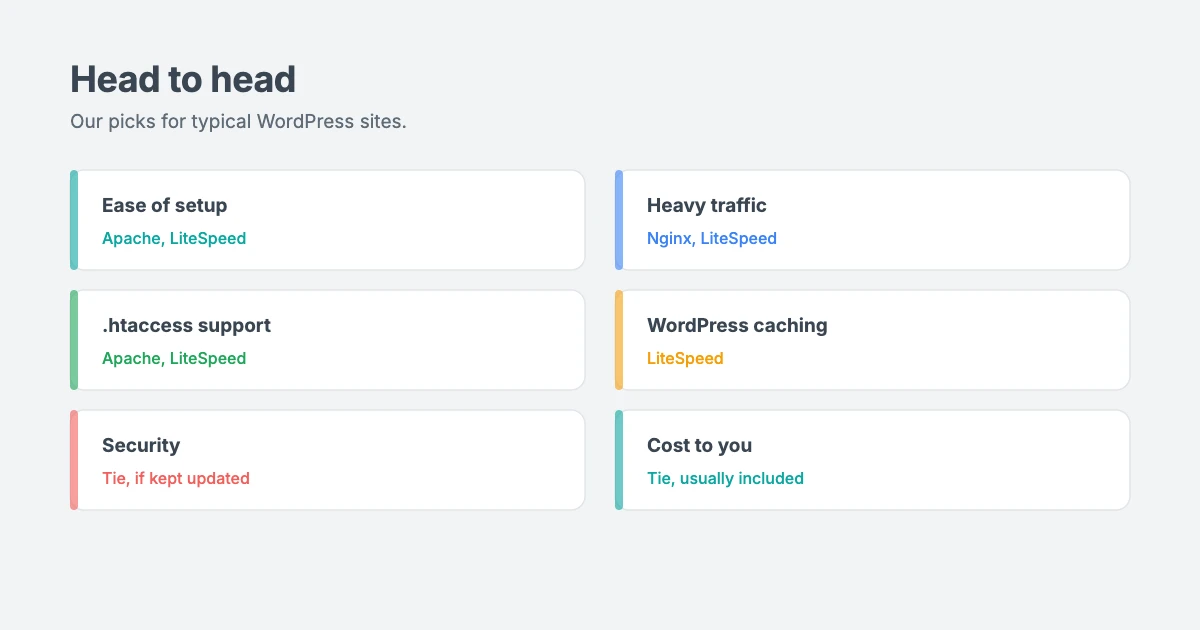
Our pick: LiteSpeed and Apache. Both support .htaccess, so you can follow almost any WordPress tutorial. Nginx usually needs your host’s help for configuration changes.
Performance
Our pick: Nginx and LiteSpeed. Their event-driven design handles busy sites more efficiently. That said, a well-cached Apache site can still be very fast for typical traffic. Caching and good hosting matter more than the server for most small sites.
WordPress caching
Our pick: LiteSpeed. The official LiteSpeed Cache plugin connects WordPress directly to the server’s cache, which makes setup simple. Apache and Nginx sites can be just as fast with a good caching plugin or host-level cache, but they usually take more setting up.
Security
Our pick: a tie. All three are secure when they’re kept updated and configured properly. Security depends much more on your host, your updates and your WordPress setup than on which server you use.
Cost
Our pick: a tie for site owners. Apache, Nginx and OpenLiteSpeed are free. LiteSpeed Enterprise costs hosts money, but it’s usually built into your hosting price, so you won’t pay for it separately.
Does your web server for WordPress affect your Core Web Vitals?
Your web server mostly affects how quickly the first byte of a page arrives, known as Time to First Byte (TTFB). A fast server with good caching helps your Largest Contentful Paint (LCP).
But many Core Web Vitals problems, such as a slow Interaction to Next Paint (INP), happen in the visitor’s browser and are caused by heavy JavaScript, not the server. Switching servers won’t fix those. Our guide on how to improve INP in WordPress explains what does.
Which web server should you choose?
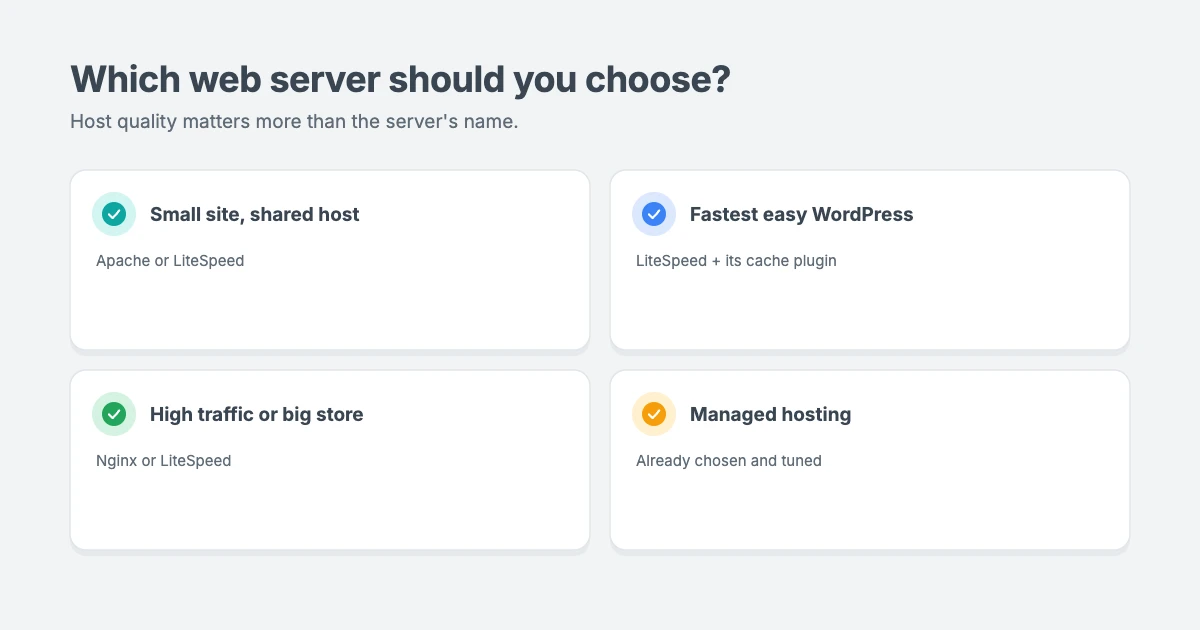
Here’s our honest recommendation for choosing a web server for WordPress:
- Starting a blog or small business site on shared hosting? Apache or LiteSpeed. If you have the choice, we’d pick LiteSpeed for the built-in caching.
- Want the fastest, easiest WordPress setup? LiteSpeed, with the LiteSpeed Cache plugin.
- Running a busy site, a large online store or a custom server? Nginx or LiteSpeed. Nginx is a common choice on managed WordPress hosts.
- Using managed WordPress hosting? Don’t worry too much. Your host has already chosen and tuned the server. Focus on their performance, support and backups instead.
When you compare Apache vs Nginx vs LiteSpeed, the most important thing isn’t the server itself, but how well your host sets it up. A well-configured Apache server will beat a poorly configured Nginx server every time.
Apache vs Nginx vs LiteSpeed: our verdict
So, where do we land on Apache vs Nginx vs LiteSpeed? If we were starting a new site today on shared or cloud hosting, LiteSpeed would be our first choice of web server for WordPress, because it pairs event-driven speed with .htaccess support and simple caching from the dashboard.
For a busy store or a site with a developer on hand, Nginx is an equally strong web server for WordPress. And if your host runs Apache with good caching, there’s no need to rush to move. In the Apache vs Nginx vs LiteSpeed debate, the right answer depends on your traffic, your host and how hands-on you want to be.
Can you switch web servers later?
On shared or managed hosting, the server is usually chosen for you, so switching normally means moving to a different hosting plan or provider. On a VPS or dedicated server, you can switch yourself, but you’ll need to convert any .htaccess rules if you move to Nginx, and test everything carefully.
If you’re moving hosts to get a faster server, our WordPress Migration service can move your site with no downtime and 301 redirects for every URL.
A fast server needs a fast theme
Even the best web server for WordPress can’t fully make up for a heavy theme. WPInterface Pro themes are built to be lightweight, with design settings in the WordPress Customizer and no page builder required, so they work well on Apache, Nginx and LiteSpeed alike.
SpeedNews Pro
SpeedNews Pro is a fast news and magazine theme for tech, business and lifestyle publishers who need pages to load quickly.

SpeedBlog Pro
SpeedBlog Pro is a fast blog theme for travel, tech, personal and creative blogs, with a clean layout that keeps readers focused.

Business Interface Pro
Business Interface Pro is a lightweight multipurpose business theme with 12 starter sites for companies of all kinds.

You can see all our themes on the WordPress themes page.
Let our team speed up your site
Not sure your server is set up properly? The WPInterface team can help:
- WordPress Speed Optimization: we audit your hosting, server caching, images, plugins and scripts, and improve your Core Web Vitals, starting with a free speed audit.
- WordPress Migration: move to a faster host without losing your rankings.
- WordPress Care Plans: updates, backups and monitoring, so your site stays fast and secure.
- VIP Support: a $29 priority ticket for quick expert help.
Frequently asked questions
Which is faster, Apache, Nginx or LiteSpeed?
Nginx and LiteSpeed are usually faster than Apache under heavy traffic, thanks to their event-driven design. For small sites with good caching, the difference is often small.
Does Nginx support .htaccess?
No. Nginx doesn’t read .htaccess files. Any rules have to be added to the server configuration, usually by your host.
Is LiteSpeed free?
OpenLiteSpeed is free and open source. The Enterprise version used by most hosts needs a paid licence, but the cost is usually included in your hosting plan.
Do I need the LiteSpeed Cache plugin?
If your host uses LiteSpeed, the free LiteSpeed Cache plugin is the easiest way to use the server’s built-in page cache. On Apache or Nginx hosting, use the caching your host recommends instead.
What is the best web server for WordPress?
There’s no single best server. In our opinion, LiteSpeed is the best all-round choice for most WordPress sites, Nginx is excellent for high-traffic and custom setups, and Apache is a reliable, beginner-friendly option.
Can I choose my web server for WordPress?
On shared and managed hosting, your host usually chooses it. On a VPS or dedicated server, you can install the one you prefer.
Final thoughts
Apache vs Nginx vs LiteSpeed isn’t a battle with one clear winner, and every web server for WordPress has its strengths. Apache is flexible and familiar, Nginx is built for scale, and LiteSpeed combines speed with Apache compatibility and excellent WordPress caching.
For most WordPress site owners, our advice is simple: choose a reliable host with good caching, ideally LiteSpeed or a well-tuned Nginx setup, pair it with a lightweight theme, and spend your energy on great content. The server is important, but it’s only one part of a fast website.
Reactions
How did this make you feel?
Be the first to react
One reaction per visitor. Tap again to change or remove it.






Leave a reply