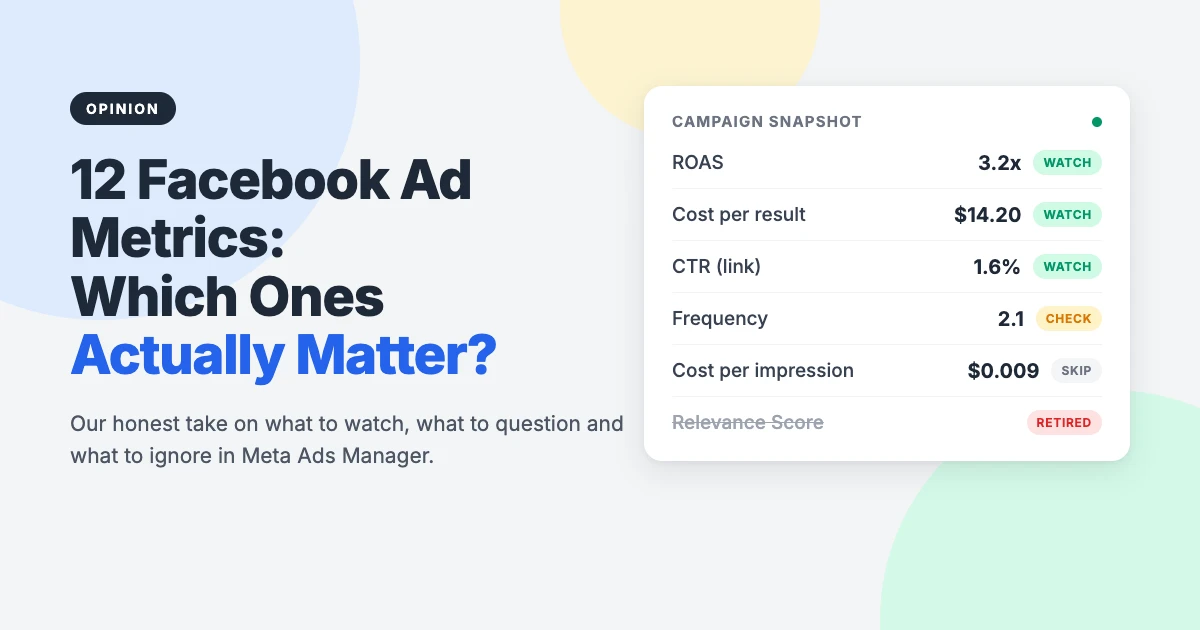
Facebook ad metrics can tell you exactly where your ad budget is going, or bury you in numbers. Meta Ads Manager offers around 200 metrics, and most WordPress site owners who run ads end up staring at the same default report, unsure whether a campaign is working.
DigitalMarketer’s article on 12 Facebook ad metrics worth your attention is a good starting list. But it was written for marketers in general, a couple of the metrics have changed or disappeared, and it doesn’t say much about the part we care about most: what happens after someone clicks through to your WordPress site.
In this opinion piece, we’ll go through all 12 metrics with our honest verdict on each, explain what has changed in 2026, share the short list we’d actually watch, and show how to check Meta’s numbers against your own WordPress or WooCommerce data using free plugins.
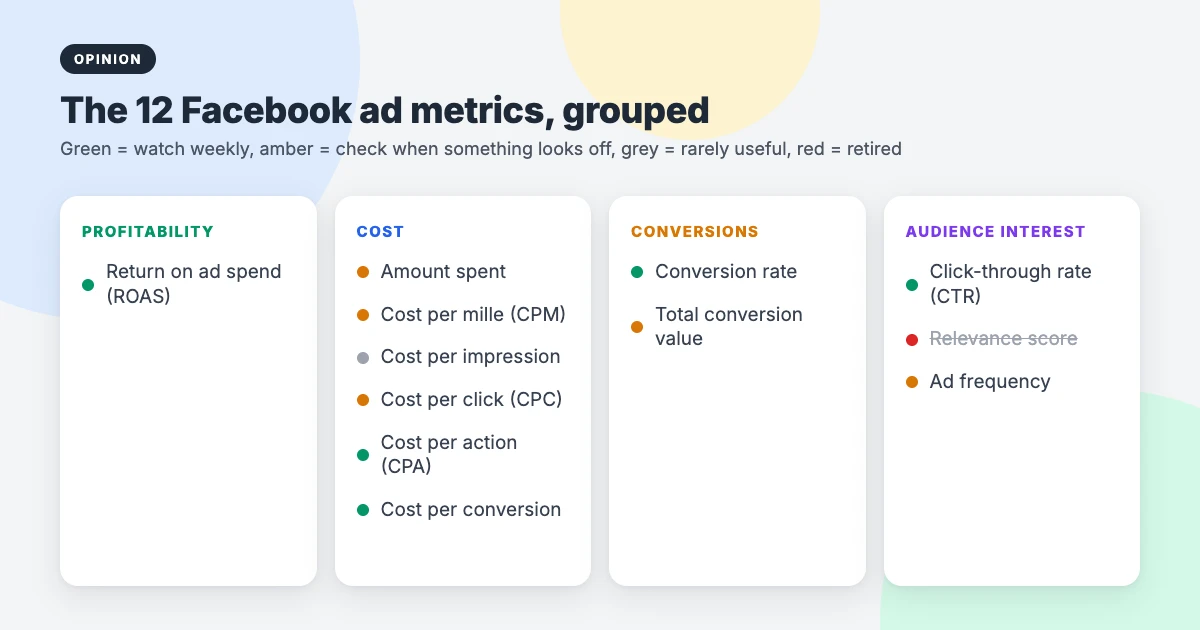
Facebook ad metrics at a glance: our verdict
Here’s our quick take on each of the 12 Facebook ad metrics. “Watch” means check it every week, “Check” means look at it when something seems off, and “Skip” means you can usually hide the column.
| Metric | What it tells you | Our verdict |
|---|---|---|
| Return on ad spend (ROAS) | Revenue for every dollar spent | Watch, but verify against your store |
| Amount spent | Total budget used | Check |
| Cost per mille (CPM) | Cost of 1,000 impressions | Check |
| Cost per impression | Cost of one impression | Skip (it’s CPM divided by 1,000) |
| Cost per click (CPC) | Cost of each link click | Check |
| Cost per action (CPA) | Cost of the action you optimise for | Watch |
| Cost per conversion | Cost of each lead or sale | Watch |
| Conversion rate | Share of visitors who convert | Watch, measured on your site |
| Total conversion value | Value of all tracked conversions | Check (only if values are set up) |
| Click-through rate (CTR) | How often people click | Watch (link CTR only) |
| Relevance score | Old 1 to 10 relevance rating | Retired: use ad relevance diagnostics |
| Ad frequency | Average views per person | Check |
Why fewer metrics is the right call
We agree with DigitalMarketer’s main argument: start with a question, not a column. “Is this campaign making money?” needs different numbers from “Why did clicks drop this week?”. If you can’t say which question a metric answers, remove it from your report.
Where we’d go further is this: Meta only sees part of the journey. It knows who saw and clicked your ad. Your WordPress site knows who actually arrived, how fast the page loaded, whether the form worked and whether the order went through. The most useful view of Facebook ad metrics combines both.
The 12 Facebook ad metrics, one by one
The original article groups the Facebook ad metrics into profitability, cost, conversions and audience interest. We’ve kept those groups and added our view on each.
1. Return on ad spend (ROAS)
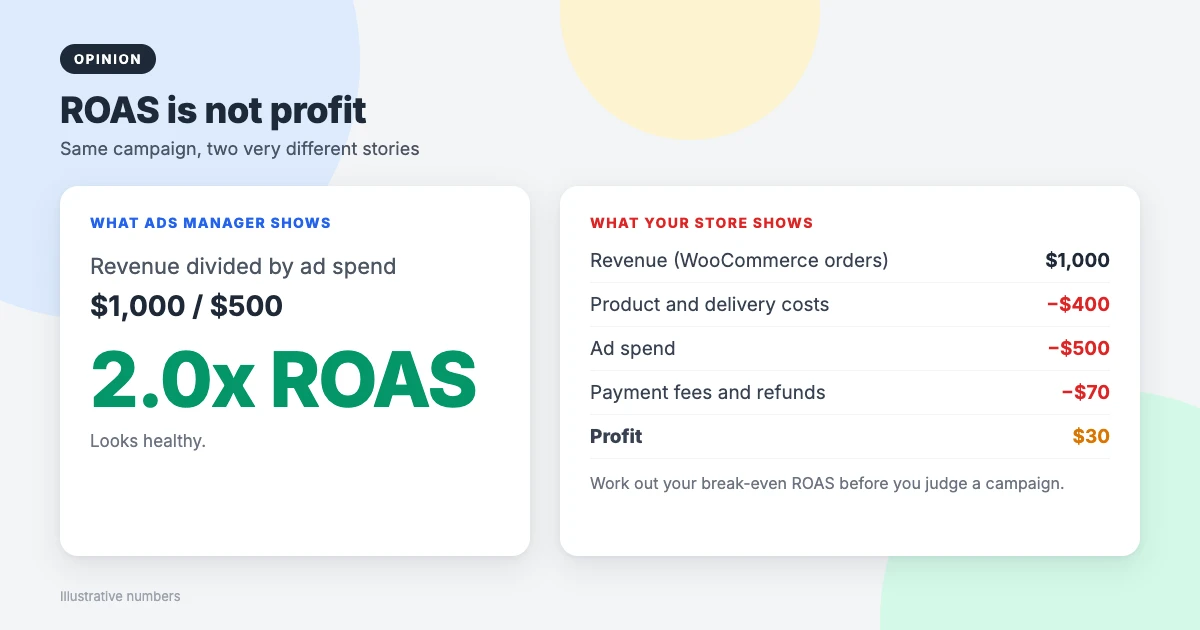
ROAS is revenue divided by ad spend. Spend $500 and make $1,000 in sales, and your ROAS is 2. It’s the closest thing Ads Manager has to a “did this work?” number, which is why it’s first on the list.
Our caution: ROAS is not profit. It ignores product costs, delivery, payment fees, refunds and your time. Before judging a campaign, work out your break-even ROAS: the point where revenue covers product costs and ad spend. For a store with 40% product costs, that’s around 1.7 before fees, so a ROAS of 2 is barely profitable.
2. Amount spent
Simple, but worth a glance. If a campaign spends far less than its budget, your audience may be too narrow or your bid too low, so the ads aren’t being shown. If it spends everything in the first few days, check your budget settings.
3. Cost per mille (CPM)
CPM is what you pay for 1,000 impressions. It’s useful for comparing audiences, placements and seasons. CPMs usually rise in busy shopping periods such as November and December, so a weaker result then isn’t always your ad’s fault. On its own, though, CPM says nothing about whether you’re making money.
4. Cost per impression
This is CPM divided by 1,000. Even the original article rates it as less important, and we’d go further: hide it. It adds a column without adding an answer.
5. Cost per click (CPC)
Use CPC (cost per link click), not “CPC (all)”, which includes clicks on your page name, likes and “see more”. A CPC that’s high compared with what you sell is a warning sign: paying $3 per click for a $10 product leaves little room. A sudden jump in CPC often means the ad has gone stale or the audience is tired of it.
6. Cost per action (CPA)
In Ads Manager, this mostly appears as cost per result: the cost of whatever your campaign is optimised for. It’s one of the most useful numbers you have, as long as the “result” is something that matters to your business. A cheap cost per video view is no use if what you need is sales.
7. Cost per conversion
This is CPA for a specific conversion event, such as a lead, an add to cart or a purchase. For WordPress sites, it’s only as good as your tracking. If your contact form doesn’t fire a Lead event, or your checkout doesn’t fire Purchase, this number will be wrong and your campaigns will optimise for the wrong thing.
8. Conversion rate
Conversion rate is conversions divided by clicks. It’s where your WordPress site has the biggest influence, because it depends on page speed, layout, trust signals and how easy your form or checkout is. Define the conversion first: a 50% add-to-cart rate means little if nobody completes the purchase.
9. Total conversion value
This adds up the values attached to your conversions. It’s great for stores that pass order values to Meta, and misleading if lower-value events such as content views are included. If you run a lead generation site, only use it if you’ve given each lead a realistic value.
10. Click-through rate (CTR)
CTR is clicks divided by impressions. Like CPC, use CTR (link click-through rate) rather than “CTR (all)”. There’s no universal good CTR, so compare your ads against each other. A low CTR usually means the creative or audience is off. A high CTR with few conversions usually means the ad promises something your landing page doesn’t deliver.
11. Relevance score (now retired)
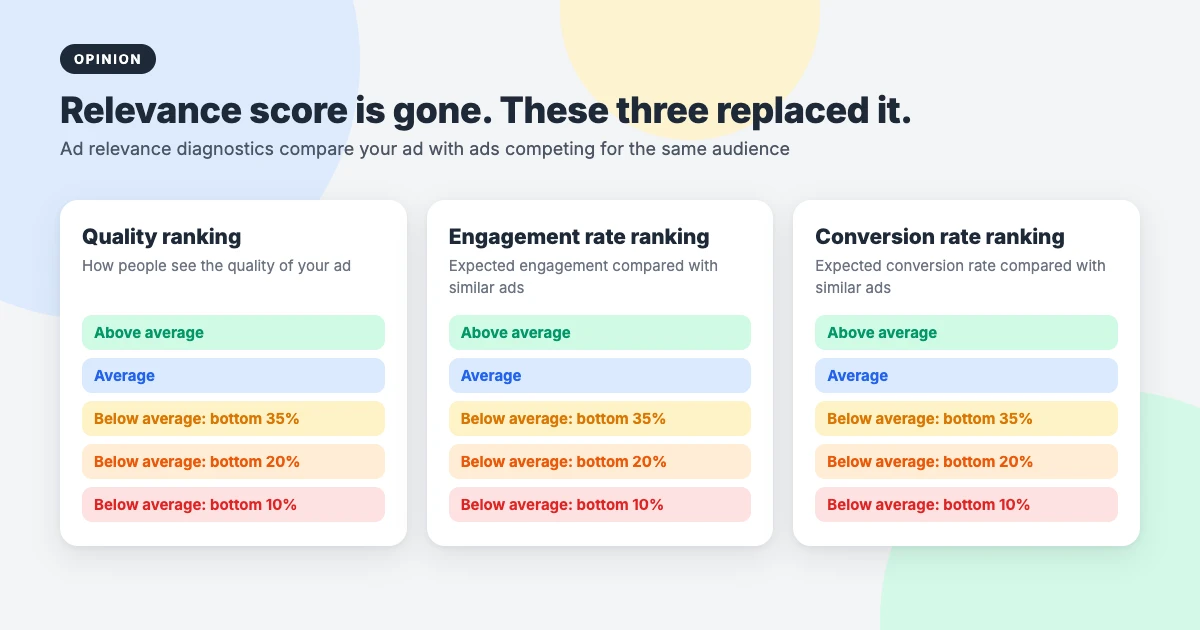
This is the one metric on the list you can’t use any more. Meta retired the single 1 to 10 relevance score and replaced it with three ad relevance diagnostics: quality ranking, engagement rate ranking and conversion rate ranking. Each one compares your ad with ads competing for the same audience, from “above average” down to “bottom 10%”.
They’re diagnostics, not goals. Meta itself says some high-performing ads have below-average rankings. Use them to work out why an ad is struggling: low quality ranking points to the creative, low engagement to the message, and low conversion rate ranking often to the landing page.
12. Ad frequency
Frequency is the average number of times each person has seen your ad. Higher frequency is fine for retargeting and brand awareness, but for cold audiences, rising frequency together with rising CPC and falling CTR is a classic sign of ad fatigue. That’s your cue to refresh the creative or widen the audience.
What’s changed since the original list
Two changes matter most if you’re reading Facebook ad metrics in 2026.
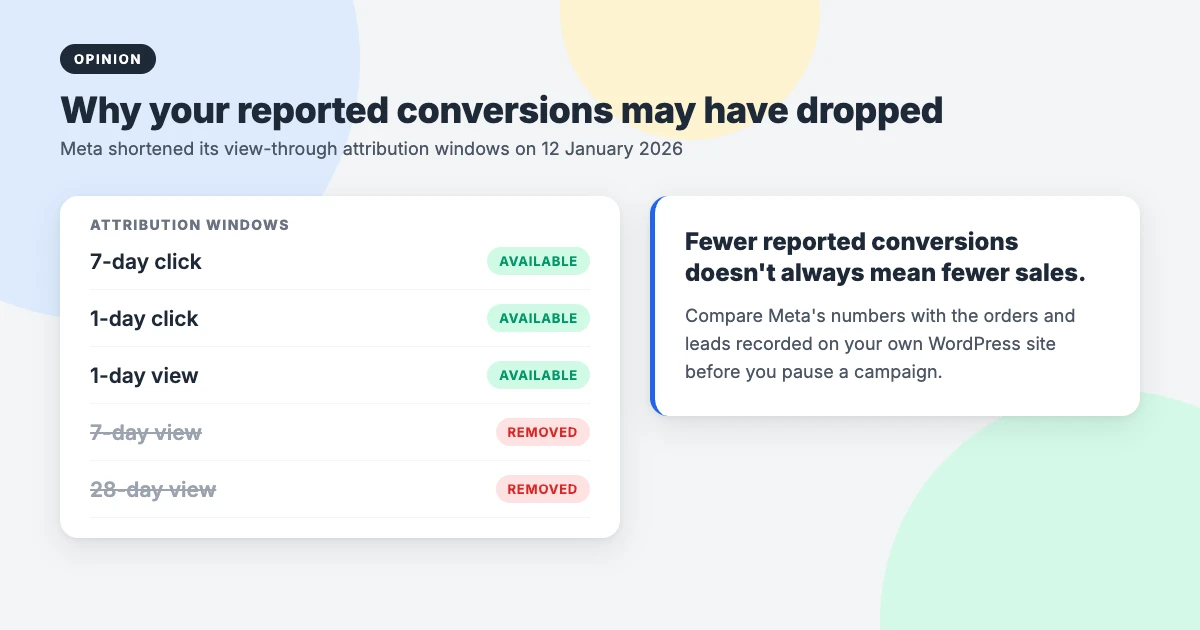
Shorter attribution windows. On 12 January 2026, Meta removed the 7-day view and 28-day view attribution windows from its reporting. One day is now the longest view-through window, with 7-day click as the default. Many advertisers saw reported conversions fall overnight without any change in real sales. If your numbers dropped in January, compare them with your own orders before blaming the campaign.
Server-side tracking. Browser privacy features and ad blockers stop the Meta Pixel from seeing some visits. Meta’s Conversions API sends events from your server instead, which fills in many of those gaps. On WordPress, both of Meta’s free official plugins support it, as we explain below.
The 5 Facebook ad metrics we’d actually watch
If you run ads to a WordPress site and want one simple report, this is the custom column set we’d save in Ads Manager:
- Cost per result, where the result is a lead or a purchase.
- ROAS (for stores), checked against your break-even ROAS.
- CTR (link click-through rate), to spot weak or tired creative.
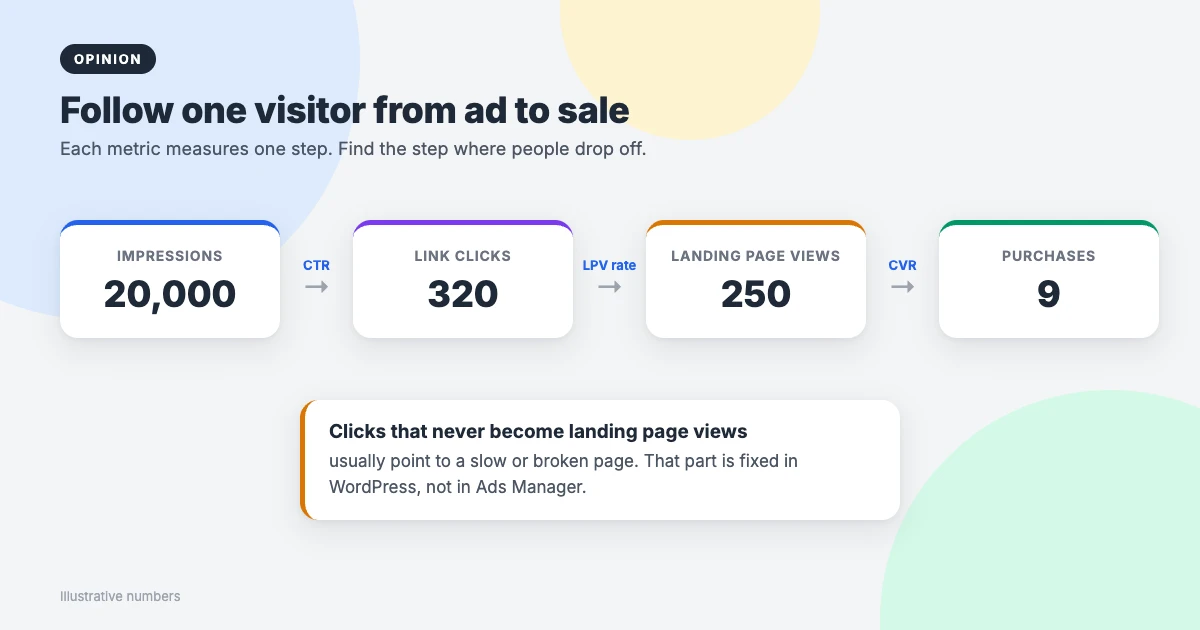
- Landing page views compared with link clicks, to catch slow or broken pages. It’s not on the original list, but it’s the most useful number for WordPress site owners.
- Frequency, to spot ad fatigue before your costs climb.
Everything else is useful for answering specific questions, but doesn’t need to be on your weekly report.
Where your WordPress site fits in
Meta reports a landing page view only when someone clicks your ad and your page actually loads with the Pixel firing. If you have 320 link clicks but only 250 landing page views, around one in five people gave up before your page appeared. No change in Ads Manager will fix that. A faster site will.
Ad traffic is mostly mobile and often arrives inside the Facebook or Instagram in-app browser, so page weight matters even more than usual. A lightweight theme, good hosting and a caching plugin make a real difference. Our guides to improving INP in WordPress, choosing between LiteSpeed Cache and WP Rocket and picking WordPress hosting cover the details.
Free plugins to track Facebook ad metrics on WordPress
- Meta pixel for WordPress: Meta’s free official plugin. It adds the Pixel, tracks events such as Lead and Purchase, and supports the Conversions API.
- Meta for WooCommerce: the free official plugin for stores. It sends purchase events and order values to Meta and syncs your product catalogue.
- Site Kit by Google: brings Google Analytics into your dashboard, so you can see what ad visitors do on your site, independently of Meta. Our comparison of Google Analytics vs Jetpack Stats explains the options.
Add UTM tags to your ad links (Ads Manager has a URL parameters field for this) so Google Analytics can tell ad visitors apart from everyone else. Then, once a month, compare Meta’s reported purchases or leads with the orders in WooCommerce or the entries in your form plugin. For revenue, your store is the source of truth, not Ads Manager.
Mistakes we see most often
- Judging ads on CTR alone. A clicky ad that doesn’t convert just spends money faster.
- Using “all” metrics. CPC (all) and CTR (all) include clicks that never reach your site.
- Trusting broken tracking. Test your Pixel events with Meta’s Test Events tool after every theme, form or checkout change.
- Ignoring the landing page. Slow pages, pop-ups on mobile and forms that fail quietly cost more than a bad ad.
- Changing too much, too soon. Give a campaign enough spend and time to collect data before you judge it.
Fast themes for ad landing pages
Your theme decides how quickly ad visitors see your page. WPInterface Pro themes are built with lean code and score highly on PageSpeed tests, which helps more of your link clicks turn into landing page views.
Business Interface Pro
Business Interface Pro is a lightweight multipurpose business theme with 12 starter sites, ideal for service businesses running lead generation ads.

Corporate Interface Pro
Corporate Interface Pro is a fast corporate theme for companies, agencies and consultants, with services, client stories, results sections and a booking button that make strong landing pages.

SpeedBlog Pro
SpeedBlog Pro is a fast blog theme for creators who promote content with ads, with a clean layout that keeps visitors reading.

You can see all our themes on the WordPress themes page.
Need a hand?
If you’d like help getting your site ready for paid traffic, the WPInterface team can do it at a fixed price:
- WordPress Speed Optimization: we make your landing pages load faster, so fewer ad clicks are lost.
- Must-Have Plugins Installation: for $59, we install and configure essential plugins, including tracking.
- WordPress Care Plans: updates, backups and monitoring, so your forms and checkout keep working.
- VIP Support: a $29 priority ticket for quick expert help with any WordPress problem.
Frequently asked questions
What are the most important Facebook ad metrics?
For most businesses: cost per result, ROAS for stores, link CTR, landing page views compared with link clicks, and frequency. Pick the ones that answer your question, and ignore the rest until you need them.
What is a good ROAS for Facebook ads?
There’s no single number. A good ROAS is one above your break-even point, which depends on your margins. A store with low product costs can profit at 2, while one with thin margins may need 4 or more.
Does Facebook still have a relevance score?
No. It was replaced by three ad relevance diagnostics: quality ranking, engagement rate ranking and conversion rate ranking. They show how your ad compares with others competing for the same audience.
Why don’t Facebook’s conversions match my WooCommerce orders?
Attribution windows, blocked Pixels, people buying on another device and orders that weren’t driven by ads all cause gaps. Adding the Conversions API narrows them, but your WooCommerce orders remain the true figure.
Do I need a paid plugin to track Facebook ads on WordPress?
No. Meta’s free official plugins, Meta pixel for WordPress and Meta for WooCommerce, cover the Pixel and the Conversions API, and Site Kit by Google adds free on-site analytics.
Why are my landing page views lower than my link clicks?
Some people leave before your page finishes loading, and some visits are blocked from firing the Pixel. A big gap usually means a slow page, so speed optimisation is the first fix to try.
Final thoughts
DigitalMarketer’s 12 Facebook ad metrics are still a sensible map, with one retired metric and a couple you can safely hide. Our honest take is that the best report is a short one: cost per result, ROAS, link CTR, landing page views and frequency, checked against what your WordPress site actually recorded.
Get your tracking right with the free official plugins, make your landing pages fast, and let your own orders and leads have the final say. That’s when Facebook ad metrics stop being noise and start telling you where to spend your next dollar.
Reactions
How did this make you feel?
Be the first to react
One reaction per visitor. Tap again to change or remove it.






Leave a reply