Sell with Paddle in Easy Digital Downloads. Let Paddle handle the tax.
Connect your EDD store to Paddle, the merchant of record that charges your customers, collects VAT and sales tax worldwide, and issues the invoices. Works with Paddle Billing and Paddle Classic. Start free; upgrade to Pro for subscriptions and refunds from WordPress.
Free on WordPress.org · No order or revenue limits · Pro has a 14-day money-back guarantee
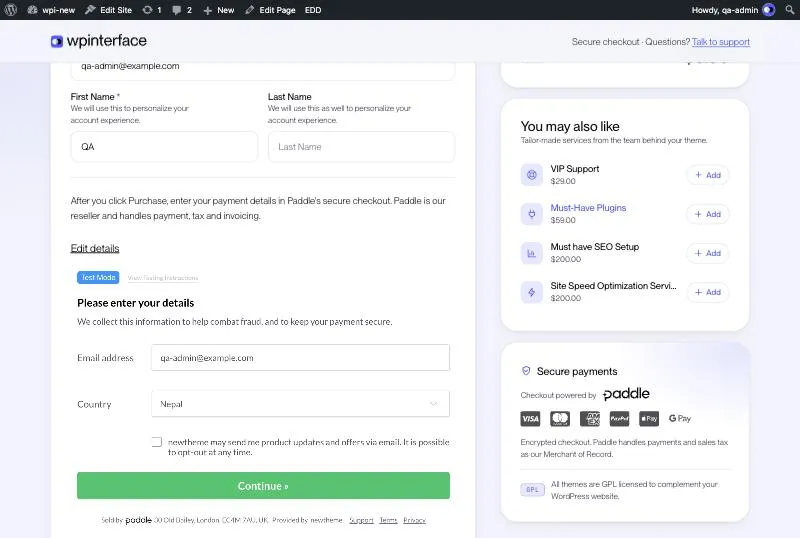
Selling worldwide means tax, invoices and compliance. Paddle takes that off your plate.
When you sell digital products to customers in many countries, you’re expected to charge the right VAT or sales tax, file returns, issue compliant invoices and deal with fraud and chargebacks. Paddle works as your merchant of record: it sells to the customer on your behalf, takes care of all of that, and pays you your earnings.
Paddle Gateway for EDD connects Paddle to Easy Digital Downloads, so you keep your EDD store, products, discounts and licence keys, and Paddle handles the money side.
Tax handled.
Paddle calculates, collects and remits VAT and sales tax based on where your customer is.
Invoices issued.
Customers get tax-compliant invoices or receipts from Paddle.
Payments covered.
Cards, PayPal, Apple Pay and Google Pay, as enabled in your Paddle account. Paddle handles fraud checks and disputes.
Everything you need to take Paddle payments in EDD
Lite covers one-time sales properly and safely. Pro adds what growing stores need.
No catalog to maintain
You don’t create products or prices in Paddle. Each order is sent with its own name and price from EDD, including discounts, fees and variable prices.
Buyers stay on your site
Paddle’s payment form opens over your checkout page. Light or dark theme, your choice of language, and optional payment icons.
Billing and Classic
Works with new Paddle Billing accounts and older Paddle Classic accounts, in live and sandbox mode.
Orders you can trust
Every webhook is signature-checked. Duplicate and out-of-order notifications are handled, and amounts and currencies are verified before an order completes.
Set up in minutes
One-click webhook setup for Paddle Billing, a Test connection button with clear messages, and a debug log when you need it.
Licence keys included
Works with EDD Software Licensing: keys are created as soon as Paddle confirms the payment.
Pro
Subscriptions
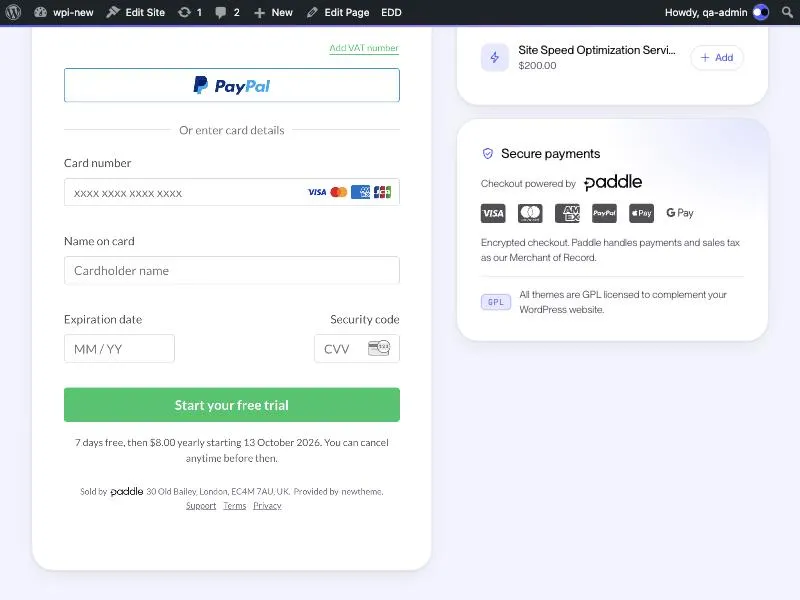
Sell with EDD Recurring Payments: free trials, sign-up fees, renewals, failed payments, pause and resume, all kept in sync with Paddle.
Pro
Refund from WordPress
Refund a whole order, one product or just the sign-up fee from the EDD order screen. The money goes back through Paddle.
Pro
Inline checkout
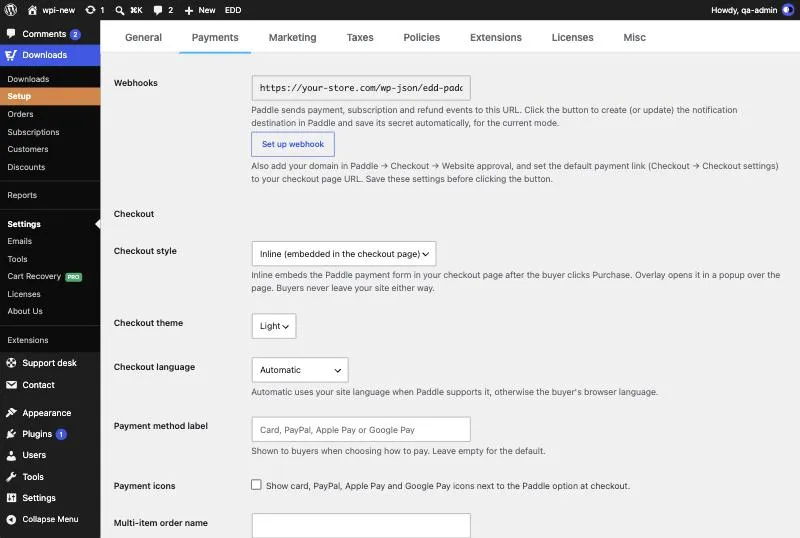
Embed Paddle’s payment form directly in your EDD checkout page, so paying feels like part of your site.
Up and running in four steps
- Install and activate Install Lite from WordPress.org and turn on Paddle under Downloads → Settings → Payments.
- Paste your Paddle keys Choose Paddle Billing or Paddle Classic and paste the credentials from your Paddle dashboard. Sandbox and live keys are kept separately.
- Connect the webhook Paddle Billing: click Set up webhook and you’re done. Paddle Classic: copy the webhook URL into your Paddle alerts settings.
- Test, then sell Click Test connection, place a sandbox order, and switch off EDD Test Mode when you’re ready to go live.
Lite or Pro?
Lite is a complete, safe gateway for one-time sales. Pro is for stores that run subscriptions, handle refunds from WordPress or want the inline checkout.
| LiteDownload free | ProGet Pro | |
|---|---|---|
| Payments & checkout | ||
| Paddle Billing accounts (live and sandbox) | Included | Included |
| Paddle Classic accounts (live and sandbox) | Included | Included |
| One-time purchases | Included | Included |
| Multi-item carts, EDD discounts, fees and variable prices | Included | Included |
| No products or prices to create in Paddle | Included | Included |
| Overlay checkout (Paddle form opens over your checkout page) | Included | Included |
| Inline checkout (Paddle form embedded in your checkout page) | Not included | Included |
| Checkout theme, language, payment label and payment icons | Included | Included |
| Cards, PayPal, Apple Pay, Google Pay (as enabled in Paddle) | Included | Included |
| All Paddle-supported currencies | Included | Included |
| Hosted Paddle checkout when JavaScript is unavailable | Included | Included |
| No limits on orders or revenue | Included | Included |
| Reliability & security | ||
| Signature-verified webhooks | Included | Included |
| One-click webhook setup (Paddle Billing) | Included | Included |
| Safe with duplicate, late and simultaneous webhooks | Included | Included |
| Several stores on one Paddle account | Included | Included |
| Payment confirmed with Paddle when the buyer returns (Billing) | Included | Included |
| Amount and currency checks before an order completes | Included | Included |
| Test connection with clear error messages | Included | Included |
| Debug log | Included | Included |
| "Check payment with Paddle" button for pending orders | Not included | Included |
| Refunds | ||
| Refunds made in Paddle recorded in EDD (full and partial) | Included | Included |
| Refund from the EDD order screen, sent to Paddle (full and partial) | Not included | Included |
| Line-level refunds (one product, or just the sign-up fee) | Not included | Included |
| Refund approval and rejection tracking in order notes | Not included | Included |
| Chargebacks and disputes: order put on hold, licence keys revoked | Not included | Included |
| Subscriptions & licensing | ||
| EDD Software Licensing keys for one-time purchases | Included | Included |
| EDD Recurring Payments subscriptions | Not included | Included |
| Free trials and sign-up fees | Not included | Included |
| Renewals recorded and licence keys extended automatically | Not included | Included |
| Failed payments and Paddle’s retries kept in sync | Not included | Included |
| Cancellations synced both ways (EDD ↔ Paddle) | Not included | Included |
| Licence renewals and upgrades aligned with the Paddle billing date | Not included | Included |
| Pause and resume billing | Not included | Included |
| Customers update their card on Paddle’s secure page | Not included | Included |
| Admin & customer | ||
| Paddle panel on the EDD order screen | Basic | Included |
| Paddle transaction and customer linked to your Paddle dashboard | Included | Included |
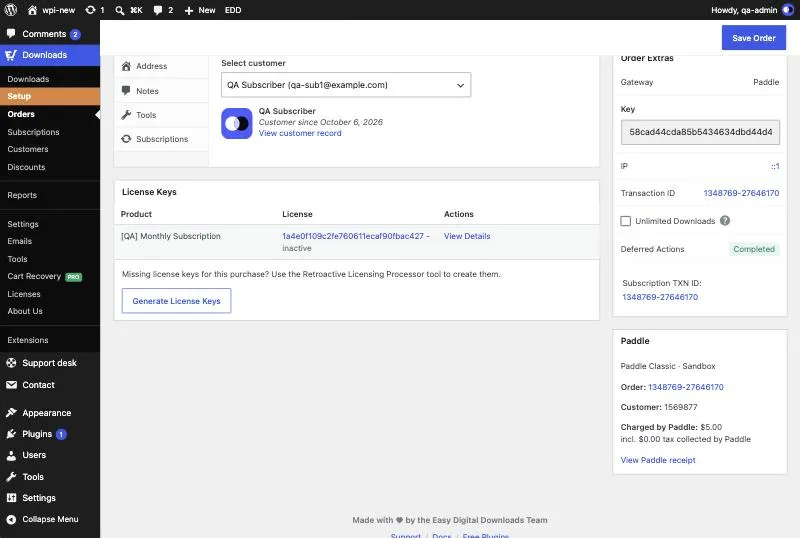
| Charged total, tax collected and your earnings on the order screen | Not included | Included |
| Paddle invoice / receipt link on the EDD receipt | Not included | Included |
| Support | ||
| WordPress.org community forum | Included | Included |
| Priority support from the WPInterface team | Not included | Included |
| Plugin updates | Included | Included |
Basic order panel: shows the Paddle transaction and customer with links to your Paddle dashboard. Pro adds the charged total, tax, your earnings, the invoice link and the “Check payment” button.
Subscriptions in Pro require the EDD Recurring Payments add-on. Licence keys require EDD Software Licensing. Paddle Classic subscriptions can be sold in USD, EUR and GBP.
Lite updates come from WordPress.org. Pro updates are included while your licence is active.
Which one do I need?
Lite is enough if…
- you sell one-time products (with or without licence keys),
- you’re happy to issue refunds in your Paddle dashboard,
- the overlay checkout works for you.
Choose Pro if…
- you sell subscriptions with EDD Recurring Payments,
- you want to refund from the EDD order screen, including single products or sign-up fees,
- you want the checkout embedded in your page,
- you want chargebacks handled automatically and earnings shown on each order.
Not sure? Start with Lite. When you upgrade, Pro takes over from Lite, and your settings and orders carry over.
Pro
Subscriptions that stay in sync, renewal after renewal
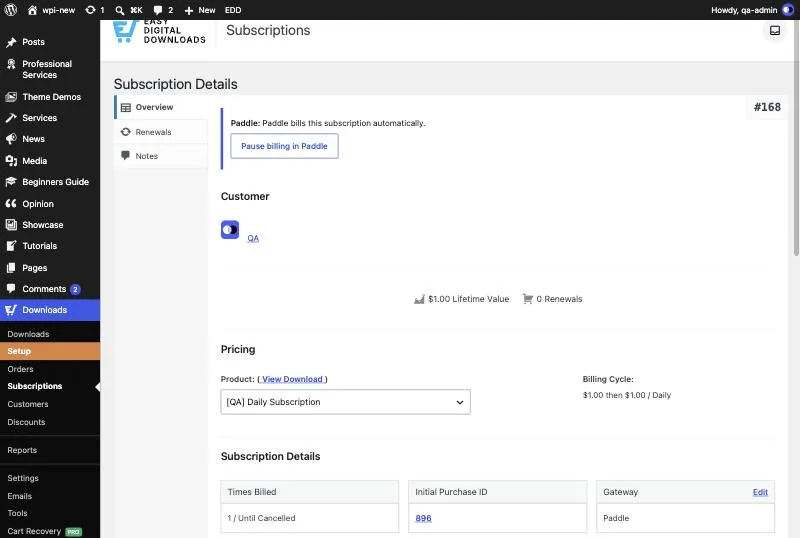
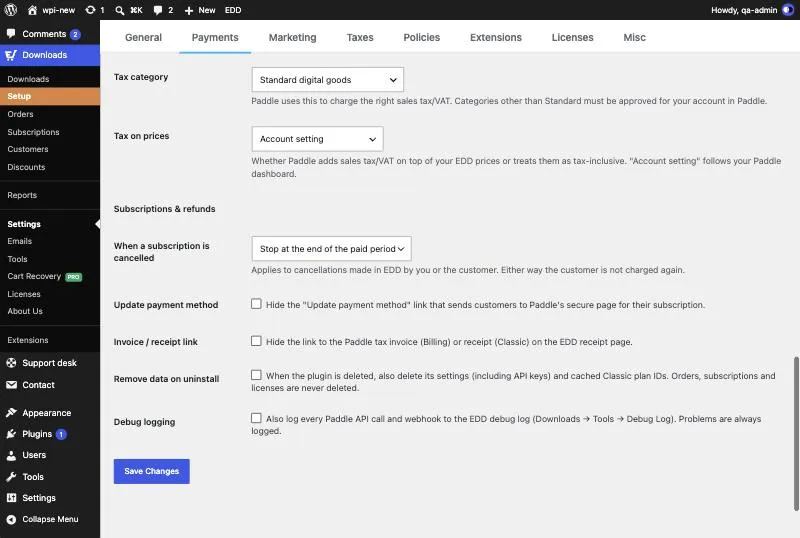
Set up recurring products in EDD as you always do: billing period, free trial, sign-up fee, number of payments. Pro sends them to Paddle and keeps both sides in step for the life of the subscription. Nothing needs to be created in Paddle.
- Trials and sign-up fees. Paddle shows the buyer exactly what they’ll pay today and what renews later.
- Renewals recorded automatically. Each renewal is added to the subscription, the expiration moves to Paddle’s next billing date, and licence keys are extended.
- Failed payments handled. The subscription is marked as failing while Paddle retries, and returns to active when the payment recovers.
- Cancellations both ways. Cancel in EDD and Paddle stops billing. Cancel in Paddle and EDD updates the subscription.
- Pause and resume. Pause billing from the subscription screen. The customer keeps access until the paid period ends.
- Customers update their own card on Paddle’s secure page, from their account or from EDD’s payment reminder emails.
- Licence renewals and upgrades keep their Paddle billing date, so customers are never charged twice for the same period.
Requires EDD Recurring Payments. One subscription per order (plus any one-time products), because Paddle bills each subscription separately.
Pro
Refund from the order screen. Paddle does the rest.
Open the order in EDD, click Refund, choose what to refund, and Pro sends the refund to Paddle. No switching dashboards, no copying transaction IDs.
- Full or partial. Refund the whole order, a single product, or only the sign-up fee.
- Progress you can follow. Order notes show when Paddle is reviewing the refund, when it’s approved, and a clear warning if Paddle rejects it.
- Refunds in Paddle still count. Refunds made in the Paddle dashboard are recorded in EDD and matched to the right products, never twice.
- Chargebacks handled. When Paddle reports a chargeback or dispute, the order goes on hold and its licence keys are revoked.
In Lite, refunds made in your Paddle dashboard are recorded in EDD automatically. Pro adds refunding from WordPress.
One plugin for both Paddle platforms
Paddle has two platforms. Paddle Gateway for EDD supports both, in Lite and in Pro, and you can switch later without breaking older orders.
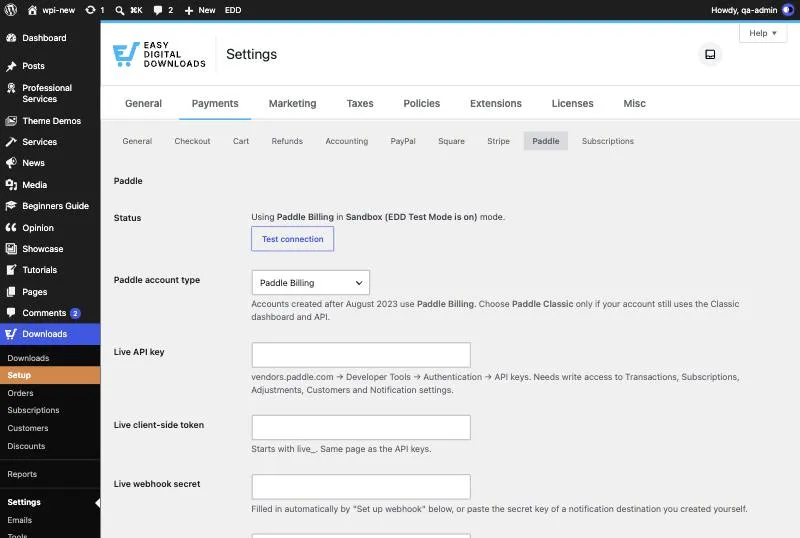
Paddle Billing
For every Paddle account created since August 2023. Paste an API key and a client-side token, click Set up webhook, and you’re connected. Payments are also confirmed directly with Paddle when the buyer returns, so orders complete even if a notification is slow.
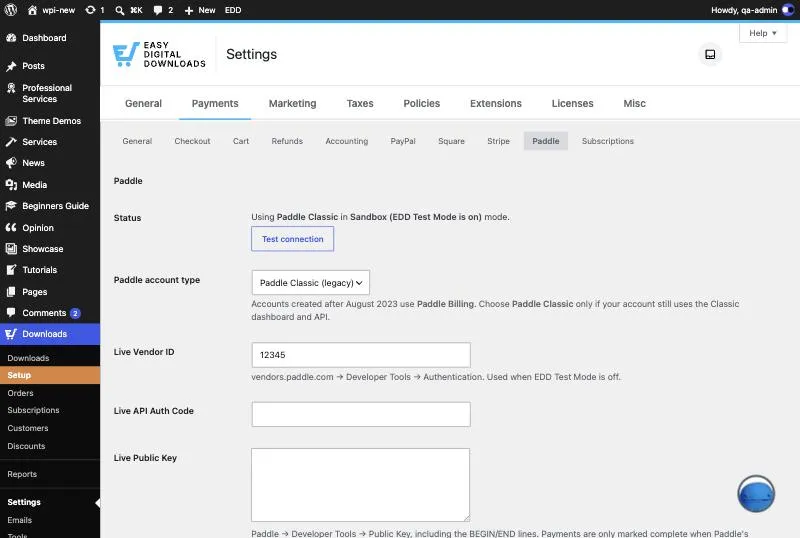
Paddle Classic
For established Paddle accounts that haven’t moved to Billing. Paste your Vendor ID, API Auth Code and public key. Subscription plans (Pro) are created in Paddle for you the first time a product is bought.
Not sure which you have? In Paddle, open Developer Tools → Authentication. API keys and client-side tokens mean Billing; a Vendor ID and Auth Codes mean Classic.
Why store owners choose WPInterface
There’s more than one way to connect Paddle to EDD. Here’s what we focused on.
Both Paddle APIs, one plugin
Paddle Billing and Paddle Classic are fully supported side by side. Older orders keep working if you move from Classic to Billing.
No product sync
You never mirror your EDD catalog in Paddle. Prices, discounts, fees and variable prices come straight from EDD on every order.
Refunds that line up
Refunds work in both directions and down to the line item, so EDD and Paddle always agree on what was refunded.
Built for real-world webhooks
Paddle can send the same notification twice, out of order, or several at once. Every one is signature-checked and processed safely, and several stores can share one Paddle account without touching each other’s orders.
Simple pricing. Every Pro feature in every plan.
Pick the number of sites you need. Every plan includes every Pro feature.
-
Personal
For 1 website
$59
One license key for a single site, with plugin updates and priority support while your license is active.
- All Pro features
- Priority support
- Plugin updates
-
Most popular
Business
For 5 websites
$89
Five license keys for five sites, with plugin updates and priority support while your license is active.
- All Pro features
- Priority support
- Plugin updates
-
Agency
For unlimited websites
$119
Use it on every site you run or build, with plugin updates and priority support while your license is active.
- All Pro features
- Priority support
- Plugin updates
Orders are processed by our online reseller, Paddle.com, the Merchant of Record for all transactions.
14-day money-back guarantee
Try Pro on your store. If it isn’t right for you, ask for a refund within 14 days of purchase and we’ll refund you in full. Refund policy
Requirements
| Requirement | Details |
|---|---|
| WordPress | 6.0 or newer |
| PHP | 7.4 or newer (OpenSSL extension needed for Paddle Classic) |
| Easy Digital Downloads | 3.1 or newer, free or Pro |
| EDD Recurring Payments | Optional. Needed to sell subscriptions (Pro). |
| EDD Software Licensing | Optional. Needed for licence keys. |
| Paddle account | Paddle Billing or Paddle Classic, plus a Paddle sandbox account for testing |
| Your website | Reachable from the internet over HTTPS, so Paddle can send payment notifications |
Paddle acts as merchant of record and handles VAT, sales tax, invoices and compliance. Payment methods depend on your Paddle account: cards, PayPal, Apple Pay and Google Pay.
Frequently asked questions
Does it work with Paddle Billing or Paddle Classic?
Both. Paddle Billing is the platform for accounts created since August 2023; Paddle Classic is the older platform. Lite and Pro support both. To check which you have, open Developer Tools → Authentication in Paddle: API keys and client-side tokens mean Billing, a Vendor ID and Auth Codes mean Classic.
Do I need to create my products in Paddle?
No. Each order is sent to Paddle with its own name and price from EDD, including discounts, fees and variable prices. For Paddle Classic subscriptions (Pro), the plugin creates the needed subscription plans in Paddle for you.
Who handles VAT and sales tax?
Paddle. As merchant of record, Paddle calculates, collects and pays VAT and sales tax, and issues tax-compliant invoices. Keep EDD’s own tax setting off so customers aren’t charged tax twice; the plugin reminds you if it’s on.
Does Lite have any limits?
No. There are no limits on orders, revenue, products or currencies, and no time limit. Lite is a complete gateway for one-time sales. Pro adds subscriptions, refunds from WordPress, inline checkout and more.
If I upgrade from Lite to Pro, do I keep my settings and orders?
Yes. Install and activate Pro, then deactivate Lite. Pro uses the same Paddle settings, webhook URL and order data, so existing orders keep working and there’s nothing to migrate or set up again.
What do I need to sell subscriptions?
Pro plus the EDD Recurring Payments add-on. Set up your recurring products in EDD as usual, and Pro handles billing, renewals, failed payments, pauses and cancellations with Paddle. Each order can contain one subscription (plus any one-time products).
How do refunds work?
In Lite, you refund in your Paddle dashboard and EDD records it automatically, full or partial. In Pro, you can also refund from the EDD order screen: the whole order, one product, or just a sign-up fee. The refund is sent to Paddle and its approval is tracked in the order notes.
What payment methods and currencies can I use?
Cards, PayPal, Apple Pay and Google Pay, depending on what’s enabled in your Paddle account. All currencies Paddle supports for your account type work. Paddle Classic subscriptions can be sold in USD, EUR and GBP.
Can I run several stores on one Paddle account?
Yes. Paddle sends every notification to every store on the account, so each order carries a store identifier and each store ignores payments that belong to another. Set up a webhook for each store.
Can I test before going live?
Yes. Turn on EDD Test Mode and the plugin uses your Paddle sandbox credentials, with test cards and no real money. Sandbox and live credentials are stored separately, and test orders always stay linked to the sandbox.
Can I use it on a local development site?
Yes, with one extra step. Paddle has to reach your site to confirm payments, and it can’t reach a local address. Expose your local site through a tunnel (such as Cloudflare Tunnel or ngrok) and point the webhook at the public URL. The setup guide shows how.
Does it work with EDD Pro and the Checkout block?
Yes. It works with the free and Pro versions of Easy Digital Downloads, the EDD Checkout block and the EDD checkout shortcode. If you use a custom checkout template, test it in sandbox first.
How does the Pro licence work, and what happens when it expires?
A yearly licence includes updates and support for one year and renews automatically. If it expires, Pro keeps working on your site; you just stop receiving updates and support until you renew. A lifetime licence is a single payment with no renewals.
How do I get support?
Lite users can ask on the WordPress.org support forum. Pro customers get priority support from the WPInterface team through our support desk.
Start selling with Paddle today
Install Lite for free and take your first Paddle payment in minutes. Upgrade to Pro when you’re ready for subscriptions and refunds from WordPress.
No order limits in Lite · 14-day money-back guarantee on Pro
Planned, not available yet
On the roadmap
These features are being considered for future Pro releases. They’re not part of the plugin today, and plans can change. Buy Pro for what it does now, not for what’s listed here.
- Instant checkout: a Buy Now block and shortcode that sends buyers straight to payment.
- Revenue dashboard: MRR, churn, refunds and Paddle fees at a glance.
- Customer self-service: let customers pause, cancel or switch plans from their account.
- Plan upgrades and downgrades with proration through Paddle.
- Webhook event log with replay.
- Localized pricing per country.
- Accounting export: CSV to reconcile EDD orders with Paddle payouts.
Paddle and Easy Digital Downloads are trademarks of their respective owners. WPInterface is not affiliated with or endorsed by Paddle or Easy Digital Downloads.