You’ve set up your blog, picked a theme and published a handful of posts you’re proud of. Then you open your stats and see the same number you saw last week: a dozen visits, most of them your own. Every blogger has been there.
The good news is that blog traffic isn’t luck. It comes from a small number of repeatable sources, and each one responds to specific, learnable actions. You don’t need a marketing budget or a huge following to get more traffic to your blog; you need to pick the right tactics and keep doing them.
In this beginner’s guide, we’ll explain where blog traffic actually comes from, walk through ten proven ways to get more of it using free tools, and show you how to measure what’s working so you can do more of it.
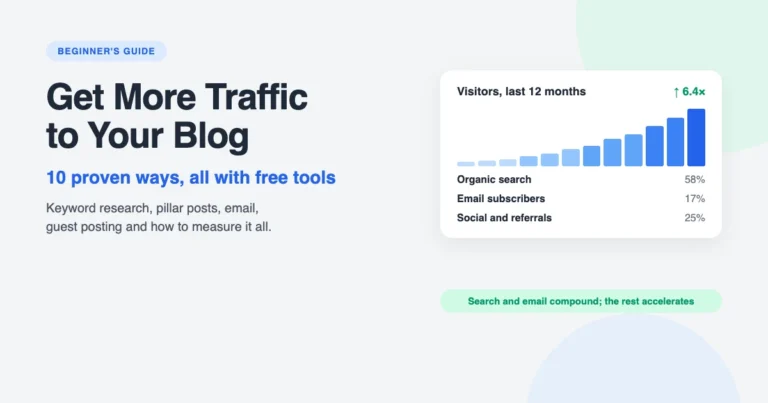
Where blog traffic comes from
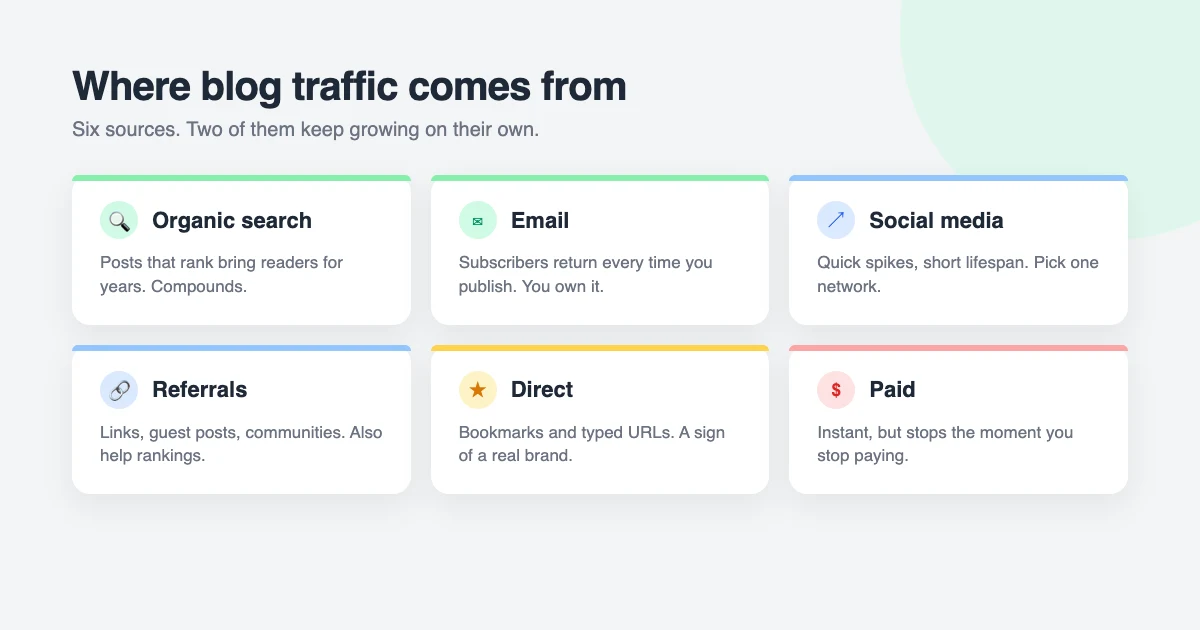
Before chasing tactics, it helps to know the six places blog traffic can come from. Every tip in this guide feeds one of them:
- Organic search. People typing a question into Google and clicking your post. For most blogs, this becomes the biggest source within a year, and it keeps growing without extra effort.
- Email. Subscribers you email when you publish. Small at first, but these are your most loyal readers and the only audience you fully own.
- Social media. Shares on Facebook, X, LinkedIn, Pinterest, Reddit or Threads. Quick spikes, short lifespan.
- Referrals. Links from other websites, guest posts and communities. Smaller numbers, but these links also help your search rankings.
- Direct. People who type your address or have you bookmarked. A sign you’re building a brand.
- Paid. Ads on Facebook, Google or elsewhere. Instant, but it stops the moment you stop paying.
The first two compound: a post that ranks keeps bringing readers for years, and every subscriber returns again and again. That’s why most of the tips below focus on search and email, with social, referral and paid traffic as accelerators. If you want more depth on social media and partnerships, our guide on how to promote your blog covers them.
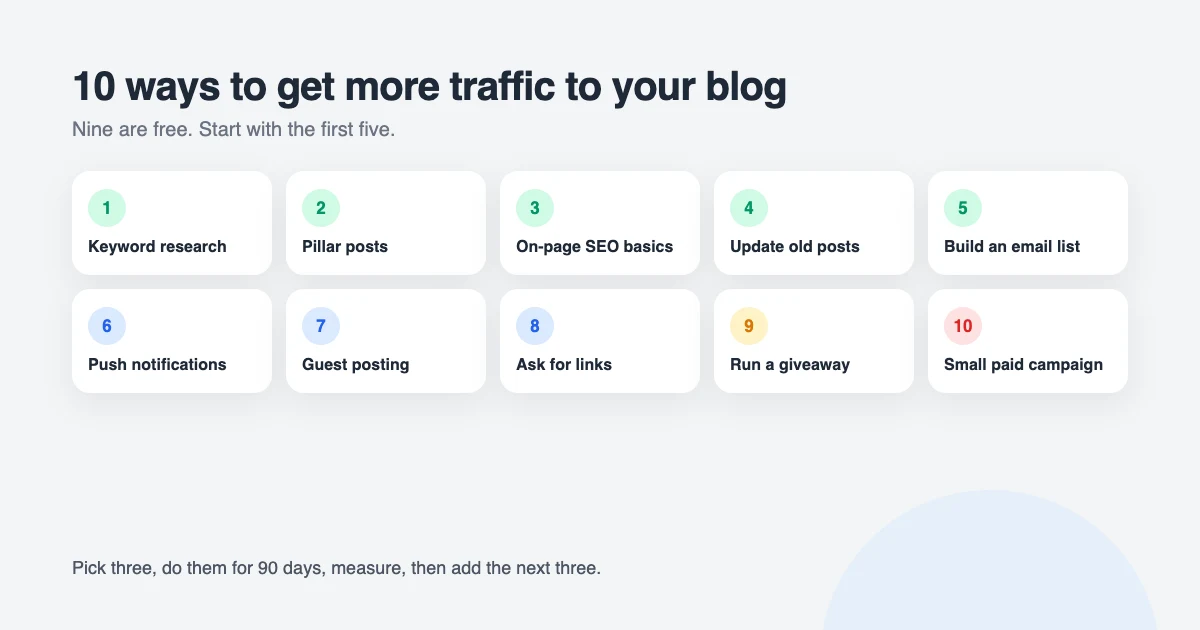
10 ways to get more traffic to your blog
1. Start every post with keyword research
The single biggest reason new blogs get no blog traffic is that they write about topics nobody is searching for. Keyword research fixes that by telling you what people actually type into Google, in their own words, before you write a line.
You don’t need a paid tool. Start with these free sources:
- Google itself. Type your topic and note the autocomplete suggestions, the “People also ask” box and the related searches at the bottom of the page. These are real queries.
- Google Search Console. Once your blog has a little traffic, the Performance report shows the exact queries you already appear for, including ones you never targeted. Those are your easiest wins.
- Google Trends. Compare two phrasings to see which is more popular and whether interest is rising or fading.
- Forums and comments. Reddit, Quora and the comments on bigger blogs in your niche are full of questions people can’t find good answers to.
Aim for specific, long-tail phrases with four or more words, such as “how to repot a monstera without killing it”, rather than “houseplants”. Big sites own the short keywords; the long ones are where a new blog can rank in weeks.
2. Write pillar posts that keep paying off
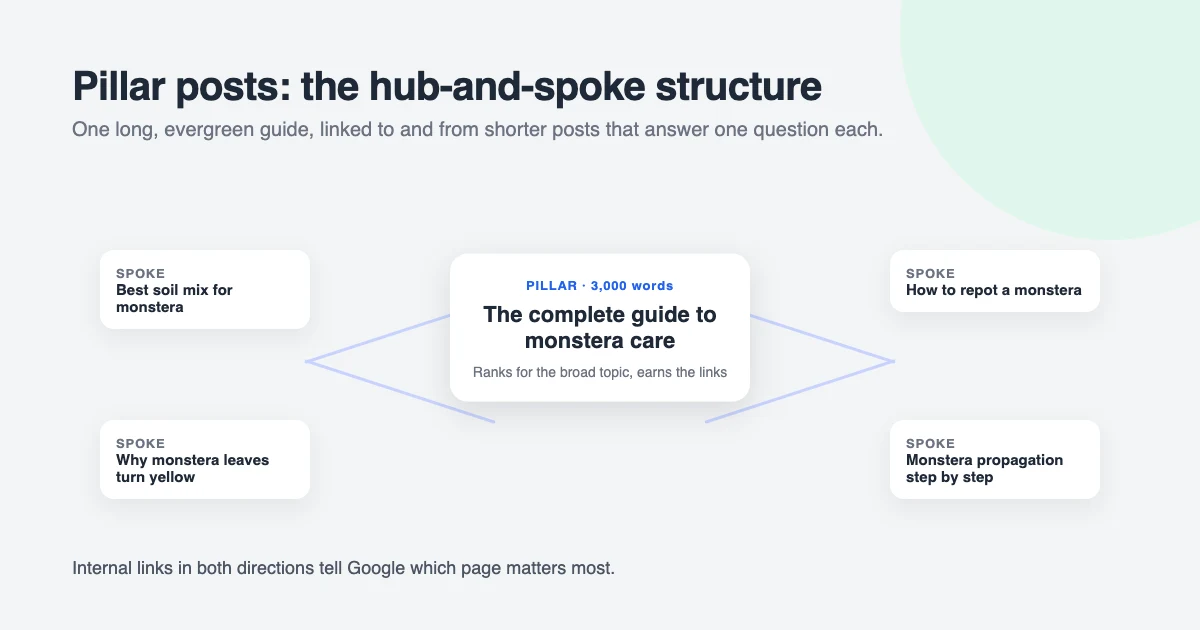
A pillar post is a long, thorough, evergreen guide to one of the main topics of your blog: “The complete guide to sourdough for beginners” rather than “What I baked this weekend”. Pillar posts are what search engines and other bloggers link to, and a single good one can bring traffic for years.
To build one:
- List the five to ten big topics your blog is about. Each is a potential pillar.
- Search each one and read the top results. Note what they cover, what they miss and where they’re out of date.
- Write something more complete, more current and easier to follow. 2,000 to 4,000 words is typical, with clear heading tags so readers can skim.
- Link to it from your shorter posts, and link out from it to them. This “hub and spoke” structure tells Google which page is the most important one on the topic.
Pillar posts take days, not hours, so plan them on an editorial calendar and publish shorter posts in between. One strong pillar a month is a realistic target for a solo blogger.
3. Get the on-page SEO basics right
On-page SEO is simply making it obvious to search engines what each post is about. It takes two minutes per post once you have the habit, and a free SEO plugin does most of the work. We use the free version of Rank Math on this site; Yoast SEO’s free version does the same job.
For every post, check:
- Your keyword is in the title, the URL, the first paragraph and at least one subheading. Naturally, not stuffed.
- The SEO title is under 60 characters and the meta description under 155. These are what people see in Google, so write them to earn the click.
- Images have descriptive alt text and sensible file sizes. Our guide on finding and inserting Creative Commons images covers the basics.
- You link to two or three of your own related posts. Internal links spread authority and keep readers on your site.
- The page loads fast on a phone. Google ranks the mobile version of your site. A lightweight theme and good Core Web Vitals matter more than any plugin setting.
Rank Math scores each post out of 100 as you write. Don’t obsess over hitting 100; anything above 80 with a readable post is fine.
4. Update your old posts
This is the fastest win on the list, because it works on blog traffic you already have. Posts that rank on page one slowly slip as they age and competitors publish fresher content. Refreshing them brings the rankings back, often within a week or two.
Once a month, open Google Search Console, go to Performance → Pages, compare the last three months with the previous three, and sort by the biggest drop in clicks. For each falling post: update facts, prices, screenshots and dates; add a section answering a question from the “People also ask” box; fix broken links; improve the title; and change the published date to today. Then request indexing in Search Console.
Also look for posts stuck in positions 8 to 20. They’re one good edit away from page one, which is where almost all the clicks are.
5. Build an email list from day one
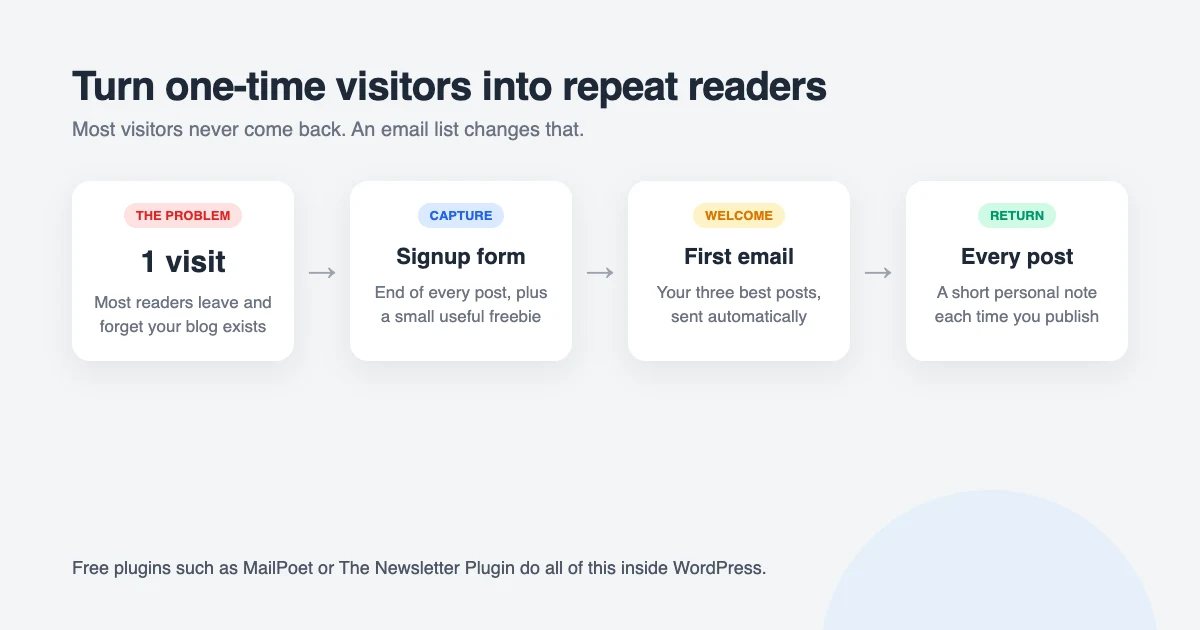
Most people who visit a blog never come back, not because they didn’t like it but because they forgot it existed. An email list fixes that. Every time you publish, you email your subscribers, and a predictable share of them visit. Over time, that becomes a traffic source you control completely, immune to algorithm changes.
You can do this for free with a plugin such as MailPoet (free for up to 500 subscribers) or The Newsletter Plugin, both of which add signup forms and send new-post emails from inside WordPress. To get people to sign up:
- Put a form where people finish reading: the end of each post and your sidebar or footer.
- Offer something small and useful: a checklist, template or short email course related to your best post.
- Send a welcome email with your three best posts, so new subscribers get value immediately.
- Email every time you publish, with a short personal note, not just the title.
Avoid aggressive popups that appear the moment someone lands. They hurt the reading experience Google measures and annoy the readers you most want to keep.
6. Add browser push notifications
Push notifications are a lighter version of email: readers click “Allow” once, and their browser shows a small alert when you publish, even when they’re not on your site. Typical click rates are higher than email because the message arrives in the moment.
The free OneSignal plugin handles it with a few clicks and can send notifications automatically for new posts. Keep it to one notification per post and don’t ask for permission the instant someone arrives; a small bell icon that readers can choose to click converts better over time.
7. Write guest posts for blogs in your niche
A guest post puts your writing in front of an audience that already exists, and the link back to your blog brings referral visitors and helps your own rankings. To find opportunities, search Google for your topic plus phrases like "write for us", "guest post" or "contribute", for example houseplants "write for us".
Pick blogs that are bigger than yours but still in your niche, read their recent posts, then pitch two or three specific ideas that fit what they publish and haven’t been covered. Write your best work for them, not your leftovers, and link naturally to one of your pillar posts in the body or author bio. One strong guest post on a relevant site is worth more than ten on random ones.
8. Ask for links to your best content
Links from other websites are still the strongest signal search engines use to decide who ranks. You can earn them without being pushy:
- Find who links to similar posts. Search your pillar topic, open the top results, and look for the articles that link to them. Those sites have already shown they link to content like yours.
- Make yours clearly better. More current, more complete, with original examples, data or images.
- Send a short, honest email. Mention the article of theirs you read, say what your post adds, and suggest it as a resource. No templates, no flattery, no follow-up spam.
- Be useful first. Answer questions in communities, link to other people’s work, and quote experts in your posts; they’ll often share it.
Expect one reply in ten. That’s normal, and a handful of real links from relevant sites can move a post from page three to page one.
9. Run a giveaway readers want to share
A giveaway rewards readers for sharing your blog, which can bring a burst of new visitors and subscribers in a week. The prize doesn’t have to be expensive; it has to be exactly what your readers want, such as a tool, book or product from your niche.
The free version of RafflePress lets you build a giveaway where people earn entries by subscribing, sharing on social media or visiting a post. Announce it to your email list and social accounts, run it for one to two weeks, and announce the winner publicly. Keep the entry actions tied to your blog, so the traffic you gain is from people interested in your topic rather than prize hunters.
10. Try a small paid campaign for your best post
Paid blog traffic is the only item on this list that costs money, and it’s last for a reason: it stops the day you stop paying. But a small budget can be worth it for one specific job, which is getting your best pillar post in front of the right people so they share it, link to it and subscribe.
Boosting a post on Facebook or Instagram to a tightly defined audience for a few dollars a day is the easiest place to start. Choose the post with the best engagement, use a strong image, and send people to the post itself, not your home page. Watch the cost per click and the time people spend on the page; if they bounce, the problem is the post, not the ad.
How to measure your blog traffic
You can’t improve what you don’t measure, and you don’t need paid analytics to do it. Install the free Site Kit by Google plugin, which connects Google Analytics and Search Console and shows both in your WordPress dashboard. Our comparison of Google Analytics vs Jetpack Stats helps if you’d prefer something simpler.
Then check three things once a week:
- Which posts bring the most visitors, so you can write more like them and link to them more.
- Which sources are growing, so you can double down on what works and drop what doesn’t.
- Which queries you rank for in positions 5 to 20, so you know which posts to update next.
Set realistic expectations for blog traffic. A new blog typically sees search traffic start to arrive after three to six months of consistent publishing, and it grows faster in year two than year one. The bloggers who make it are the ones who keep going through the quiet months.
Common mistakes that keep blog traffic low
- Writing for yourself instead of for a search. Personal updates are fine occasionally, but they don’t bring strangers.
- Publishing and forgetting. A post with no promotion, no internal links and no updates rarely finds readers on its own.
- Spreading across every social network. Pick the one where your readers actually are and show up there consistently.
- A slow, cluttered site. Heavy themes, too many plugins and autoplaying popups drive people away before they read a word. Our comparison of caching plugins is a good place to start speeding things up.
- Giving up at month three. Search traffic is a slow curve that suddenly steepens. Most blogs quit just before it does.
Choose a blog theme that helps you grow
Your theme affects how fast your blog loads, how easy it is to read and how well it works on phones, all of which affect how much traffic you keep. WPInterface Pro blog themes are lightweight, SEO-friendly and RTL ready, with clean layouts that keep readers focused on your content.
SpeedBlog Pro
SpeedBlog Pro is a fast blog theme for travel, tech, personal and creative blogs, built to score well on Core Web Vitals out of the box.

BlogNest Pro
BlogNest Pro is a clean, modern blog theme with stylish post layouts that make your writing the star of the page.

TruthBlog Pro
TruthBlog Pro is a professional blog theme with flexible layouts for categories and featured posts, ideal for niche and opinion blogs.

You can see all our blog themes on the WordPress themes page.
Let our team help you grow your blog
Want a blog that’s set up to attract and keep readers from day one? The WPInterface team can help:
- News and Blog Website Setup: we set up one of our blog themes with your branding, categories, newsletter signup and SEO basics, usually in about 7 days.
- WordPress Speed Optimization: a faster blog keeps more readers and ranks better.
- Must-Have Plugins Installation: for $59, we install and configure the essentials, including SEO, analytics and a newsletter plugin.
- VIP Support: a $29 priority ticket for fast expert help with a single problem.
Frequently asked questions
How do I get more traffic to my blog for free?
Research keywords before you write, publish thorough pillar posts, get the on-page SEO basics right, update old posts, and build an email list. All five cost nothing but time, and together they bring most of a successful blog’s traffic.
How long does it take to get blog traffic?
Social and email traffic can start on day one. Search traffic usually takes three to six months to appear and a year or more to become significant, which is why starting early and staying consistent matters so much.
How often should I publish?
Consistency beats volume. One well-researched post a week, or one pillar post a month plus shorter posts, will outperform daily thin posts. Pick a schedule you can keep for a year.
What is the best traffic source for a new blog?
Organic search, because it compounds. A post that ranks keeps bringing visitors for years without further work. Email is second, because those readers come back every time you publish.
Do I need to pay for ads to get blog traffic?
No. Most successful blogs grow without ads. A small paid campaign can speed up one post’s exposure, but it’s an accelerator, not a foundation.
Does my theme affect blog traffic?
Yes. A slow or hard-to-read theme increases bounces and lowers your Core Web Vitals, which affect rankings. A lightweight, mobile-friendly theme helps every other tactic work better.
Final thoughts
Getting more traffic to your blog isn’t about finding one secret channel. It’s about choosing topics people search for, writing the most useful post on each, making it easy for search engines and readers to find, and giving visitors a reason to come back.
Pick three of the ten tactics above, do them for the next 90 days, and measure. Then add the next three. Blog traffic grows slowly and then all at once, and the only bloggers who see the “all at once” part are the ones still publishing when it arrives.
Reactions
How did this make you feel?
Be the first to react
One reaction per visitor. Tap again to change or remove it.



Leave a reply