Public LMS – eLearning, Course Builder, Quizzes & Certificates
Turn your WordPress site into a school.
Public LMS is a learning management system for WordPress. Build courses in a drag-and-drop builder, write lessons in the block editor, and let students enroll, learn in a focused learning area, take quizzes and earn certificates. Selling with Stripe, PayPal or offline payments is free. Pro adds what schools and businesses need: teams and cohorts, subscriptions, a gradebook, AI and white label.
Free on WordPress.org · No limits on courses or students · Pro for teams and organizations
0
limits on courses or students
10
question types
3
free ways to take payment
5
LMS plugins you can move from
01 — A look inside
Build it. Test it. Prove it.
Three screens of the learning management system you and your students will use every day: the builder, the quiz and the certificate.
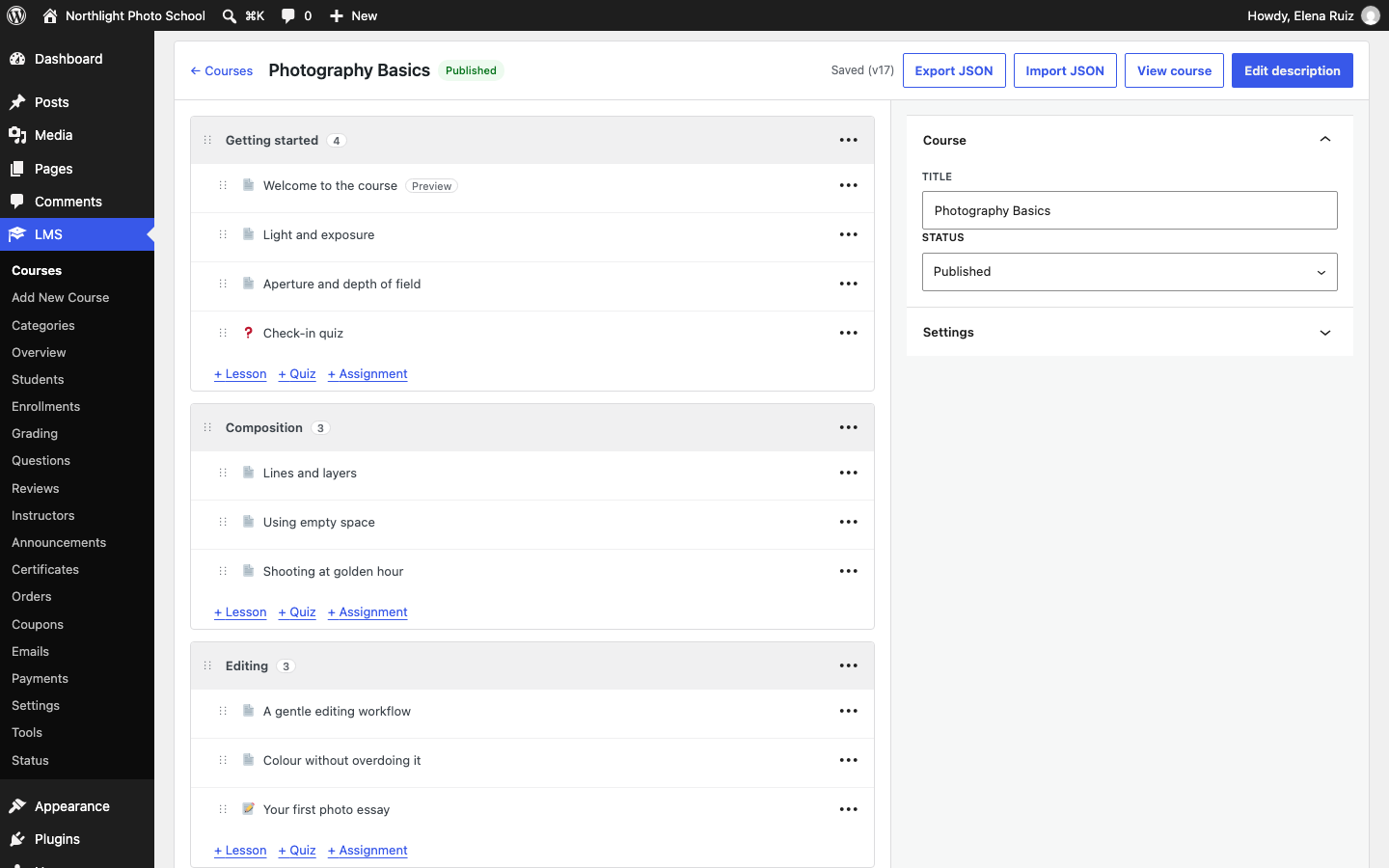
A course builder you drag into shape
Sections, lessons, quizzes, assignments and live lessons in one view. Drag them into order, duplicate a course, or import and export it.
Quizzes that keep up with students
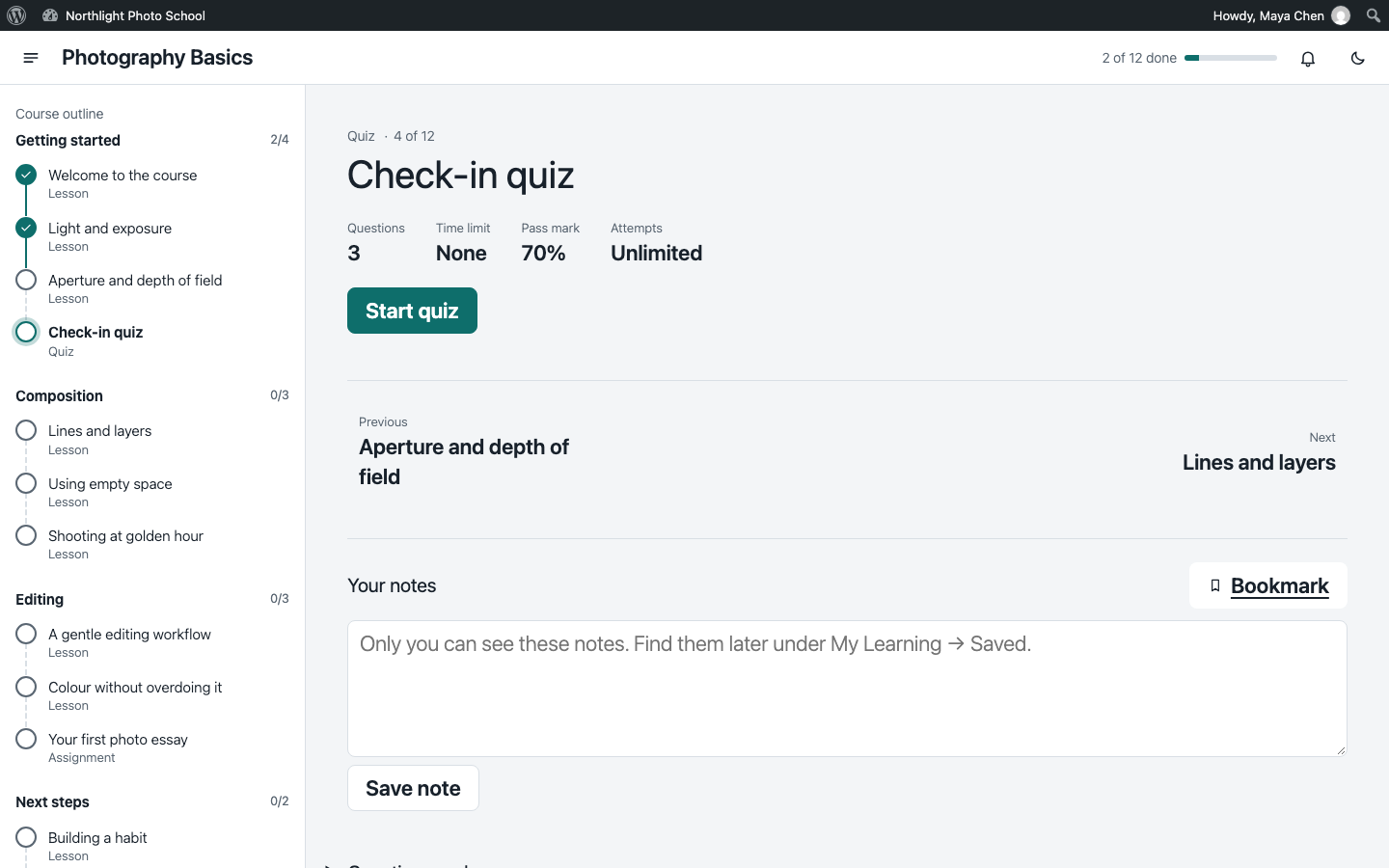
Ten question types, question banks, attempts, time limits and pass marks. Answers are saved on the server while students work.
Certificates anyone can check
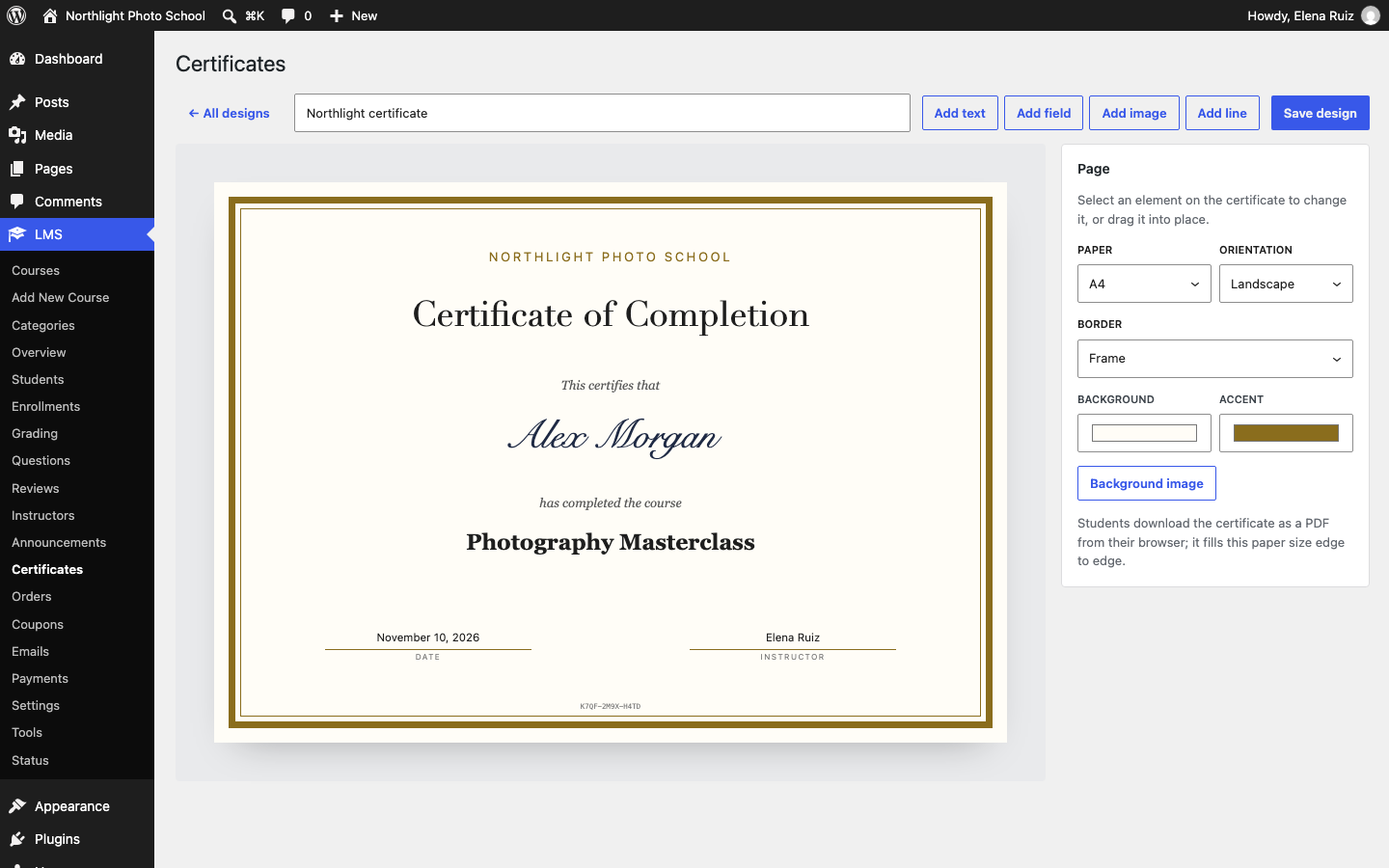
Design your own certificate. Students save it as a PDF, and anyone can check its code on a public verification page.
Screenshots
The learning management system, screen by screen
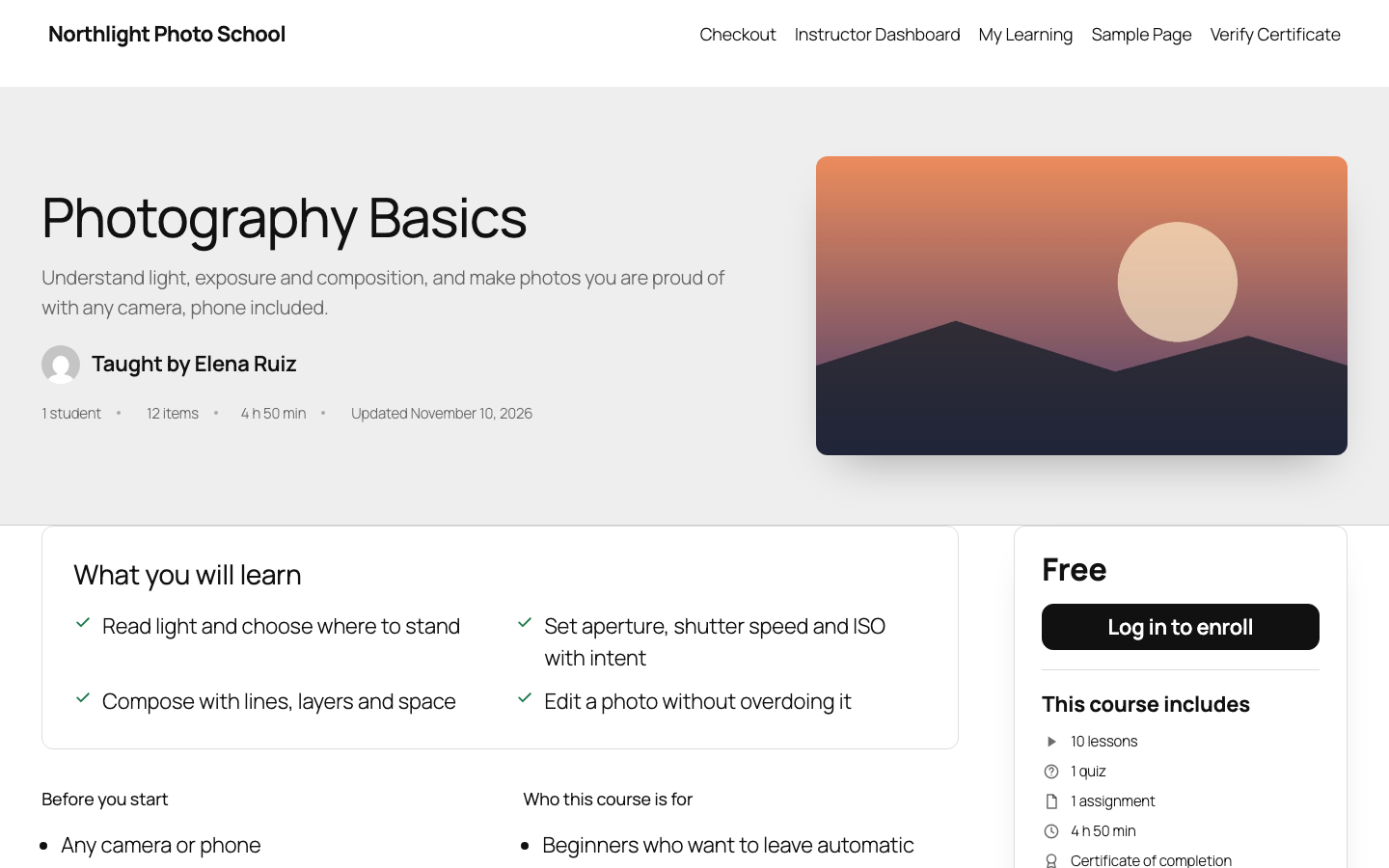
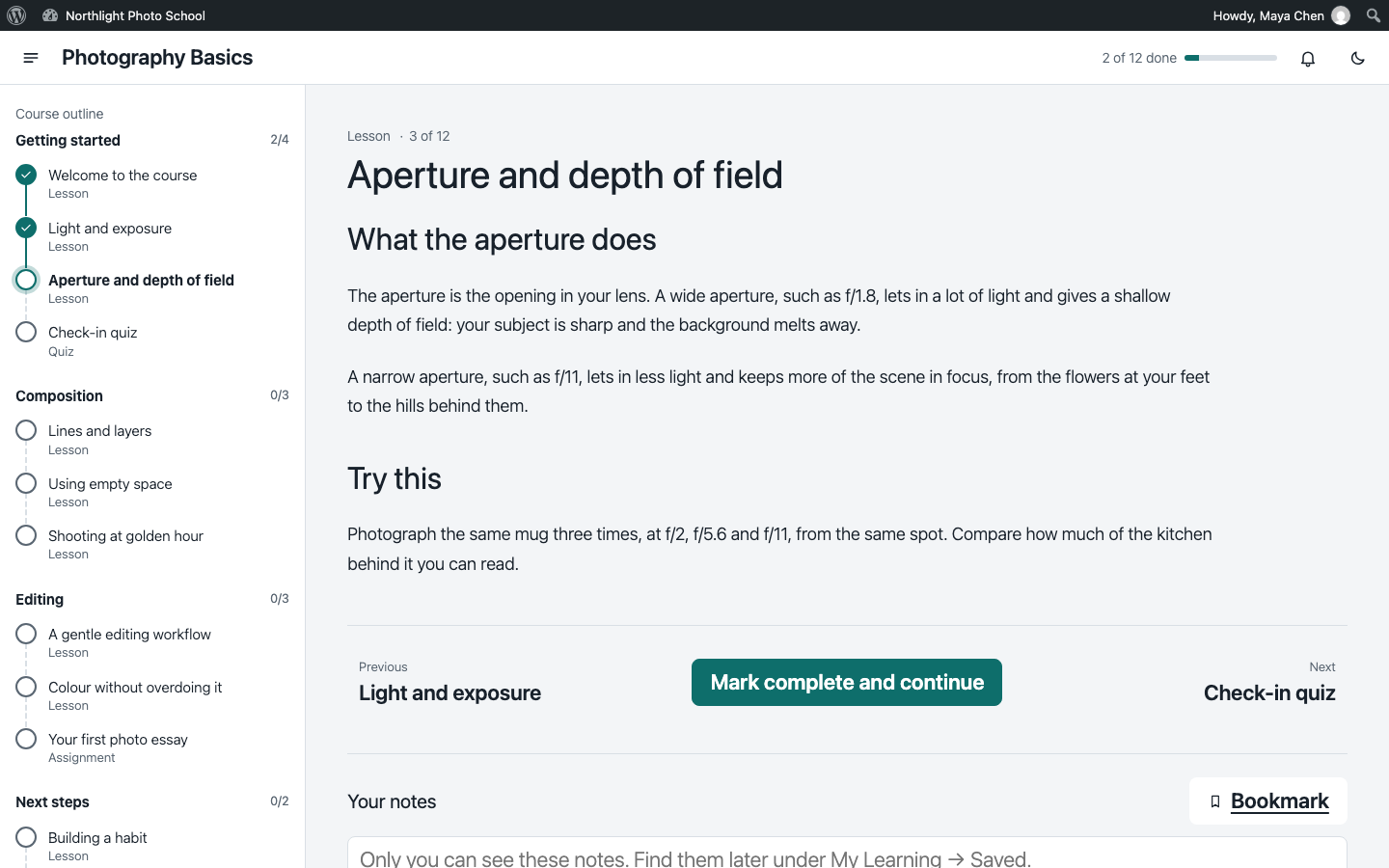
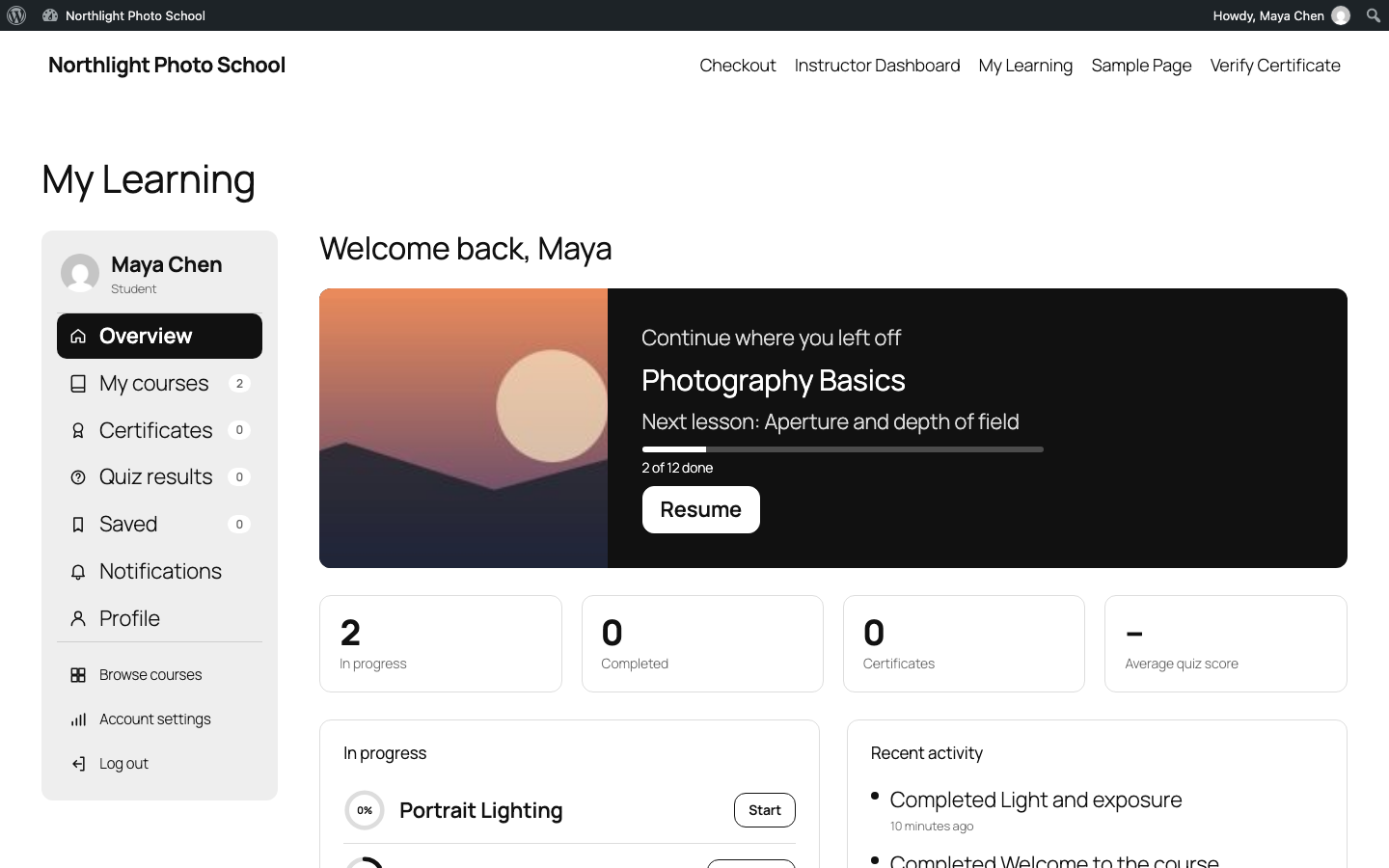
The same screens you get after installing: the builder, a course page, the learning area, a quiz, My Learning and the certificate designer.
02 — Features
A complete learning management system, free
Grouped the way you run a school. Each card lists what the free edition does, then what Pro adds for organizations and teams.
Build courses
Plan a course in the learning management system, fill it with lessons and keep its files private.
- Unlimited courses, sections, lessons, quizzes and assignments
- A drag-and-drop course builder
- Lessons written in the block editor
- Video from YouTube, Vimeo or your media library, plus audio and PDF lessons with transcripts
- Protected lesson files, downloaded through links made for each student
- Content bank, course duplicate, import and export
Pro
- AI drafts of outlines, lessons and quiz questions, reviewed before anything is saved
- Co-instructors and departments
Teach and learn
A calm place to learn, and the timing tools a learning management system needs to run a course.
- A focused learning area with a curriculum sidebar
- Free enrollment, manual enrollment and progress tracking
- Content drip, prerequisites, access length and enrollment windows
- Lesson notes, bookmarks, notifications, announcements and live lessons
- A schedule on My Learning with a private calendar feed
- Course reviews, questions and answers
Pro
- Zoom and Google Meet meetings created for live lessons
- Watch-time rules on video lessons
- An AI tutor that answers from the course’s own lessons
Quizzes and certificates
Check what students learned and give them something to show for it.
- Ten question types and question banks
- Attempts, time limits and pass marks
- Images and sounds on questions, with a warning about unanswered ones
- Assignments with grading
- Certificates you design, saved as PDF, with a public verification page
Pro
- A gradebook with weights and letter grades
- Certificates that expire, with renewal reminders
Selling
Sell courses from the learning management system itself, or through the store you already run.
- A built-in cart and one-page checkout
- Stripe, PayPal and offline payments
- Coupons, tax by country, refunds and order emails
- Or sell through WooCommerce or Easy Digital Downloads
- A sales and enrollment overview
Pro
- Subscriptions and memberships, with free trials
- Course bundles and gifts
- Razorpay and pay by invoice
- Checkout questions, numbered invoices and price zones
- Seats for teams, with volume discounts
Running it at scale
Staff roles, emails and the tools to move your learning management system in and grow.
- Student dashboard, instructor dashboard and instructor registration
- Teaching assistant and read-only viewer roles
- Editable emails, plus your own emails for any event
- Move from Tutor LMS, LearnDash, LifterLMS, LearnPress or Masteriyo
- REST API, WP-CLI and Abilities API for developers
Pro
- Groups and cohorts with seats and leaders
- Revenue sharing and instructor payouts
- Analytics with students at risk
- Single sign-on, two-step sign-in and an activity log
- Marketing tools and signed webhooks
- White label (Agency plan)
03 — Free or Pro
Free or Pro?
The free learning management system holds what an individual needs to teach and sell. Pro adds what organizations need: teams, more ways to sell, reporting, sign-in, AI and integrations.
| FreeDownload free | ProGet Pro | |
|---|---|---|
| Build courses | ||
| Unlimited courses, sections, lessons, quizzes and assignments | Included | Included |
| Drag-and-drop course builder | Included | Included |
| Lessons written in the block editor | Included | Included |
| Video, audio and PDF lessons with transcripts | Included | Included |
| Protected lesson files and per-student download links | Included | Included |
| Content bank, course duplicate, import and export | Included | Included |
| Course FAQ and coming-soon courses | Included | Included |
| AI drafts of outlines, lessons and quiz questions | Not included | Included |
| Co-instructors and departments | Not included | Included |
| Teach and learn | ||
| Focused learning area with a curriculum sidebar | Included | Included |
| Free enrollment, manual enrollment and progress tracking | Included | Included |
| Content drip, prerequisites, access length and enrollment windows | Included | Included |
| Lesson notes, bookmarks, notifications and announcements | Included | Included |
| Live lessons that link to your meeting service | Included | Included |
| Zoom and Google Meet meetings created for live lessons | Not included | Included |
| Watch-time rules on video lessons | Not included | Included |
| Course reviews, questions and answers | Included | Included |
| Schedule on My Learning with a private calendar feed | Included | Included |
| Reminders and a daily "new lessons are open" email | Included | Included |
| AI tutor that answers from the course's lessons | Not included | Included |
| AI drafts of assignment feedback | Not included | Included |
| Quizzes, grades and certificates | ||
| Ten question types and question banks | Included | Included |
| Attempts, time limits and pass marks | Included | Included |
| Images and sounds on questions, answers saved on the server | Included | Included |
| Assignments and grading | Included | Included |
| Gradebook with weights and letter grades | Not included | Included |
| Certificate designer, PDF and public verification page | Included | Included |
| Certificates that expire, with renewal reminders | Not included | Included |
| Selling | ||
| Cart and one-page checkout | Included | Included |
| Stripe, PayPal and offline payments | Included | Included |
| Coupons, tax by country, refunds and order emails | Included | Included |
| Sell through WooCommerce or Easy Digital Downloads | Included | Included |
| Sales and enrollment overview | Included | Included |
| Subscriptions and memberships, with free trials | Not included | Included |
| Course bundles and gifts | Not included | Included |
| Razorpay and pay by invoice | Not included | Included |
| Checkout questions | Not included | Included |
| Numbered invoices | Not included | Included |
| Price zones in your buyers' currencies | Not included | Included |
| Seats for teams, with volume discounts | Not included | Included |
| People and teams | ||
| Student dashboard, instructor dashboard and instructor registration | Included | Included |
| Public instructor profiles | Included | Included |
| Teaching assistant and LMS Viewer roles | Included | Included |
| Groups and cohorts with seats, leaders and CSV import | Not included | Included |
| Revenue sharing and instructor payouts | Not included | Included |
| Choose what each LMS role may do | Not included | Included |
| Communication and growth | ||
| Editable emails, plus your own emails for any event | Included | Included |
| Browser events for analytics tools | Included | Included |
| Analytics with students at risk, and emailed reports | Not included | Included |
| Mailchimp, MailerLite, HubSpot, Brevo and FluentCRM | Not included | Included |
| Signed webhooks (Zapier too) | Not included | Included |
| Running the site | ||
| Setup wizard, tools and status screen | Included | Included |
| Move from Tutor LMS, LearnDash, LifterLMS, LearnPress or Masteriyo | Included | Included |
| Block themes, classic themes and template overrides | Included | Included |
| Elementor, Bricks and Divi widgets | Included | Included |
| Works with WP Rocket, W3 Total Cache, LiteSpeed Cache and Cloudflare APO | Included | Included |
| REST API, WP-CLI, Abilities API and hooks | Included | Included |
| Single sign-on: Google, Microsoft, LinkedIn, OpenID Connect, SAML | Not included | Included |
| Two-step sign-in and activity log | Not included | Included |
| Network settings on multisite | Not included | Included |
| White label, and your own words for Course, Lesson, Student and Instructor | Not included | Agency plan |
| Support and updates | ||
| WordPress.org support forum | Included | Included |
| Priority support from the WPInterface team | Not included | Included |
| Updates | WordPress.org | While your license is active |
White label and your own words are in the Agency plan only. Every other Pro feature is in every plan.
Pro is its own plugin. Activating it switches off the free edition and keeps your courses, students and settings; nothing in the free edition depends on Pro.
Card and PayPal buyers pay on Stripe’s or PayPal’s own page. Your site only learns whether the payment went through.
Which one do I need?
Free is enough if…
- you teach your own courses,
- you sell them with Stripe, PayPal or offline payments,
- one instructor and a few assistants run the site.
Choose Pro if…
- you train teams, classes or cohorts,
- you sell subscriptions, memberships, bundles or seats,
- several instructors share the work and the revenue,
- you need a gradebook, analytics, single sign-on or white label.
Not sure? Start free. When you add Pro, your courses, students and settings carry over.
04 — Pro
Pro is for schools and businesses
Teams and cohorts, the ways organizations pay, and the sign-in, reporting and branding they expect from a learning management system.
Pro
Train teams, classes and cohorts
A group enrolls a team in its courses together, with a seat limit and leaders who follow their members’ progress. Give a cohort a start date and every member’s lessons open on the cohort’s schedule, even for people who join late.
- Seats for teams. Course pages sell seats; the buyer gets a group to invite their team to, by email or from a CSV file.
- Cohort dates. Lessons that open some days after enrolling count from the cohort’s start.
- Gradebook. Weighted quizzes and assignments, with your own letter grades.
- Analytics. Learning figures across courses and groups, including students at risk, emailed weekly or monthly.
- Certificates that expire. Students are reminded before a certificate runs out and renew it by taking the course again.
Pro
Sell the way organizations buy
Go past one-off course sales. Sell access by the month or year, package courses together, and let companies pay on terms.
- Subscriptions and memberships. Plans for chosen courses, whole categories or every course, with an optional free trial.
- Bundles and gifts. Several courses for one price, and courses sent as a gift.
- More ways to pay. Razorpay, and pay by invoice for organizations.
- Checkout questions. Ask buyers what you need to know, kept on the order and the invoice.
- Invoices and price zones. Numbered invoices, and prices in your buyers’ own currencies.
Pro
Sign-in, integrations, AI and your brand
Connect the LMS to the tools your organization already uses, and make it look like your own.
- Single sign-on. Google, Microsoft, LinkedIn, OpenID Connect or SAML, optionally only for some email domains.
- Two-step sign-in and an activity log of sign-ins, role changes, grades, refunds and more.
- Marketing tools and webhooks. Mailchimp, MailerLite, HubSpot, Brevo, FluentCRM, and signed webhooks for anything else.
- AI with your own key. Draft outlines, lessons, quiz questions and feedback, and let students ask an AI tutor. Nothing is saved until a person reviews it.
- Revenue sharing. Pay instructors a share of their courses’ sales.
- White label (Agency plan). Your brand name, menu label and icon, and your own words for Course, Lesson, Student and Instructor.
Version 1.0.0
New in 1.0.0
The first public release of the learning management system, with protected files, new lesson types and a schedule for every student.
- Protected lesson files: files uploaded to a lesson never enter the Media Library, and students get links made for them that expire.
- Audio and PDF lessons, with transcripts as text or a file.
- Quizzes: images and sounds on questions, answers kept on the server while a student works, a warning about unanswered questions, and points by kind of question.
- Reminders for students who stopped, and a daily email when scheduled lessons open.
- Your own emails for any event: enrollment, completion, certificates, grades, payments and more.
- A schedule on My Learning with a private calendar feed for Google Calendar, Apple Calendar or Outlook.
- Teaching assistant and LMS Viewer roles. Assistants grade and edit content without publishing or deleting; viewers read reports.
- A preview before migrating from another LMS, a student timeline for staff, and commands in WordPress’s command palette.
- Pro: cohort start and end dates on groups, checkout questions, and your own words for Course, Lesson, Student and Instructor.
Public LMS Pro pricing
Pick the number of sites. Every plan has every Pro feature; white label is in Agency. Each license includes a year of updates and priority support.
-
Starter
For 1 website
$119
One license key for a single site, with plugin updates and priority support while your license is active.
- All Pro features
- Priority support
- Plugin updates
-
Most popular
Business
For 5 websites
$229
Five license keys for five sites, with plugin updates and priority support while your license is active.
- All Pro features
- Priority support
- Plugin updates
-
Agency
For unlimited websites
$449
Use it on every site you run or build, with plugin updates and priority support while your license is active.
- All Pro features
- Priority support
- Plugin updates
Orders are processed by our online reseller, Paddle.com, the Merchant of Record for all transactions.
Your license
What a Pro license covers
One key, entered on LMS → License, turns on Pro’s features and updates across your learning management system.
Every Pro feature
Teams and cohorts, subscriptions, bundles, gradebook, analytics, sign-in options, AI and integrations, on as many sites as your plan allows.
Updates in your dashboard
New versions of Pro arrive like any other plugin update while your license is active.
Priority support
Help from the WPInterface team through our support desk.
Keep what you built
Activating Pro switches off the free edition and uses the same courses, students and settings.
Move between sites
Free a site from your account on the store and use the activation somewhere else.
White label (Agency)
Your brand in the dashboard, your menu label and icon, and your own words for the LMS’s main terms.
Before you buy
Requirements
Free and Pro are the same learning management system, with the same courses, students and settings. Pro is a separate plugin you upload after purchase.
| Requirement | Details |
|---|---|
| WordPress | 6.9 or newer, with a block theme or a classic theme |
| PHP | 8.1 or newer |
| Payments (optional) | A Stripe or PayPal account to take card or PayPal payments. Offline payments need nothing extra. |
| WooCommerce or Easy Digital Downloads | Optional, only to sell courses through them. WooCommerce 10.0 or newer. |
| WordPress’s own mailer. An SMTP or email-service plugin is recommended for reliable delivery. | |
| nginx servers | One server rule keeps students’ files private. LMS → Status gives you the exact line. |
Questions
Frequently asked questions
Editions, plans, payments and moving in. Can’t find it? Ask the team.
Is Public LMS a complete learning management system or an add-on?
A complete learning management system. Courses, lessons, quizzes, assignments, enrollment, progress, certificates and a checkout are all in the free plugin, and nothing in it depends on Pro or on another LMS plugin. Pro is a separate plugin that adds what organizations need.
Does the free version limit the number of courses or students?
No. Nothing in the free learning management system is limited by count, time or license.
Can I sell courses with the free version?
Yes. The free learning management system has its own cart and checkout with Stripe, PayPal and offline payments, coupons, tax by country, refunds and order emails. You can also sell through WooCommerce or Easy Digital Downloads instead.
How do quizzes work?
A quiz can mix ten question types, draw questions from question banks, and set attempts, a time limit and a pass mark. Answers are saved on the server every 30 seconds and when the page is left, so a student can carry on from another device, and a timed quiz is still graded if it runs out with the page closed. Students see a warning that names unanswered questions before they submit.
Can I sell courses through WooCommerce or Easy Digital Downloads?
Yes. Create the product in WooCommerce or the download in Easy Digital Downloads, set the course’s Enrollment to “Sold in WooCommerce or Easy Digital Downloads”, and enter the product’s ID. The learning management system enrolls the buyer when the order is paid and ends access on a refund.
Are students’ files and paid lesson files private?
Yes. Assignment files are stored in a private folder with random names and downloaded through signed links that expire. Files uploaded to a lesson as protected files never enter the Media Library, and in paid courses students get download links made for them that stop working when they lose access. On nginx, LMS → Status gives you the one server rule to add.
What does Pro add?
What organizations need: groups and cohorts with seats, subscriptions and memberships, bundles and gifts, Razorpay and pay by invoice, checkout questions, co-instructors and revenue sharing, a gradebook, analytics, Zoom and Google Meet, AI drafts and an AI tutor, single sign-on, marketing integrations and webhooks, and white label in the Agency plan.
Which Pro plan do I need?
Choose by the number of sites: Starter for one, Business for up to five, Agency for unlimited sites. Every plan has every Pro feature, except white label and your own words for the LMS’s main terms, which are in Agency only.
Do I lose anything when I add Pro?
No. Pro is its own plugin. Activating it switches off the free edition, and the learning management system keeps the same courses, students and settings. Enter your license key on LMS → License to turn on Pro’s features and updates.
Can I move from another LMS plugin?
Yes. LMS → Tools finds courses from Tutor LMS, LearnDash, LifterLMS, LearnPress and Masteriyo on the same site and brings over courses, lessons, quizzes, students, their progress and reviews. A preview shows what will come over first. The other plugin’s data is only read, never changed, so you can try the new learning management system safely.
Does it work with my theme and page builder?
Yes. The learning management system’s course pages are block templates on block themes, and the plugin ships PHP templates for classic themes, which you can override from your theme. There are widgets for Elementor, Bricks and Divi.
Does it work with page caching?
Yes. Course and catalogue pages stay cacheable; the learning area, checkout and dashboards are kept out of page caches automatically, for WP Rocket, W3 Total Cache, LiteSpeed Cache and Cloudflare APO.
Do buyers’ card details touch my site?
No. Card and PayPal payments happen on Stripe’s or PayPal’s own page; the site only learns whether the payment went through.
Does the plugin send data anywhere?
Only to the payment services you turn on. Until you enter Stripe or PayPal keys, the free edition makes no requests to any external service.
What doesn’t it do yet?
The learning management system has no SCORM, xAPI or H5P import yet. Certificates are saved as PDF from the browser’s print dialog, and live lessons link to the meeting service you use rather than hosting video calls.
How do I get support?
Free users can ask on the WordPress.org support forum. Pro customers get priority support from the WPInterface team through our support desk.
Open your school today
Install the free learning management system, build your first course and take your first enrollment. Add Pro when you are teaching teams or selling to organizations.
No limits on courses or students · Pro from one site to unlimited
Tutor LMS, LearnDash, LifterLMS, LearnPress, Masteriyo, Stripe, PayPal, Razorpay, Zoom, Google Meet, Elementor, Bricks and Divi are trademarks of their respective owners. WPInterface is not affiliated with or endorsed by them.