
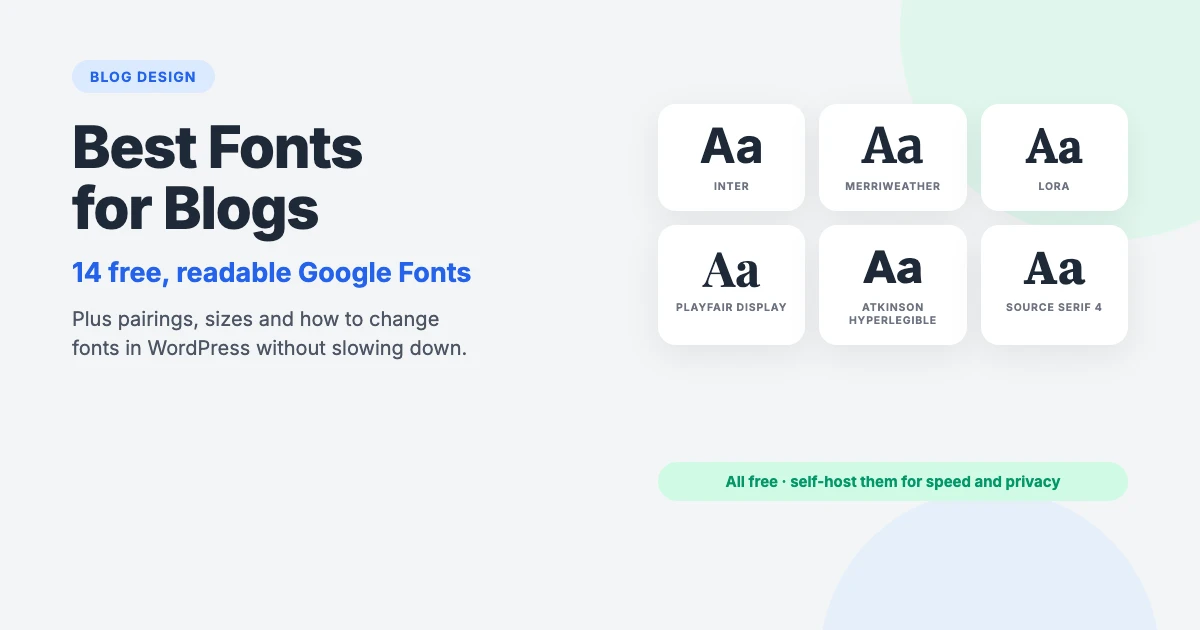
Readers decide whether to stay on a blog post in a few seconds, and much of that decision happens before they’ve read a single sentence. Text that’s too small, too light, cramped or set in an awkward typeface feels like hard work, so people leave. The same words in a clear, comfortable font feel inviting.
Choosing the best fonts for your blog isn’t about finding something unusual. It’s about picking a typeface that’s easy to read on a phone at 11pm, that suits the tone of your writing, and that loads quickly without leaking your visitors’ data to third parties.
In this guide, we’ll share 14 of the best fonts for blogs, all free and all available from Google Fonts, show you four pairings that work, explain the sizing and spacing rules that matter more than the font itself, and walk you through changing fonts in WordPress the fast, privacy-friendly way.
Why your blog font matters
- Readability. A comfortable font lets readers get through a 2,000-word post without noticing the effort. An uncomfortable one makes them skim and leave.
- Personality. Fonts carry tone. A sturdy serif feels considered and literary; a geometric sans feels modern and confident; a rounded sans feels friendly.
- Accessibility. Many of your readers have low vision, dyslexia or tired eyes. Clear letterforms, generous size and good contrast help everyone, and they’re part of making a site that meets accessibility guidelines.
- Speed. Every weight of your blog fonts is a file the browser has to download. Choose carefully and your fonts cost almost nothing; choose carelessly and they can add half a second to every page.
Serif, sans-serif or display?
Every one of the best fonts for blogs on this list falls into one of three groups:
- Sans-serif fonts have plain letter endings. They look clean and modern, and they’re the safest choice for body text on small screens. Most blogs use one.
- Serif fonts have small strokes, or serifs, at the ends of letters. They feel bookish and trustworthy. The old advice that serifs are hard to read on screens dates from low-resolution monitors; modern screen serifs at 18px or larger read just as well.
- Display fonts are designed for large sizes: headings, titles and logos. They add character but become tiring in paragraphs, so use them for headings only.
A good rule: pick one font for body text first, because that’s what readers spend most of their time looking at. Then, if you want, pick a second font for headings.
The best fonts for blogs at a glance
| Font | Type | Best for | Pairs well with |
|---|---|---|---|
| Inter | Sans | Body text, any niche | Source Serif 4, Merriweather |
| Open Sans | Sans | Friendly body text | Lora, Montserrat |
| Roboto | Sans | Tech and news blogs | Roboto Slab, Merriweather |
| Lato | Sans | Lifestyle, health, education | Playfair Display, Lora |
| Source Sans 3 | Sans | Long lists and tutorials | Source Serif 4, Playfair Display |
| Atkinson Hyperlegible | Sans | Maximum accessibility | Literata, Merriweather |
| Merriweather | Serif | Essays and long reads | Montserrat, Inter |
| Lora | Serif | Personal and creative blogs | Poppins, Open Sans |
| Source Serif 4 | Serif | Business and editorial | Source Sans 3, Inter |
| Literata | Serif | Book, fiction and writing blogs | Inter, Atkinson Hyperlegible |
| PT Serif | Serif | Multilingual blogs | PT Sans, Montserrat |
| Montserrat | Sans (display) | Headings and titles | Merriweather, Open Sans |
| Playfair Display | Serif (display) | Elegant headings | Source Sans 3, Lato |
| Poppins | Sans (display) | Bold, modern headings | Lora, Inter |
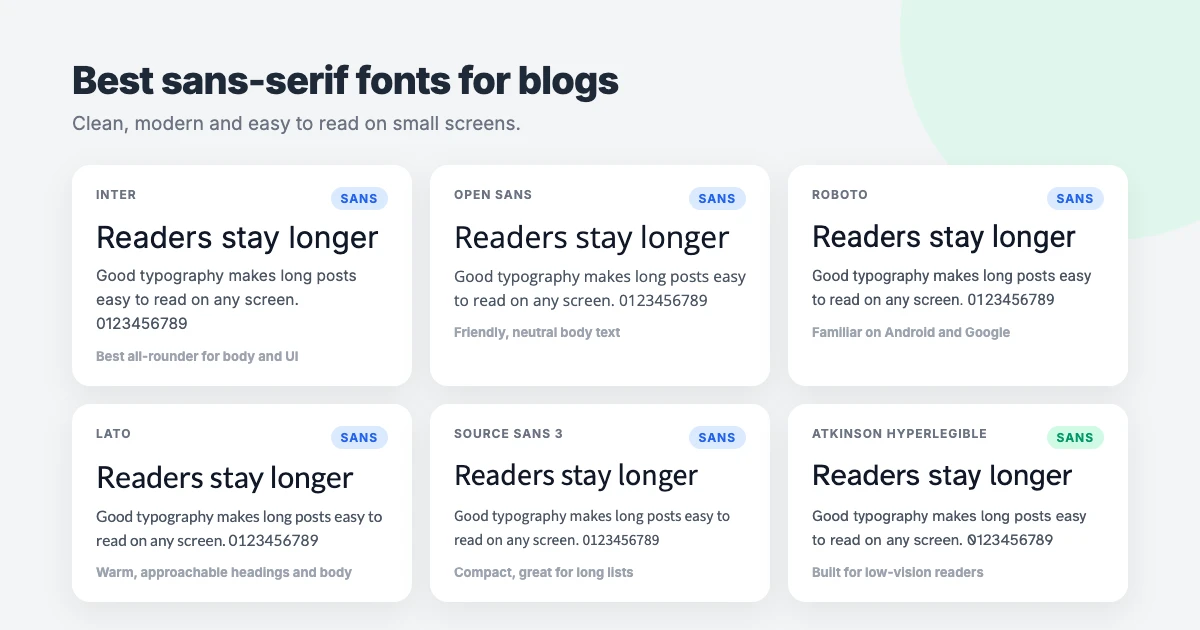
Best sans-serif fonts for blogs
1. Inter
Inter was designed by Rasmus Andersson specifically for computer screens, and it shows. It has a tall x-height (the height of lowercase letters), open shapes and careful spacing, so it stays crisp at small sizes. It’s a variable font, meaning one file covers every weight from thin to black. If you want one font that works for everything, this is our top pick among the best fonts for blogs.
2. Open Sans
Open Sans, designed by Steve Matteson, is one of the most widely used fonts on the web, and for good reason. It’s neutral but friendly, with wide letters and plenty of space between them. It works for almost any niche and supports a huge range of languages, which makes it a safe default for multilingual blogs.
3. Roboto
Roboto became Android’s system font in 2011, so millions of people read it every day without noticing. That familiarity is its strength: it feels natural, especially for tech, news and how-to blogs. Its slightly mechanical shapes are a little cooler than Open Sans, and it has a matching slab serif, Roboto Slab, for headings.
4. Lato
Lato, by Polish designer Łukasz Dziedzic, has semi-rounded details that make it feel warm and approachable. It’s a lovely choice for lifestyle, wellness, parenting and education blogs, and it looks particularly good in bold for headings.
5. Source Sans 3
Source Sans 3 was Adobe’s first open-source typeface. It’s slightly narrower than Open Sans, so more fits on a line without feeling cramped, which helps in tutorials full of lists, steps and code. It comes with a matching serif, Source Serif 4, for an easy, harmonious pairing.
6. Atkinson Hyperlegible
Atkinson Hyperlegible was created by the Braille Institute for readers with low vision. Letters that are easily confused, like capital I, lowercase l and the number 1, or O and 0, are deliberately made different. If accessibility matters to your readers, and it does to every blog, this is one of the most readable fonts you can choose.
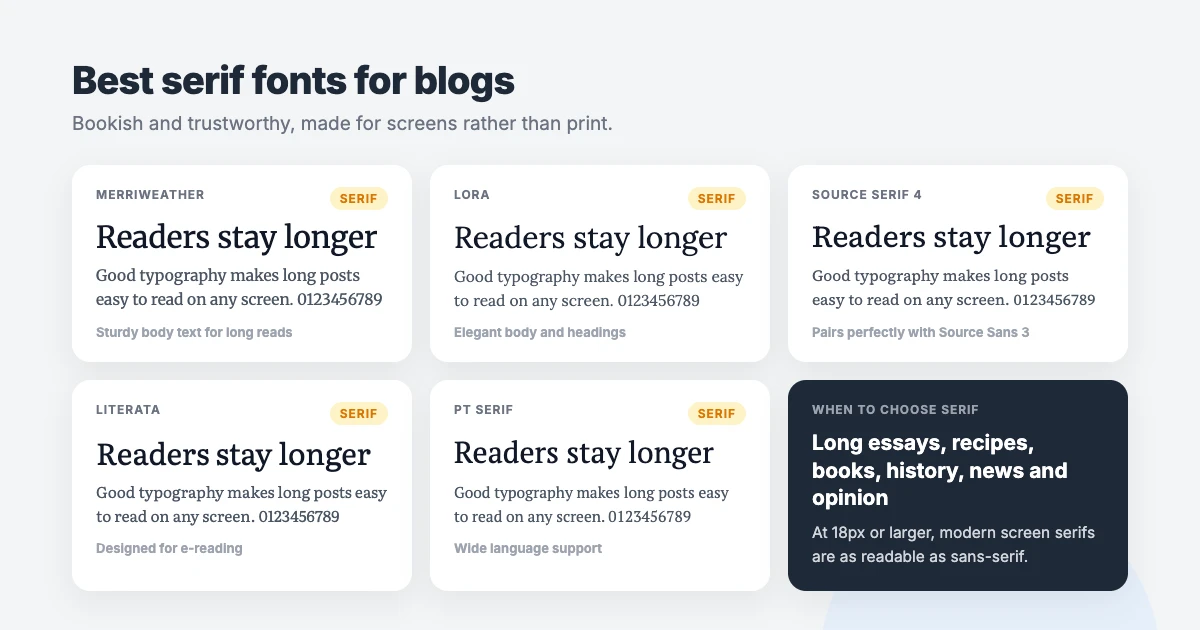
Best serif fonts for blogs
7. Merriweather
Merriweather was designed by Eben Sorkin to be pleasant to read on screens. It’s sturdy, with a large x-height and slightly condensed letters, so it holds up well on phones. It’s our favourite serif for long-form essays, opinion pieces and news.
8. Lora
Lora has gentle, brush-inspired curves that give it a personal, slightly literary feel. It works beautifully for travel, food, personal and creative blogs, both in paragraphs and in headings.
9. Source Serif 4
Source Serif 4 is a refined, modern serif with optical sizes, meaning its shapes subtly adjust for small text and large headings. It feels professional and calm, making it a great fit for business, finance and editorial blogs.
10. Literata
Literata was designed by TypeTogether as the reading font for Google Play Books, so it was built for hours of reading on screens. If you write fiction, book reviews or long personal essays, it gives your blog the feel of a good e-book.
11. PT Serif
PT Serif by ParaType supports both Latin and Cyrillic scripts and has a matching sans, PT Sans. It’s a practical, readable choice for multilingual blogs and anyone who wants a classic serif that doesn’t feel stuffy.
Best fonts for blog headings
These three are the best fonts for blogs when you want headings with a strong personality. Use them for post titles and headings, then pair them with one of the body fonts above.
12. Montserrat
Montserrat was inspired by old signs in the Montserrat neighbourhood of Buenos Aires. Its wide, geometric capitals look confident and modern in headings, menus and buttons. It’s a little too wide for long paragraphs, so pair it with a calmer body font.
13. Playfair Display
Playfair Display is a high-contrast serif with thin and thick strokes, inspired by 18th-century type. It looks elegant at large sizes and instantly says fashion, food, weddings or interiors. Never use it for body text; the thin strokes disappear at small sizes.
14. Poppins
Poppins, from the Indian Type Foundry, is a geometric sans built from near-perfect circles. It’s bold, clean and very popular for headings on modern lifestyle, travel and creator blogs. It also supports Devanagari, useful for Hindi and Nepali content.
Bonus: the system font stack
The fastest font is one you don’t download at all. A system font stack tells the browser to use the device’s own interface font: San Francisco on Apple devices, Segoe UI on Windows and Roboto on Android. It looks native everywhere and adds zero bytes to your page:
body {
    font-family: -apple-system, BlinkMacSystemFont, "Segoe UI", Roboto,
                 "Helvetica Neue", Arial, sans-serif;
}
It’s a great choice for speed-focused blogs, though you give up a consistent look across devices.
Font pairings that work for blogs
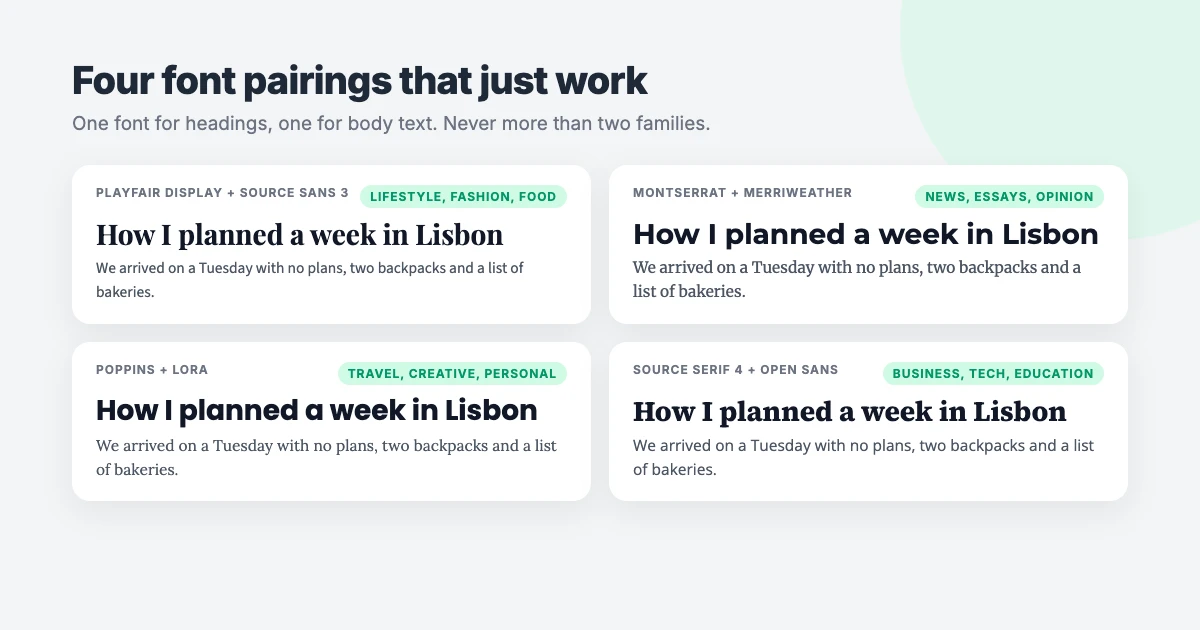
Combining two of the best fonts for blogs, one for headings and one for body text, adds hierarchy and personality. The trick is contrast with harmony: the two should be clearly different (usually one serif and one sans) but share similar proportions, especially x-height. These four pairings are reliable starting points:
- Playfair Display + Source Sans 3: elegant and polished, for lifestyle, fashion and food blogs.
- Montserrat + Merriweather: confident headings with sturdy, bookish body text, for news, essays and opinion.
- Poppins + Lora: modern and warm, for travel, creative and personal blogs.
- Source Serif 4 + Open Sans: calm and professional, for business, tech and education blogs.
If you’d rather keep things simple, use a single family in two weights, for example Inter at 800 for headings and 400 for body text. One family is faster, and it’s very hard to get wrong.
Typography rules that matter more than the font
Even the best fonts for blogs are hard to read when they’re set badly. Get these basics right and almost any font on this list will look professional:
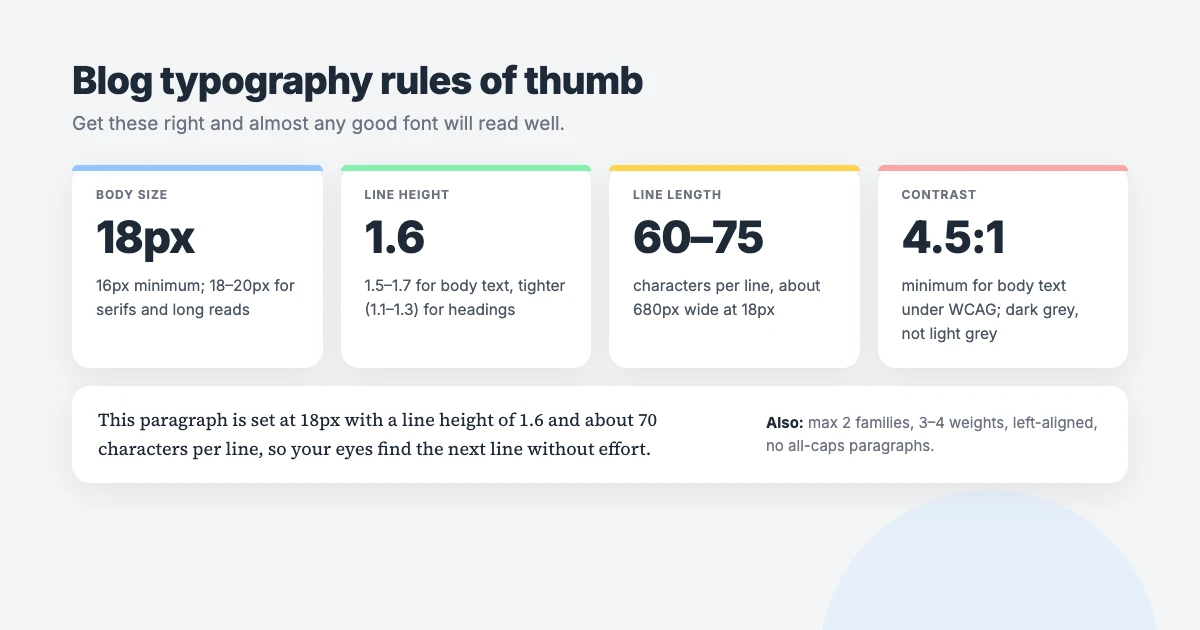
- Body size: 18px. 16px is the minimum; 18 to 20px is more comfortable for long posts and for serif fonts. Make headings roughly 1.3 to 2 times the body size, with a clear step between H2 and H3. Our guide to heading tags in WordPress explains the structure.
- Line height: about 1.6. Body text needs breathing room between lines, between 1.5 and 1.7. Headings look better tighter, at 1.1 to 1.3.
- Line length: 60 to 75 characters. Lines that run the full width of a desktop screen are tiring to follow. Keep your content column to roughly 680 to 720px.
- Contrast: at least 4.5:1. That’s the minimum ratio for normal-size text under the WCAG contrast guidelines. Use dark grey or near-black on white; pale grey text looks stylish in a mock-up and frustrating in real life.
- Two families, three or four weights. Regular, bold and perhaps italic for body text, plus one weight for headings, is plenty.
- Left-align body text. Justified text creates uneven gaps on phones, and centred paragraphs are hard to read. Avoid long passages in capitals or italics.
Keep your fonts fast and private
How you load your blog fonts matters as much as which ones you choose:
- Host fonts on your own site. Loading fonts straight from Google’s servers shares each visitor’s IP address with Google, and a German court ruled in 2022 that doing so without consent breached GDPR. Self-hosted fonts avoid the issue and are usually faster, because the browser doesn’t need to connect to another domain.
- Load only the weights you use. Every extra weight and style is another file. Two families with three weights each is a sensible ceiling.
- Use WOFF2 and variable fonts. WOFF2 is the smallest web font format, and a variable font can replace several separate weight files with one.
- Use
font-display: swapand preload your body font. Visitors see text immediately in a fallback font instead of a blank page. This also helps your Core Web Vitals.
How to change fonts in WordPress
In WPInterface Pro blog themes
SpeedBlog Pro, BlogSky Pro, BlogAura Pro, BlogNest Pro and BlogLex Pro include a full typography panel. Go to Appearance → Customize → Typography, where you can choose any of 1,527 Google Fonts for body text, headings, menus and more, and set sizes, weights and line heights. Fonts are downloaded once and served from your own site, and only the weights you use are loaded, so you get the speed and privacy benefits above automatically.
In block themes: the Font Library
If you use a block theme, WordPress has a built-in Font Library that can install any of the best fonts for blogs above:
- Go to Appearance → Editor → Styles and open Typography.
- Next to Fonts, open the font manager and choose the Install Fonts tab. Allow access to Google Fonts when asked.
- Search for a font, select the weights you need and click Install. WordPress downloads the files to your site, so they’re self-hosted.
- Back in Typography, set the font for Text and Headings, then click Save.
In other classic themes
Check Appearance → Customize first; many themes have their own settings for blog fonts. If yours doesn’t, the free Custom Fonts plugin lets you add Google Fonts or upload your own font files, hosts them on your own server, and assigns them to headings and body text. If your theme or plugins already load Google Fonts from Google’s servers, the free OMGF plugin can download them and serve them locally instead.
Whichever method you use, avoid editing your theme’s stylesheet directly; an update will overwrite your changes. Test on a phone afterwards, read a whole post, and check that bold, italic and headings all look right.
Readable fonts for every reader
Even the best fonts for blogs can’t suit everyone. Some readers need bigger text, others find a particular typeface difficult. That’s why WPInterface Pro themes include a built-in accessibility toolbar that lets visitors enlarge text, switch to a plain readable font or to OpenDyslexic, a font designed for readers with dyslexia, without changing the design for anyone else. For more options, see our list of the best accessible WordPress themes.
Blog themes with full typography control
Want to try the best fonts for blogs without touching code? These WPInterface Pro blog themes let you pick from 1,527 self-hosted Google Fonts in the Customizer, and they’re lightweight, SEO-friendly and RTL ready.
SpeedBlog Pro
SpeedBlog Pro is a fast blog theme for travel, tech, personal and creative blogs, with a dark mode and a clean layout that keeps readers focused.

BlogSky Pro
BlogSky Pro is a bright, minimal blog theme that’s easy to read on any screen, perfect for personal and lifestyle blogs.

BlogNest Pro
BlogNest Pro is a clean, modern blog theme with stylish post layouts that make your writing the star of the page.

BlogAura Pro and BlogLex Pro include the same typography panel. Compare them all in our roundup of the best WordPress blog themes.
Want help with your blog design?
- News and Blog Website Setup: we set up one of our blog themes with your branding, fonts, colours, categories and SEO basics, usually in about 7 days.
- WordPress Speed Optimization: we self-host your fonts, trim unused weights and fix everything else slowing your blog down.
- VIP Support: a $29 priority ticket for quick expert help with a single problem.
Frequently asked questions
What is the best font for a blog?
Of the best fonts for blogs on this list, Inter or Open Sans for body text is the safest choice: free, readable on every screen and available in many languages. If you write long essays, Merriweather or Literata are excellent serif alternatives.
Is serif or sans-serif better for blogs?
Both work on modern screens. Sans-serif is the safer default for small screens and short posts; serif suits long reads and literary or editorial blogs. Size, spacing and contrast matter more than the category.
What font size should blog text be?
At least 16px, ideally 18px for body text, with a line height of about 1.6. Headings should be roughly 1.3 to 2 times larger than body text.
How many fonts should a blog use?
One or two families at most: one for body text and, optionally, one for headings. More fonts make a blog look messy and slow it down.
Do fonts affect SEO?
Indirectly. Fonts affect page speed and Core Web Vitals, and readable text keeps visitors on the page longer. Self-host your fonts, load only the weights you use, and choose a readable body font.
Are Google Fonts free to use on a blog?
Yes. Every font on Google Fonts is open source and free for personal and commercial use, including on monetised blogs. To protect your visitors’ privacy, serve them from your own site rather than Google’s servers.
Final thoughts
The best fonts for blogs are the ones readers never notice, because reading feels effortless. Start with a proven body font like Inter, Open Sans or Merriweather, set it at 18px with a 1.6 line height in a column of about 70 characters, and add a heading font only if it brings real personality.
Then self-host your blog fonts, load only the weights you need, and read a full post on your phone. If it feels comfortable there, you’ve found your font.





Leave a reply