Compare Products for Easy Digital Downloads
Help customers choose, then see which comparisons sell.
With Compare Products for Easy Digital Downloads, customers pick downloads and see them side by side in a clear, accessible table, with a purchase button under each one. Pro adds your own comparison fields, highlights, share links and the numbers behind every comparison.
Free version coming to WordPress.org · Pro requires the free plugin · 14-day money-back guarantee on Pro
0
cookies: the compare list stays in the browser
3
field types in Pro: text, number, yes/no
Dialog or page
for the comparison table
14 days
money-back guarantee on Pro
01 — Features
A comparison table that helps people decide
The free Compare Products for Easy Digital Downloads plugin gives you the compare button, the compare bar and the table. Pro adds the details that sell.
Compare button everywhere
It follows the Easy Digital Downloads purchase button on product pages, grids and blocks, or place it yourself.
Compare bar
A bar at the bottom of the screen shows what is selected, with one click to compare, remove a product or clear everything.
Comparison table
Image, name, price, price options, categories, tags, short description and the purchase button, one column per product.
Show only differences
Customers hide the rows that are the same for every product.
Cache friendly, no cookie
The list is kept in the customer’s own browser, so pages stay the same for every visitor and can be cached.
Insights
See your most compared products, and a “Compared” column in the downloads list.
02 — How it works
Up and running in four steps
- Install and activate Install Compare Products for Easy Digital Downloads, then upload Pro under Plugins → Add New.
- Choose dialog or page Open the comparison in a dialog or on a compare page that is created for you.
- Add your fields With Pro, define rows such as “PHP version” or “Includes support”, and limit them to categories.
- Watch what converts See which products are compared, compared together and then bought.
All Compare Products for Easy Digital Downloads settings live in your WordPress dashboard.
03 — Free or Pro
Free or Pro?
Compare Products for Easy Digital Downloads is a complete comparison table on its own. Pro is for stores whose products need their own specs, and owners who want the numbers.
| FreeFree version | ProGet Pro | |
|---|---|---|
| Comparison | ||
| Compare button, compare bar and comparison table | Included | Included |
| Dialog or compare page | Included | Included |
| Show only differences | Included | Included |
| Choose and order the rows | Included | Included |
| Fixed comparisons with a shortcode | Included | Included |
| Variable prices and price ranges | Included | Included |
| Blocks and shortcodes | Included | Included |
| Custom comparison fields: text, number, yes/no | Not included | Included |
| Fields per download category | Not included | Included |
| Highlighted differences | Not included | Included |
| Best values: lowest price and best number | Not included | Included |
| Price options side by side | Not included | Included |
| Share link for a comparison | Not included | Included |
| “Often compared with” suggestions | Not included | Included |
| Compare a whole wishlist in one click | Not included | Included |
| Insights | ||
| Most compared products | Included | Included |
| Compared-then-bought counts and sales | Not included | Included |
| Pairs compared together most often | Not included | Included |
Comparing a wishlist needs the Wishlist for Easy Digital Downloads plugin.
Which one do I need?
The free plugin is enough if…
- the standard rows (price, options, categories, tags, description) describe your products,
- you just want customers to compare and buy.
Choose Pro if…
- your products need their own specs, such as versions or included items,
- you want share links, suggestions and conversion numbers.
Not sure? Start with the free plugin. When you need more, add Pro: your settings and data stay where they are.
04 — Pro
What Pro adds to your comparisons
Pro
Compare what matters for your products.
Easy Digital Downloads has no product attributes, so Compare Products for Easy Digital Downloads Pro lets you define your own rows and makes the best choice obvious.
- Custom comparison fields. Text, number or yes/no rows. Type the values in on each download, or read them from a custom field your downloads already have.
- Fields per category. Limit a field to download categories, so “PHP version” only shows when plugins are compared.
- Highlight differences. Rows where the products differ are tinted.
- Best values. The lowest price is marked, and the best value of any number field.
- Price options side by side. One row per option name, so “Single site” lines up across products.
- Share link. Visitors copy a link that opens the same comparison for someone else.
- Often compared with. Product pages suggest the products visitors compare with the one being viewed.
- Conversion insights. Compared-then-bought counts, sales per product and the pairs compared most often.
Simple pricing. Every Pro feature in every plan.
Pick the number of sites you need. Every plan includes every Pro feature, updates and support.
-
Personal
For 1 website
$39
One license key for a single site, with plugin updates and priority support while your license is active.
- All Pro features
- Priority support
- Plugin updates
-
Most popular
Business
For 5 websites
$69
Five license keys for five sites, with plugin updates and priority support while your license is active.
- All Pro features
- Priority support
- Plugin updates
-
Agency
For unlimited websites
$99
Use it on every site you run or build, with plugin updates and priority support while your license is active.
- All Pro features
- Priority support
- Plugin updates
-
Lifetime
$199
Buy now — Compare Products for Easy Digital Downloads, Lifetime
Orders are processed by our online reseller, Paddle.com, the Merchant of Record for all transactions.
14-day money-back guarantee
Try Pro on your site. If it isn’t right for you, ask for a refund within 14 days of purchase and we’ll refund you in full. Refund policy
Save with the EDD Add-ons Bundle
Get all five Pro add-ons — Wishlist, Compare Products, Quick View, Product Badges and Payfast — from $79 a year, or $349 once for a lifetime licence. See the bundle
About this plugin
Compare Products for Easy Digital Downloads: help customers choose
Compare Products for Easy Digital Downloads adds a “Compare” button next to every purchase button. The downloads a customer picks are collected in a compare bar and shown side by side in a clear, accessible comparison table, with a purchase button under each one.
It is built only for Easy Digital Downloads, so it shows prices, price ranges and price options the way EDD does. The free plugin is complete on its own; Compare Products Pro adds your own comparison fields, highlights, share links and conversion insights.
Why your Easy Digital Downloads store needs product comparison
When products look alike, customers hesitate. Two themes, three licence levels, a starter kit and a pro kit: without a side-by-side view, customers open tabs, lose track and often leave. Compare Products for Easy Digital Downloads puts the choices next to each other, so the difference is obvious and the decision is easier.
Comparisons also show you how people shop. The free Compare Products for Easy Digital Downloads plugin lists your most compared products and adds a “Compared” column to the downloads list, so you see which products customers weigh against each other.
How the free comparison works
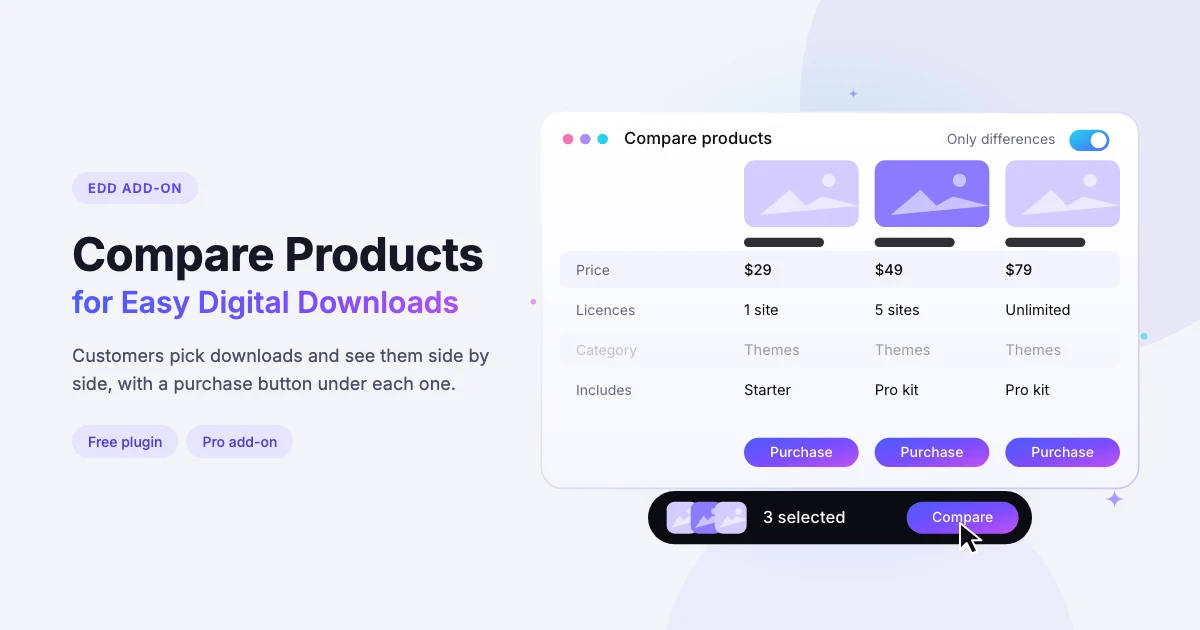
The Compare button follows the Easy Digital Downloads purchase button on product pages, grids and blocks. Show it before or after the purchase button, or place it yourself with the block, the shortcode or a template tag. A compare bar at the bottom of the screen shows what is selected, with one click to open the comparison, remove a product or clear everything.
The comparison table shows the image, name, price or price range, price options, categories, tags, short description and the purchase button, one column per product. Open it in an accessible dialog on the current page, or on a compare page that is created for you. Customers can hide the rows that are the same for every product, and you choose which rows appear and in what order; rows with nothing to show are left out automatically.
What Compare Products Pro adds
Easy Digital Downloads has no product attributes, so Pro lets you define your own comparison rows: text, number or yes/no. Type the values in on each download, or read them from a custom field your downloads already have, and limit a field to download categories so “PHP version” only shows when plugins are being compared.
Rows where the products differ are tinted, the lowest price is marked, and the best value of any number field is highlighted, highest or lowest, your choice. Price options line up side by side, one row per option name. Visitors can copy a share link that opens the same comparison for someone else, and product pages suggest the products that visitors often compare with the one being viewed.
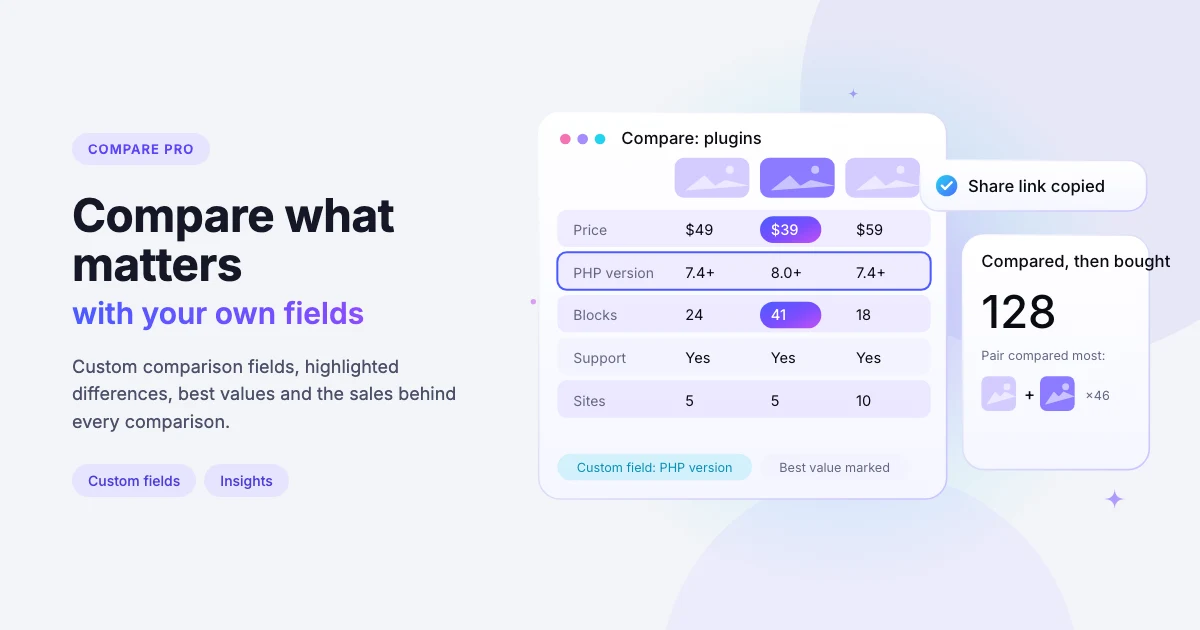
Pro insights count compared-then-bought purchases and sales per product, and show the pairs compared together most often. With Wishlist for Easy Digital Downloads active, customers can compare everything on their wishlist in one click.
Fixed comparisons for your own pages
Put a comparison together yourself and show it on any page, such as a landing page or a buyer’s guide, with the Comparison Table block or [wpicp_table ids="12,34,56"]. The Compare Link block and [wpicp_count] add a link with a live item count to your header.
Private, fast and accessible
No account is needed and no cookie is set: the compare list is kept in the customer’s own browser, and no personal data is stored on your site. Statistics are anonymous counters and can be switched off. Pages stay the same for every visitor, so they can be cached, including the compare page.
On the storefront Compare Products for Easy Digital Downloads loads one small script with no dependencies and one small stylesheet. The table is a real table with row and column headings, opened in a native dialog with keyboard support, visible focus and screen reader announcements. On phones it scrolls sideways and the row names stay in view.
Set up Compare Products for Easy Digital Downloads in five minutes
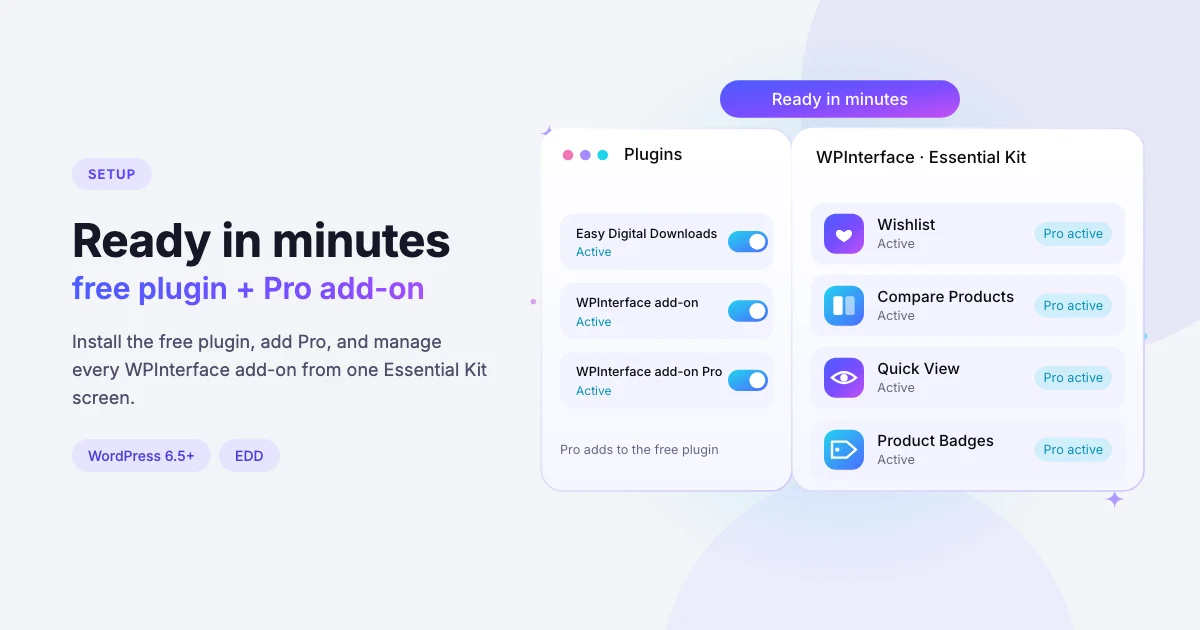
Install and activate Compare Products for Easy Digital Downloads, then open its settings under Downloads. Choose whether the Compare button sits before or after the purchase button, and whether the comparison opens in a dialog on the current page or on a compare page. If you pick the page, it is created for you, and it can be cached like any other page.
Next, decide which rows the table shows and put them in your order: image, name, price, price options, categories, tags, short description and the purchase button. Add the Compare Link block to your header so customers always see how many products they have selected. With Pro, add your own comparison fields, choose which download categories each one applies to, and decide whether a higher or a lower number is better for every number field.
What the comparison table shows
Each product gets its own column. The price row shows the price, or the price range when a download has price options, and the price options row lists every option. Under each column is the usual Easy Digital Downloads option picker with the purchase button, so customers can choose a licence and buy without leaving the comparison.
Categories, tags and the short description come straight from your downloads, so there is nothing extra to fill in for the free Compare Products for Easy Digital Downloads table. With “Show only differences”, rows that are the same for every product disappear and what sets the products apart stays in view. In Pro, the price options row becomes one row per option name, so “Single site” or “Unlimited sites” line up across products.
Use comparisons in your marketing
In Compare Products for Easy Digital Downloads, a fixed comparison is a ready-made buyer’s guide: put your three licence levels or your best-selling themes side by side on a landing page, in a blog post or in a launch announcement. Visitors can add more products to it from your store at any time.
With Pro, the share link lets a customer send their comparison to a colleague or a client who has to approve the purchase, and “Often compared with” on each product page invites shoppers to compare the products that other visitors weighed against it. The insights then show which comparisons ended in a sale.
Who Compare Products for Easy Digital Downloads is for
Stores that sell similar products in several versions: themes and plugins, template packs, course bundles, music or photo collections. When choosing is the hard part, a comparison table does the selling.
Agencies and developers can add their own rows with the wpicp_rows and wpicp_cell filters, change a finished table with wpicp_table_rows, and listen for the wpicp:updated and wpicp:table events from the storefront script.
Before you buy
Requirements
Pro is an add-on to the free Compare Products for Easy Digital Downloads plugin, which must be installed and active.
| Requirement | Details |
|---|---|
| WordPress | 6.5 or newer |
| PHP | 7.4 or newer |
| Easy Digital Downloads | The free plugin from WordPress.org, or EDD Pro |
| Compare Products for Easy Digital Downloads | The free plugin, installed and active |
| Wishlist for Easy Digital Downloads | Optional. Lets customers compare their wishlist in one click (Pro) |
Easy Digital Downloads has no product attributes. How do I add specs?
With Compare Products for Easy Digital Downloads Pro you define your own comparison fields (text, number or yes/no) and fill them in on each download, or read them from custom fields you already use.
Does it work with variable prices?
Yes. Compare Products for Easy Digital Downloads shows the price range of a download with price options, lists every option, and puts the usual Easy Digital Downloads option picker with the purchase button under each product, so customers can choose a licence and buy straight from the comparison.
Can I place the Compare button myself?
Yes. Besides showing it before or after the purchase button automatically, you can place it with the Compare Button block, the [wpicp_button id="123"] shortcode, or wpicp_button( $download_id ) in your theme templates. The Compare Link block and [wpicp_count] add a header link with a live count of the selected products.
Does it set cookies or need an account?
No. Compare Products for Easy Digital Downloads keeps the compare list in the customer’s own browser, and no personal data is stored on your site.
Does it work on phones?
Yes. On phones the Compare Products for Easy Digital Downloads table scrolls sideways and the row names stay in view.
Can I show a comparison I choose myself?
Yes. Use the Comparison Table block or [wpicp_table ids="12,34,56"] to show a fixed comparison of the downloads you pick, on any page.
Can I choose which rows appear?
Yes. Switch rows on and off and change their order in the settings. Rows with nothing to show are left out automatically, and with Pro you add your own rows.
Can I see which products are compared?
Yes. Compare Products for Easy Digital Downloads shows your most compared products and adds a “Compared” column to the downloads list. Pro adds compared-then-bought counts, sales per product and the pairs compared most often.
Do I need the free plugin?
Yes. Pro is an add-on: it needs the free “Compare Products for Easy Digital Downloads” plugin installed and active, and adds its features on top. Your settings and data stay in the free plugin, so you can add or remove Pro at any time.
Where is the free version?
The free plugin is being prepared for WordPress.org. Until it is listed there, see all our plugins or ask the team.
How do I get Pro after buying?
Your Pro download and licence key are in your WPInterface account straight after purchase.
What do the plans include?
Every plan includes every Pro feature. Personal covers 1 site, Business 5 sites and Agency unlimited sites, each with a year of updates and support. Lifetime is a single payment for unlimited sites.
Is there a refund policy?
Yes. If Pro isn’t right for your store, ask for a refund within 14 days of purchase. See our refund policy.
Help customers pick the right download
Start with the free Compare Products for Easy Digital Downloads plugin, then add Pro for custom fields, highlights and insights.
Pro requires the free plugin · 14-day money-back guarantee on Pro