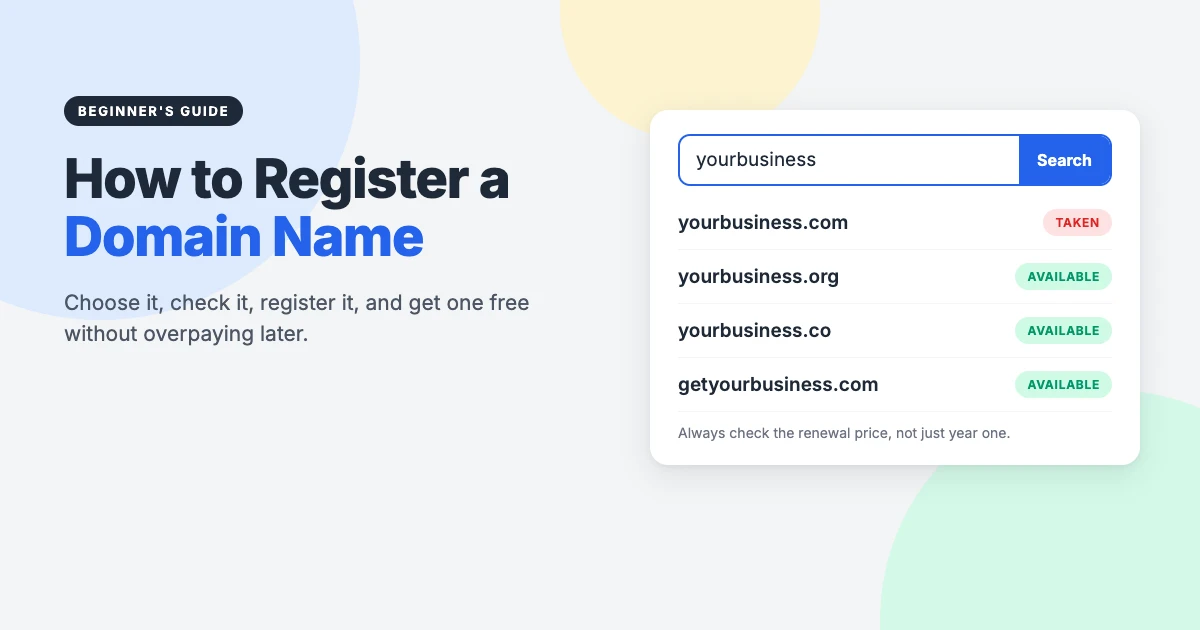
Before you can build a website, you need to register a domain name: the address people type to find you, such as yourbusiness.com. It’s usually the first real step in getting online, and one of the cheapest. It’s also where many beginners overpay, get locked into a provider they don’t like, or lose their name by forgetting a renewal.
This guide is completely independent. We don’t recommend any registrar or host here, and there are no referral links in this article. Instead, we’ll show you how domain registration actually works, so you can compare any provider yourself and spot a good deal from a bad one.
In this beginner’s guide, we’ll explain what a domain name is, how to choose one, how to register a domain name step by step, the honest truth about getting one for free, and what to do straight after you’ve registered it.
What is a domain name?
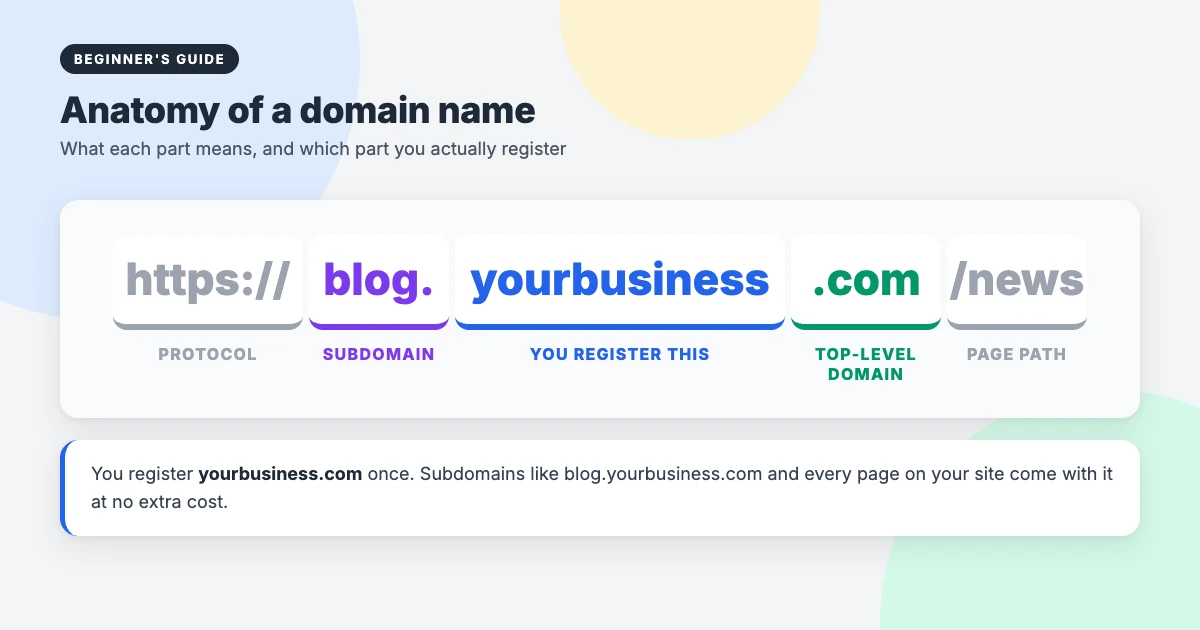
Every website lives on a server with a numeric IP address. A domain name is a human-friendly label that points to it. When someone types your domain, the Domain Name System (DNS) looks up where your site is hosted and sends them there.
A domain has two main parts: the name you choose (yourbusiness) and the extension, also called the top-level domain or TLD (.com). Once you register a domain name, you can create as many subdomains, such as shop.yourbusiness.com, and email addresses, such as hello@yourbusiness.com, as you like.
One important detail: you don’t buy a domain outright. You rent it for a period, usually one to ten years, and keep it for as long as you keep renewing.
Domain name vs web hosting
Beginners often mix these up. Your domain is the address. Your hosting is the server that stores your website’s files. You need both for a website, but they’re separate services, and you can buy them from the same company or from different ones.
Who does what in domain registration
Understanding the four players involved makes pricing and rules much easier to follow:
- ICANN coordinates the domain system and sets the rules for generic extensions such as .com, .org and .net.
- Registries run individual extensions. Each one sets the wholesale price for its extension.
- Registrars are the companies you actually buy from. To sell generic extensions, they must be accredited by ICANN.
- You are the registrant: the person or business the domain is registered to.
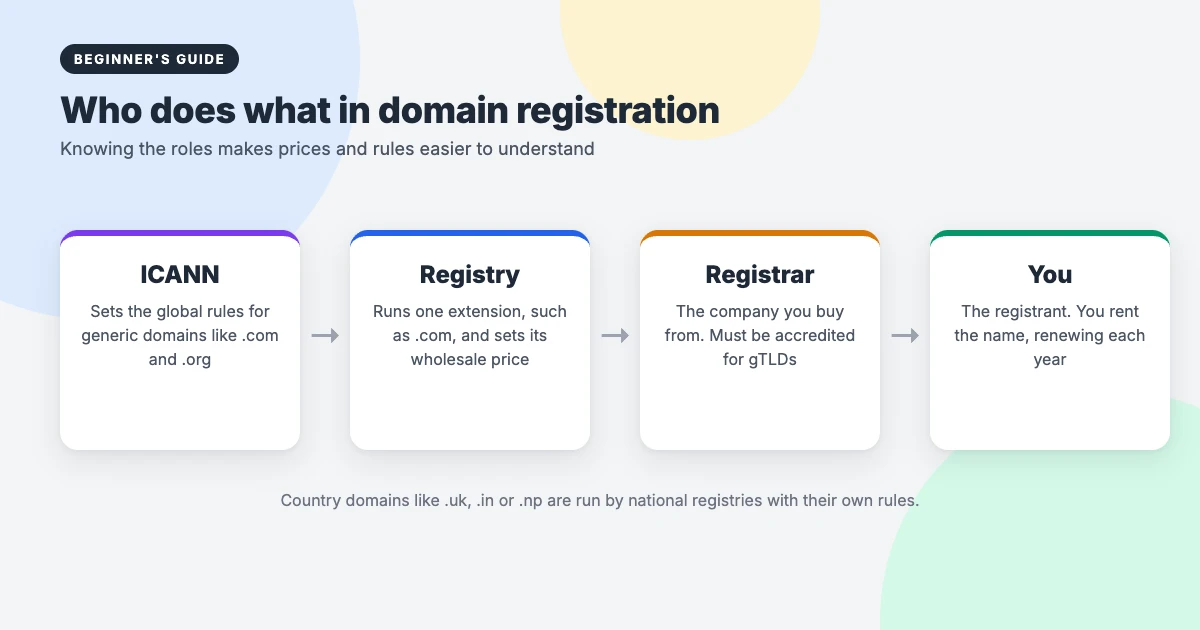
Because every accredited registrar gets the same name from the same registry, the domain itself is identical wherever you buy it. What differs is the price, the extras, the account features and how easy the company is to leave. Country extensions, such as .uk, .in or .np, are run by national registries that set their own rules.
How to choose a good domain name
Your domain will appear on your website, emails, business cards and social profiles for years, so it’s worth getting right. These rules work for almost everyone:
- Keep it short. Shorter names are easier to remember, type and fit on a logo.
- Make it easy to say and spell. If you have to spell it out over the phone, it’s too complicated.
- Avoid hyphens and numbers. People forget them, and they’re easy to confuse with a competitor.
- Think brand first, keywords second. A memorable brand name usually beats a long keyword-stuffed one.
- Check trademarks. Search your country’s trademark database before you buy, so you don’t build on a name you may have to give up.
- Check social handles. It helps if the same name is free on the platforms you plan to use.
Choosing a domain extension
The extension you pick affects how people see your site and, sometimes, who can register it:
| Extension | Best for | Notes |
|---|---|---|
| .com | Almost anyone | The most recognised extension worldwide, so the hardest to find a short name in. |
| .org | Non-profits, communities, projects | Widely trusted. Open to anyone, despite its reputation. |
| .net | Tech and network services | A common alternative when the .com is taken. |
| Country code (.uk, .ca, .in, .np) | Local businesses and organisations | Signals you serve a specific country. Some have residency rules. |
| Newer extensions (.shop, .blog, .studio) | Niche brands | Lots of choice, but check renewal prices carefully. Some are much higher than .com. |
Before you register a domain name, our honest advice is to choose .com if you can get a good one, or your country’s extension if you mainly serve one country. Avoid obscure extensions just because they’re cheap in the first year.
How to register a domain name, step by step
The process is almost identical at every registrar. Here’s how to register a domain name without paying for anything you don’t need.
Step 1: Check if your name is available
Type your idea into any registrar’s search box. Availability is the same everywhere, because it comes from the registry. If it’s taken, you can see who owns it and when it was registered through ICANN’s lookup tool, which uses RDAP. RDAP replaced the old WHOIS system for generic domains in January 2025.
If your first choice is gone, try a short prefix or suffix (such as “get” or “hq”), a different extension, or a fresh name. Be wary of anyone offering to sell you an already-registered name for a high price unless you’re sure it’s worth it.
Step 2: Compare registrars
Check that the company is on ICANN’s list of accredited registrars, then compare the things that actually matter, not just the headline price:
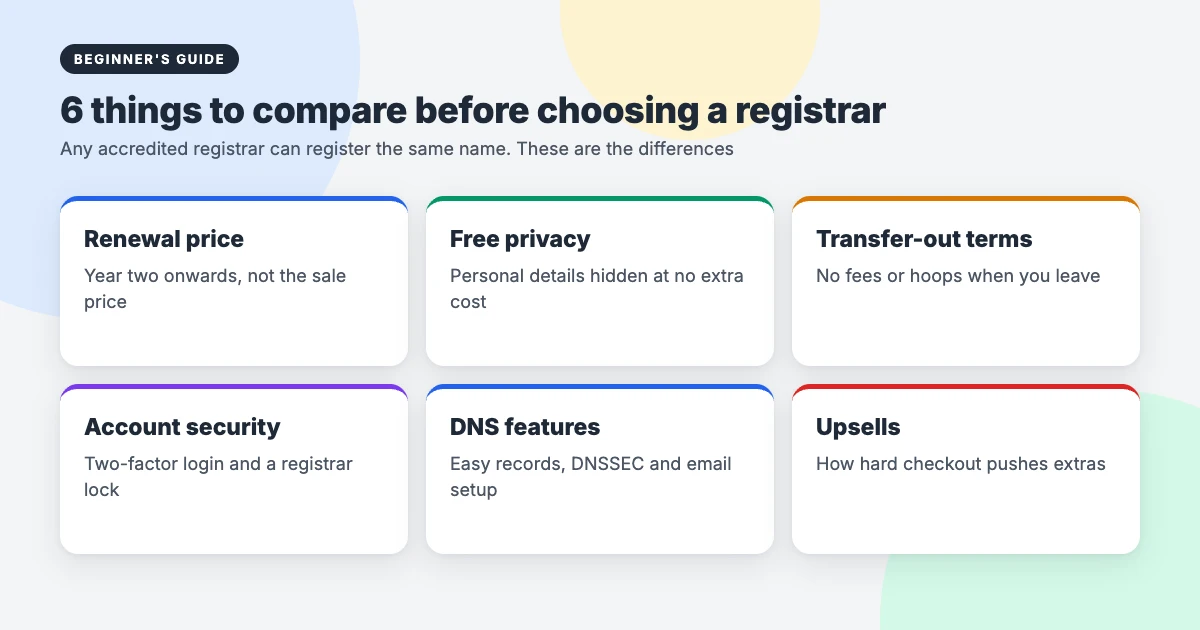
- Renewal price: the price you’ll pay from year two. A cheap first year often comes with an expensive renewal.
- Privacy: whether your personal details are hidden from public lookups at no extra cost.
- Transfer-out terms: whether you can leave easily, without fees or delays.
- Account security: two-factor login and a registrar lock to stop someone stealing your domain.
- DNS tools: a simple DNS editor, DNSSEC support and easy email setup.
- Upsells: how many extras are added or pushed at checkout.
Every accredited registrar also passes on a small ICANN fee, typically around 20 cents a year, for generic extensions. That’s normal and not a hidden charge.
Step 3: Add the domain to your cart and skip the extras
Choose how many years to register for. One year is fine for most people; multi-year registration only makes sense if the renewal price is fair. Then review the cart carefully. Checkout pages often pre-select add-ons such as premium security, SEO tools or extra extensions. You don’t need these to register a domain name, and you can always add them later.
Step 4: Enter accurate contact details
When you register a domain name, the rules require real contact information. Use details you’ll keep for years, especially your email address, because renewal reminders, transfer approvals and security alerts all go there. Most registrars will also ask you to verify your email address shortly after registering. If you ignore that email, the domain can be suspended.
If you’re registering for a business or organisation, register it in the organisation’s name, not a staff member’s or a web designer’s. It’s one of the most common reasons businesses lose control of their own domain.
Step 5: Turn on privacy, auto-renew and security
Before you finish, switch on domain privacy (if it isn’t already on), auto-renew, two-factor login and the registrar lock. These four settings prevent most domain disasters.
Step 6: Point your domain to your website
Your domain doesn’t do anything until it points somewhere. If your hosting is with another company, update the domain’s nameservers or DNS records to the values your host gives you. Changes usually work within a few hours, though they can take up to 48 hours to reach everyone.
How to get a domain name for free (the honest version)
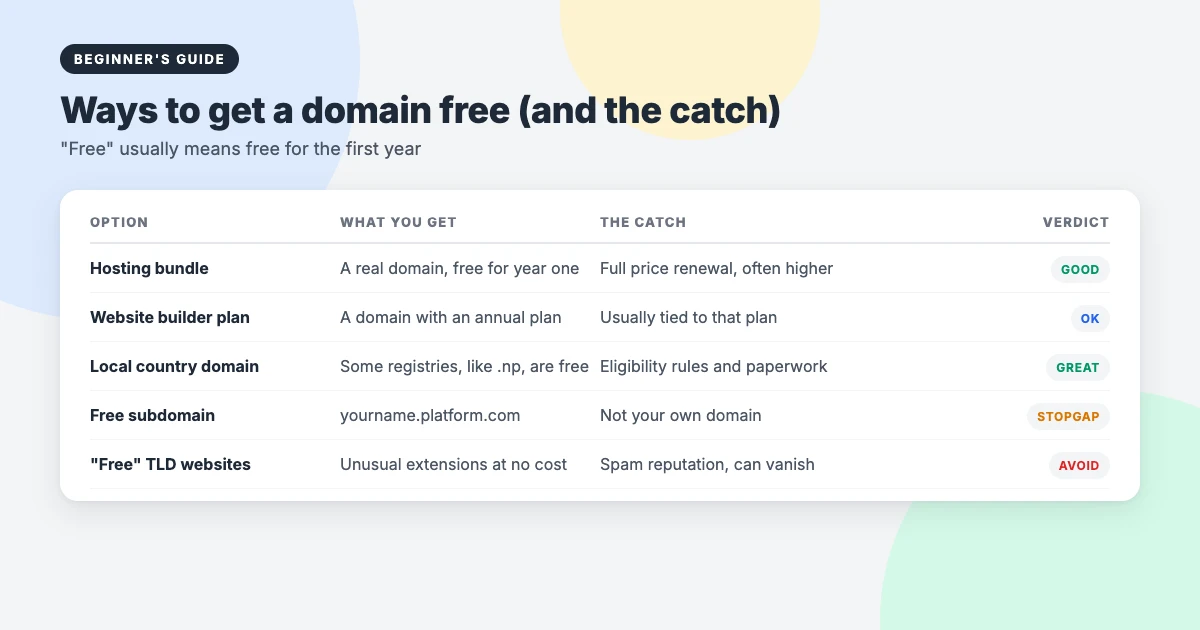
You’ll see lots of “free domain” offers. Some are genuinely useful, but almost all have a catch. Here’s how the main options compare:
1. Free for the first year with web hosting
Many web hosts include a domain free for the first year when you buy a yearly hosting plan. It’s a real domain in your name, and it saves you the first year’s fee. The catch is that it renews at the full price, which can be higher than at a standalone registrar, and it may be harder to move if you change hosts. Check the renewal price and transfer terms before you buy.
2. Free with a website builder plan
Some website builders include a domain with annual paid plans. It’s convenient, but the domain is often tied to that plan. Make sure you can transfer it away if you ever leave.
3. Free country domains for local residents
A few national registries offer their extension for free to eligible people and organisations. In Nepal, for example, registration under the .np extension is free of cost, subject to the registry’s naming and document requirements. If you live in a country with a similar scheme, it can be the best free option of all, because there’s no first-year trap.
4. A free subdomain
Blogging platforms and site builders give you a free address such as yourname.platform.com. It’s fine for testing, but it isn’t your own domain, it looks less professional, and you can’t take it with you.
What to avoid: “free domain” websites
Be careful with services that hand out unusual extensions for nothing. The best-known one, Freenom, stopped offering free domains in 2023, and many sites built on its domains disappeared. Free extensions like these have often been abused for spam, which can hurt your email delivery and reputation.
Our view: a domain usually costs much less per year than a decent meal out. If no genuine free option fits, paying for a domain you fully control is better value than a “free” one with strings attached.
Should you keep your domain and hosting together?
There’s no single right answer, so here are both sides fairly:
- Together: one account, one bill and one support team. DNS is usually set up for you. Simpler for beginners.
- Separate: if your host has problems or you want to switch, your domain is unaffected. You just point it somewhere new. Many developers prefer this for that reason.
Whichever you choose, make sure the domain is registered in your name and that you have the login, not just your web designer.
Domain privacy, RDAP and your personal details
Domain registration data can be looked up publicly through RDAP, the successor to WHOIS. Many registrars now hide personal details automatically, but not all do, and some charge for privacy. Without it, your name, email and even home address could be visible, which invites spam and scam calls.
Check whether privacy is included before you buy. If you register a domain name for a business, using a business address and a role-based email (such as domains@yourbusiness.com) adds another layer of protection.
Renewals, expiry and transfers
Once you register a domain name, losing it is surprisingly common, and almost always avoidable. If a domain isn’t renewed, it usually goes through a grace period (when your site may stop working but you can still renew normally), then a redemption period of 30 days for most generic domains, when you can only get it back by paying an extra restore fee. After that, anyone can register it.
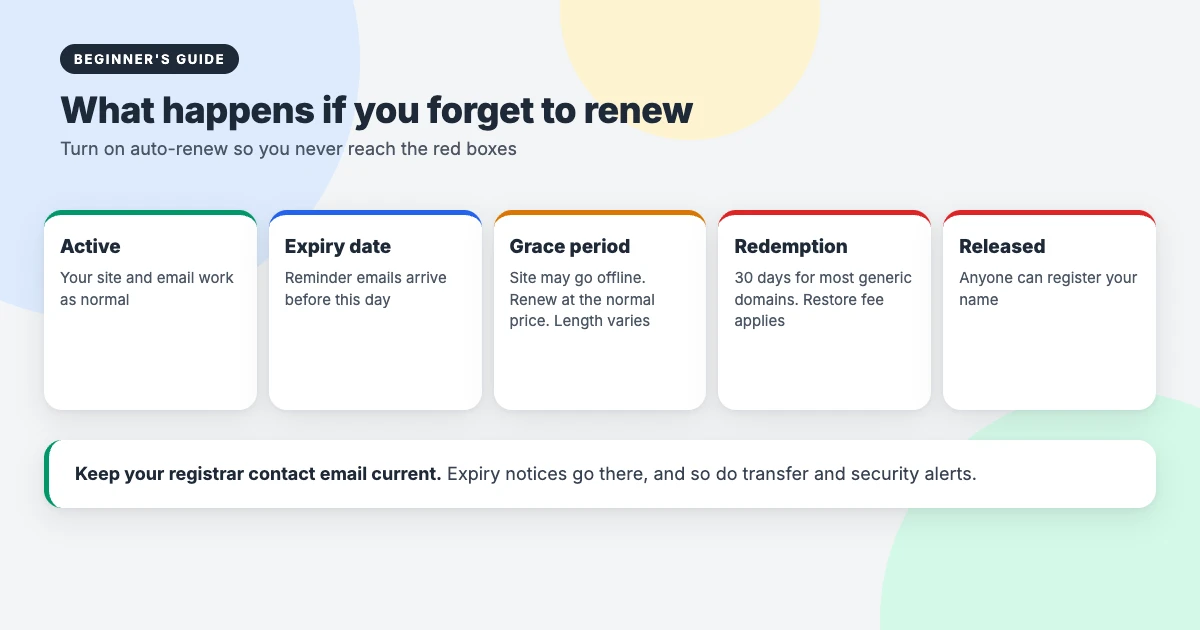
Auto-renew with an up-to-date payment card prevents all of this. Expired domains can also be snapped up quickly, so don’t rely on remembering.
If you want to move your domain to another registrar later, unlock it, request a transfer authorisation code (often called an EPP or auth code) and start the transfer at the new registrar. Transfers usually aren’t allowed in the first 60 days after registration or a previous transfer. ICANN has been updating its transfer rules, so check your registrar’s current policy before you plan a move.
What to do after you register a domain name
- Verify your email from the registrar’s confirmation message.
- Turn on auto-renew, two-factor login and the registrar lock if you haven’t already.
- Point the domain to your hosting and install WordPress.
- Set up a professional email address at your domain.
- Add an SSL certificate so your site loads over HTTPS. Most hosts provide one free.
- Save your logins somewhere safe, such as a password manager, and note the renewal date.
Once your site is live, our guides on hardening WordPress security and setting up uptime monitoring will help you keep it safe. If you’re still planning your budget, see our honest take on how much a business website really costs.
Need a hand?
We don’t sell domains or hosting, so we have no reason to push any provider. If you’d like help once your domain is registered, the WPInterface team can take care of the WordPress side:
- WordPress Installation and Theme Setup: for $99, we install WordPress on the host you choose and set up your theme.
- WordPress Migration: we move your site to a new host or domain without breaking links.
- VIP Support: a $29 priority ticket for help with DNS, SSL or any other WordPress problem.
Frequently asked questions
How much does it cost to register a domain name?
It depends on the extension and the registrar. A .com usually costs somewhere between about $10 and $20 a year at regular prices, while some newer extensions cost much more. Always compare the renewal price, not just the first-year offer.
Can I really get a domain name for free?
Yes, but usually only for the first year, as part of a hosting or website builder plan. Some countries also offer their own extension free to local residents and organisations. Ongoing free domains from unofficial sources are best avoided.
Do I own my domain name forever?
No. You register it for a set period, usually one to ten years, and must keep renewing it. As long as you renew on time, you can keep it indefinitely.
Which registrar should I use?
Any ICANN-accredited registrar can register the same domain. Choose the one with a fair renewal price, free privacy, easy transfers and good security for your needs, rather than the lowest first-year price.
Can I move my domain to another registrar later?
Yes. Unlock the domain, get the transfer code from your current registrar and start the transfer at the new one. Transfers are usually blocked for the first 60 days after registration or a previous transfer.
How long does it take for a new domain to work?
Registration itself is almost instant. Once you point the domain to your host, it usually starts working within a few hours, though DNS changes can take up to 48 hours to reach everyone.
Final thoughts
Registering a domain name is simple once you know what to look for. Pick a short, clear name; choose .com or your country’s extension; compare renewal prices, privacy and transfer terms rather than first-year deals; and switch on auto-renew and security the moment you buy.
Do that, and you can register a domain name with any reputable provider and keep it safely for as long as your website exists.
Reactions
How did this make you feel?
Be the first to react
One reaction per visitor. Tap again to change or remove it.







Leave a reply