Wishlist for Easy Digital Downloads
Turn “maybe later” into sales.
Let customers save the downloads they like and bring them back to buy. Wishlist for Easy Digital Downloads gives every store a fast, accessible wishlist; Pro adds multiple lists, automatic emails, campaigns and the numbers behind them.
Free version coming to WordPress.org · Pro requires the free plugin · 14-day money-back guarantee on Pro
1 click
adds a whole wishlist to the cart
10
named wishlists per customer with Pro
3
email types in Pro: price drop, reminder, campaign
14 days
money-back guarantee on Pro
01 — Features
A wishlist your customers will actually use
The free Wishlist for Easy Digital Downloads plugin covers everything a store needs. Pro adds the follow-up that turns saved items into orders.
Guests welcome
Visitors build a wishlist without an account. It moves to their account when they log in or register.
Variable prices
The price option the customer selected is the one that gets saved and added to the cart.
Add all to cart
One button puts the whole wishlist in the cart and goes to checkout.
Share link
Customers create a public, read-only link to their wishlist and can switch it off again at any time.
Price drop and purchased badges
The wishlist shows when a product costs less than when it was saved, and marks products already bought.
Import from EDD Wish Lists
Copy existing lists from the official EDD Wish Lists extension, so you can switch without losing anything.
02 — How it works
Up and running in four steps
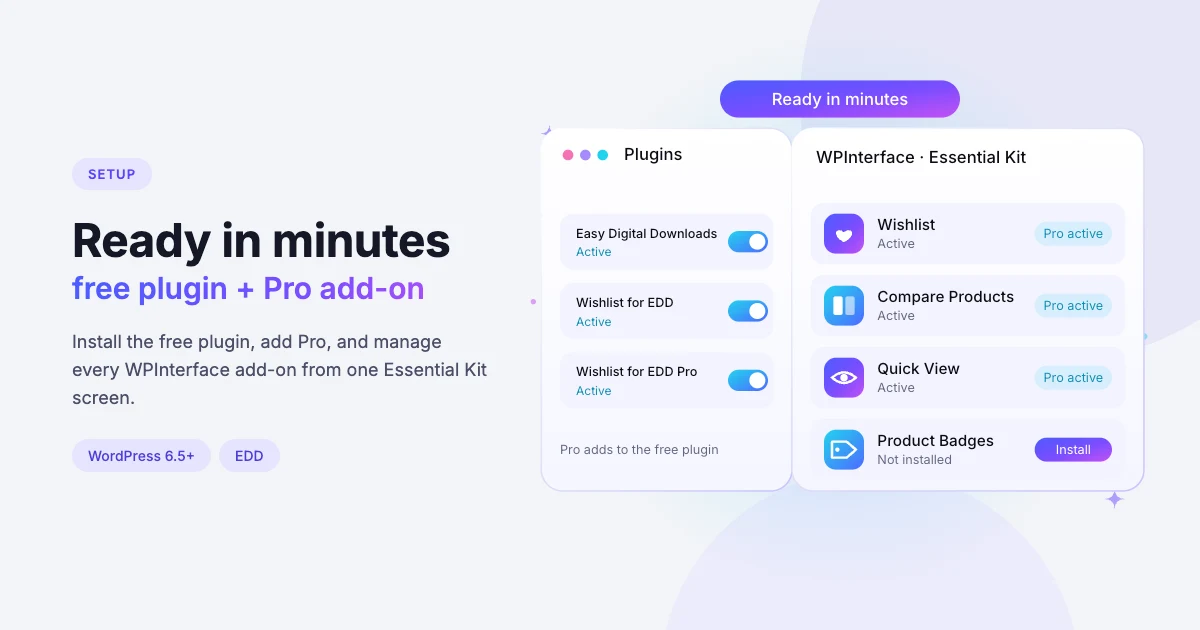
- Install and activate Install Wishlist for Easy Digital Downloads, then upload Pro under Plugins → Add New.
- Pick your wishlist page The wishlist page and the “Add to wishlist” button work straight away; adjust them under Downloads → Settings.
- Switch on the emails Turn on price drop and reminder emails, and choose when reminders are sent.
- Watch the numbers See your most wishlisted products and, with Pro, the sales they bring in.
All Wishlist for Easy Digital Downloads settings live in your WordPress dashboard.
03 — Free or Pro
Free or Pro?
Wishlist for Easy Digital Downloads is a complete wishlist on its own. Pro is for stores that want to follow up and measure the results.
| FreeFree version | ProGet Pro | |
|---|---|---|
| Wishlist | ||
| Add to wishlist button on product pages, grids and blocks | Included | Included |
| Guest wishlists that move to the account on login | Included | Included |
| Variable prices | Included | Included |
| Add all to cart | Included | Included |
| Share link | Included | Included |
| Price dropped and purchased badges | Included | Included |
| Blocks and shortcodes | Included | Included |
| Import from EDD Wish Lists | Included | Included |
| Multiple named wishlists per customer | Not included | Included |
| Save for later from the checkout | Not included | Included |
| Social sharing: X, Facebook, WhatsApp and email | Not included | Included |
| Emails | ||
| Price drop emails | Not included | Included |
| Reminder email for saved, unbought products | Not included | Included |
| Campaigns with your discount codes | Not included | Included |
| Insights | ||
| Most wishlisted products | Included | Included |
| Wishlist-to-purchase rate and sales from wishlisted items | Not included | Included |
| Value still waiting on wishlists | Not included | Included |
| Wishlist on the EDD customer screen | Not included | Included |
Which one do I need?
The free plugin is enough if…
- you want customers to save, share and buy their wishlist,
- you don’t plan to email customers about it.
Choose Pro if…
- you want price drop and reminder emails to bring customers back,
- you want to run campaigns and see the sales wishlists bring in.
Not sure? Start with the free plugin. When you need more, add Pro: your settings and data stay where they are.
04 — Pro
What Pro adds to your wishlist
Pro
Bring customers back to what they saved.
A saved product is a sale waiting to happen. Pro reminds customers at the right moment and shows you what it earns.
- Multiple wishlists. Customers create, rename and delete named lists and choose where each product goes.
- Price drop emails. Customers hear about it when something on their wishlist gets cheaper.
- Reminder emails. One friendly reminder about products that were saved but not bought.
- Campaigns. Email everyone who wishlisted a product, with one of your discount codes.
- Save for later. Customers move a cart item to their wishlist from the checkout.
- Social sharing. Share buttons for X, Facebook, WhatsApp and email.
- Insights. Wishlist-to-purchase rate, sales from wishlisted items, the value still waiting on wishlists and your biggest opportunities.
- Customer profile. See a customer’s wishlist on the Easy Digital Downloads customer screen.
Simple pricing. Every Pro feature in every plan.
Pick the number of sites you need. Every plan includes every Pro feature, updates and support.
-
Personal
For 1 website
$39
One license key for a single site, with plugin updates and priority support while your license is active.
- All Pro features
- Priority support
- Plugin updates
-
Most popular
Business
For 5 websites
$69
Five license keys for five sites, with plugin updates and priority support while your license is active.
- All Pro features
- Priority support
- Plugin updates
-
Agency
For unlimited websites
$99
Use it on every site you run or build, with plugin updates and priority support while your license is active.
- All Pro features
- Priority support
- Plugin updates
-
Lifetime
$199
Buy now — Wishlist for Easy Digital Downloads, Lifetime
Orders are processed by our online reseller, Paddle.com, the Merchant of Record for all transactions.
14-day money-back guarantee
Try Pro on your site. If it isn’t right for you, ask for a refund within 14 days of purchase and we’ll refund you in full. Refund policy
Save with the EDD Add-ons Bundle
Get all five Pro add-ons — Wishlist, Compare Products, Quick View, Product Badges and Payfast — from $79 a year, or $349 once for a lifetime licence. See the bundle
About this plugin
Wishlist for Easy Digital Downloads: save now, buy later
Wishlist for Easy Digital Downloads gives every download in your store an “Add to wishlist” button and a wishlist page where customers review what they saved, share it and add it all to the cart.
It is built only for Easy Digital Downloads, so it understands variable prices, free downloads and the EDD purchase button. The free plugin is complete on its own; Wishlist Pro adds the emails, campaigns and reports that turn saved items into orders.
Why your Easy Digital Downloads store needs a wishlist
Most visitors don’t buy on their first visit. They compare, wait for payday or need to ask someone first. Without a wishlist, the download they liked is one closed tab away from being forgotten. With Wishlist for Easy Digital Downloads they save it in one click and find it again on their next visit, already in the price option they chose.
A wishlist also tells you something. The products people save are the products they want, so the free plugin shows your most wishlisted downloads and adds a wishlist count column to the downloads list. That is useful when you plan a sale, a bundle or your next product.
How the free wishlist works
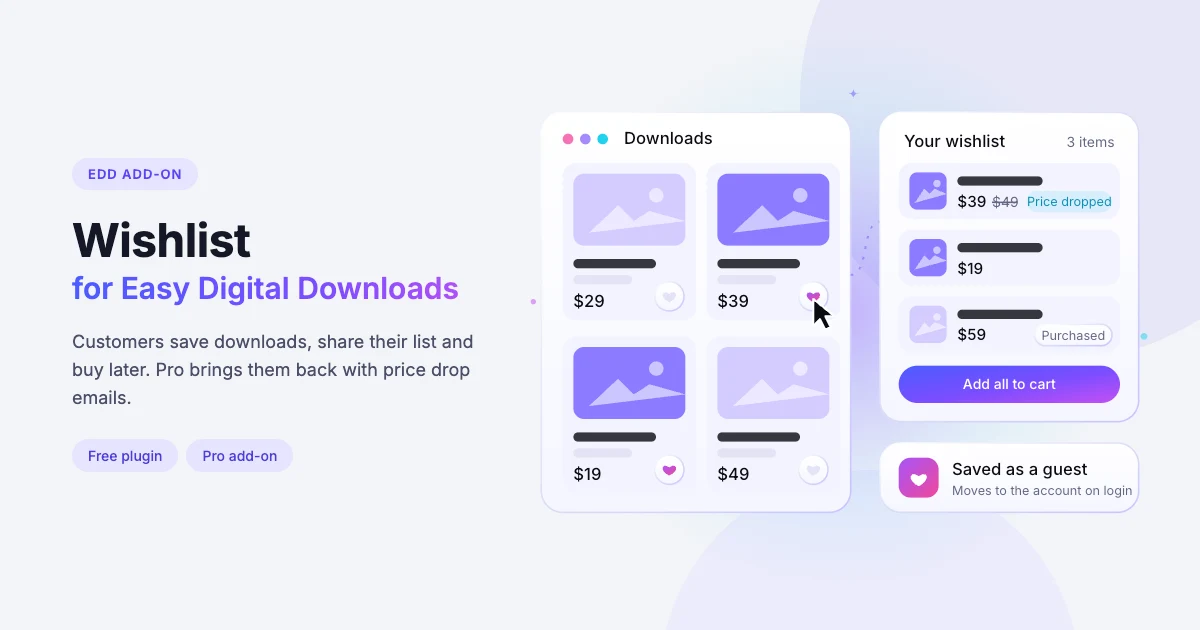
The “Add to wishlist” button follows the Easy Digital Downloads purchase button on product pages, in product grids and in blocks, in block themes and classic themes alike. Guests can build a wishlist without an account, and their list moves to their account when they log in or register. On the wishlist page, one button puts every item in the cart and goes to checkout.
Customers can create a public, read-only share link for their list and switch it off again at any time. When a saved product gets cheaper, the wishlist shows the old price and a “Price dropped” badge. Products a customer has already bought are marked as purchased, or removed automatically if you prefer. A Wishlist block, a Wishlist Button block and a Wishlist Link block with a live counter, plus matching shortcodes, let you place everything where you want it.
What Wishlist Pro adds
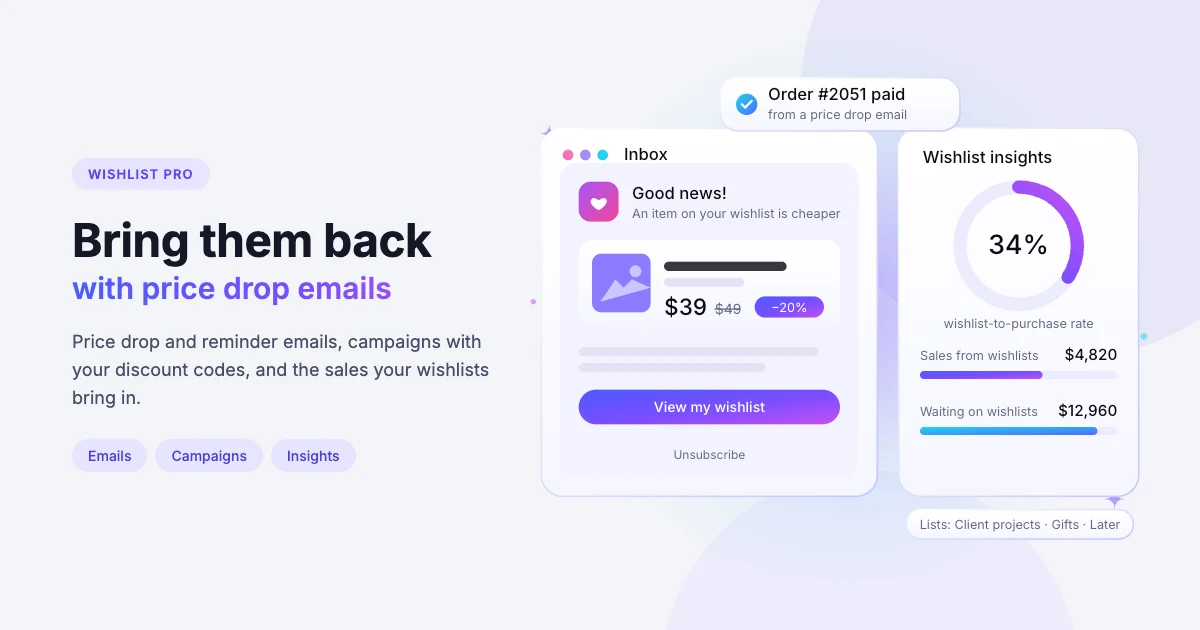
Wishlist Pro is an add-on to the free Wishlist for Easy Digital Downloads plugin. Customers get multiple named wishlists, up to ten each, and choose where each product goes. A price drop email tells them when something on their wishlist gets cheaper, and one friendly reminder email follows up on products that were saved but not bought. Every email includes an unsubscribe link, and customers can switch wishlist emails off on their wishlist page.
With campaigns you email everyone who wishlisted a product, with one of your own discount codes. Save for later lets customers move a cart item to their wishlist from the checkout, and share buttons for X, Facebook, WhatsApp and email help lists travel. Pro insights show your wishlist-to-purchase rate, the sales that came from wishlisted items, the value still waiting on wishlists and your biggest opportunities, and the EDD customer screen shows each customer’s wishlist.
Built for digital products and variable prices
Easy Digital Downloads sells licences, bundles and price options, not sizes and colours. Wishlist for Easy Digital Downloads saves the exact price option the customer selected and adds that same option to the cart, so “Business licence” stays “Business licence” from the product page to checkout. Free downloads work too.
Private, fast and accessible
The plugin supports the WordPress personal data export and erasure tools and adds suggested text to your privacy policy. On the storefront it loads one small script with no dependencies and one small stylesheet. Buttons are real buttons, with keyboard support, visible focus and screen reader announcements.
Switching from EDD Wish Lists
Already using the official EDD Wish Lists extension? Wishlist for Easy Digital Downloads can copy your existing lists, so customers keep what they saved when you switch.
Who Wishlist for Easy Digital Downloads is for
Stores with many products, where customers browse before they decide: themes, plugins, templates, fonts, music, photos, courses or ebooks. A wishlist gives those customers a place to collect what they like, and gives you a reason to get back in touch.
Stores that run sales. When a saved download gets cheaper, the free plugin shows the drop on the wishlist page, and Wishlist Pro emails the customer about it. With campaigns you can send a discount code to everyone who saved one product, so a launch, a sale or a bundle reaches the people most likely to buy.
Agencies and developers who build Easy Digital Downloads stores for clients. Wishlist for Easy Digital Downloads works with block themes and classic themes, has blocks and shortcodes for every part, and offers actions, filters and a storefront event for custom work, such as wpiwl_item_added, wpiwl_button_html and the wpiwl:updated event.
Before you buy
Requirements
Pro is an add-on to the free Wishlist for Easy Digital Downloads plugin, which must be installed and active.
| Requirement | Details |
|---|---|
| WordPress | 6.5 or newer |
| PHP | 7.4 or newer |
| Easy Digital Downloads | The free plugin from WordPress.org, or EDD Pro |
| Wishlist for Easy Digital Downloads | The free plugin, installed and active |
| Emails | Your site must be able to send email for price drop, reminder and campaign emails |
Can guests use the wishlist?
Yes. With Wishlist for Easy Digital Downloads, visitors can build a wishlist without an account, and it moves to their account when they log in or register.
Can customers stop the emails?
Yes. Every email includes an unsubscribe link, and customers can switch wishlist emails off on their wishlist page.
I use the official EDD Wish Lists extension. Can I switch?
Yes. Wishlist for Easy Digital Downloads can copy existing lists from EDD Wish Lists.
Does it work with my theme?
Yes. Wishlist for Easy Digital Downloads works with block themes and classic themes. The “Add to wishlist” button follows the Easy Digital Downloads purchase button on product pages, grids and blocks, and you can place it yourself with the Wishlist Button block or the [wpiwl_button] shortcode.
Where do customers find their wishlist?
On the wishlist page, which shows the [wpiwl_wishlist] shortcode or the Wishlist block. Add the Wishlist Link block or the [wpiwl_count] shortcode to your header for a link with a live item count.
Can I see what customers saved?
Yes. The free plugin shows your most wishlisted products and adds a wishlist count column to the downloads list. Wishlist Pro adds the wishlist-to-purchase rate, sales from wishlisted items and each customer’s wishlist on the Easy Digital Downloads customer screen.
Do I need the free plugin?
Yes. Pro is an add-on: it needs the free “Wishlist for Easy Digital Downloads” plugin installed and active, and adds its features on top. Your settings and data stay in the free plugin, so you can add or remove Pro at any time.
Where is the free version?
The free plugin is being prepared for WordPress.org. Until it is listed there, see all our plugins or ask the team.
How do I get Pro after buying?
Your Pro download and licence key are in your WPInterface account straight after purchase.
What do the plans include?
Every plan includes every Pro feature. Personal covers 1 site, Business 5 sites and Agency unlimited sites, each with a year of updates and support. Lifetime is a single payment for unlimited sites.
Is there a refund policy?
Yes. If Pro isn’t right for your store, ask for a refund within 14 days of purchase. See our refund policy.
Turn wishlists into orders
Start with the free Wishlist for Easy Digital Downloads plugin, then add Pro for emails, campaigns and insights when you’re ready.
Pro requires the free plugin · 14-day money-back guarantee on Pro